
将选择的产品变体资料传送至联络表格7查询表格。
使用WooCommerce,我使用Contact 7和产品信息请求插件在单个产品页面中添加表单,因为我需要允许用户发送有关产品的查询请求的功能(认为是简单的联系人表单)。
你可以理解看到这张截图:
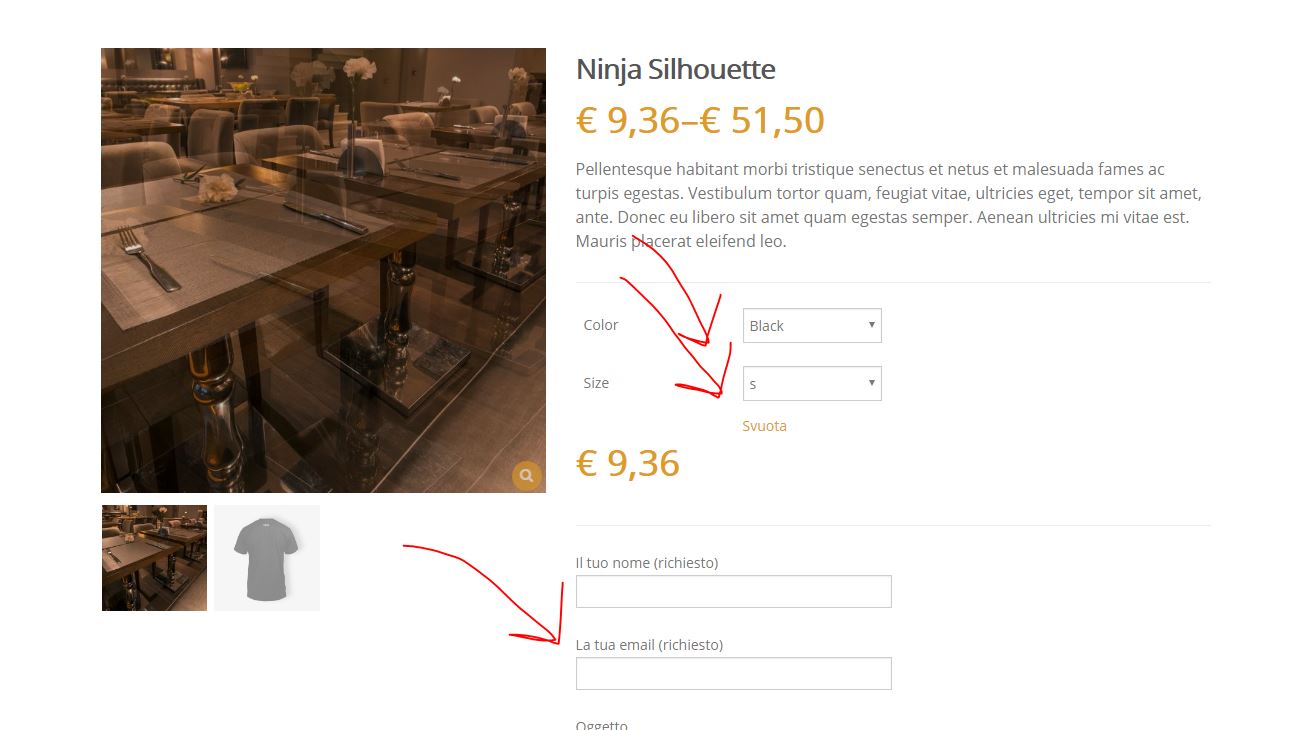
我所有的产品都是可变的产品(从属性)。
是否有任何方法由客户检索选定的变体并通过联系表格7发送?
例如:
用户选择颜色黑色和大小s,然后填写表格,当电子邮件发送,除了收到经典信息(姓名,电子邮件ecc.)我还会收到选中的属性(在本例中是black和s) )
回答 1
Stack Overflow用户
发布于 2017-02-11 10:10:44
更新:添加了WC 3+兼容性
我已经测试过它,它不会发送与选择的变化有关的任何数据,因为它只是输出下面的选择联系表格(在单一产品页)下的添加-购物车按钮。此外,这个插件已经更新了两年多了,所以它有点过时了。
的好新:一个工作解决方案
我找到了与此相关的答案: 产品名称WooCommerce (联系人表7)
它解释了如何在产品选项卡中设置联系人表单7的短代码,并在电子邮件中显示选定的产品标题。
因此,从这个答案我已经转换了代码,使用它就像插件一样(就在add to cart按钮下面)。
在这个示例/答案中,我在变量产品2中为产品变体设置了两个属性:Color和Size.
这是我将在代码中使用的表单的设置Contact form 7:
<label> Your Name (required)
    [text* your-name] </label>

<label> Your Email (required)
    [email* your-email] </label>

<label> Subject (required)
    [text* your-subject class:product_name] </label>

<label> Your Message
    [textarea your-message] </label>

[submit "Send"]

[text your-product class:product_details]这里我添加了这个文本字段[text your-product class:product_details].因此,您还需要在“邮件”正文中添加“邮件”设置选项卡[your-product]标签,以便在电子邮件中获得:
From: [your-name] <[your-email]>
Subject: [your-subject]

Product: [your-product]

Message Body:
[your-message]

--------------
This e-mail was sent from a contact form 7woocommerce_after_add_to_cart_form动作钩子中钩住的PHP代码自定义函数:
add_action( 'woocommerce_after_add_to_cart_form', 'product_enquiry_custom_form' );
function product_enquiry_custom_form() {

    global $product, $post;

    // Set HERE your Contact Form 7 shortcode:
    $contact_form_shortcode = '[contact-form-7 id="382" title="form"]';

    // compatibility with WC +3
    $product_id = method_exists( $product, 'get_id' ) ? $product->get_id() : $product->id;
    $product_title = $post->post_title;

    // The email subject for the "Subject Field"
    $email_subject = __( 'Enquire about', 'woocommerce' ) . ' ' . $product_title;

    foreach($product->get_available_variations() as $variation){
        $variation_id = $variation['variation_id'];
        foreach($variation['attributes'] as $key => $value){
            $key = ucfirst( str_replace( 'attribute_pa_', '', $key ) );
            $variations_attributes[$variation_id][$key] = $value;
        }
    }
    // Just for testing the output of $variations_attributes
    // echo '<pre>'; print_r( $variations_attributes ); echo '</pre>';


    ## CSS INJECTED RULES ## (You can also remve this and add the CSS to the style.css file of your theme
    ?>
    <style>
        .wpcf7-form-control-wrap.your-product{ opacity:0;width:0px;height:0px;overflow: hidden;display:block;margin:0;padding:0;}
    </style>

    <?php


    // Displaying the title for the form (optional)
    echo '<h3>'.$email_subject.'</h3><br>
        <div class="enquiry-form">' . do_shortcode( $contact_form_shortcode ) . '</div>';


    ## THE JQUERY SCRIPT ##
    ?>
    <script>
        (function($){

            <?php
                // Passing the product variations attributes array to javascript
                $js_array = json_encode($variations_attributes);
                echo 'var $variationsAttributes = '. $js_array ;
            ?>

            // Displaying the subject in the subject field
            $('.product_name').val('<?php echo $email_subject; ?>');

            ////////// ATTRIBUTES VARIATIONS SECTION ///////////

            var $attributes;

            $('td.value select').blur(function() {
                var $variationId = $('input[name="variation_id"]').val();
                // console.log('variationId: '+$variationId);
                if (typeof $variationId !== 'undefined' ){
                    for(key in $variationsAttributes){
                        if( key == $variationId ){
                            $attributes = $variationsAttributes[key];
                            break;
                        }
                    }

                }
                if ( typeof $attributes !== 'undefined' ){
                    // console.log('Attributes: '+JSON.stringify($attributes));
                    var $attributesString = '';
                    for(var attrKey in $attributes){
                        $attributesString += ' ' + attrKey + ': ' + $attributes[attrKey] + ' — ';
                    }
                   $('.product_details').val( 'Product <?php echo $product_title; ?> (ID <?php echo $product_id; ?>): ' + $attributesString );
                }
            });

        })(jQuery);
    </script>

    <?php
}
代码在您的活动子主题(或主题)的function.php文件中,或者在任何插件文件中。
您将完全了解插件使用这些附加功能所做的事情:
- 自定义产品标题,作为邮件的主题。
- 所选的变体属性名称标签+在附加的fiels (将被隐藏的)中值。
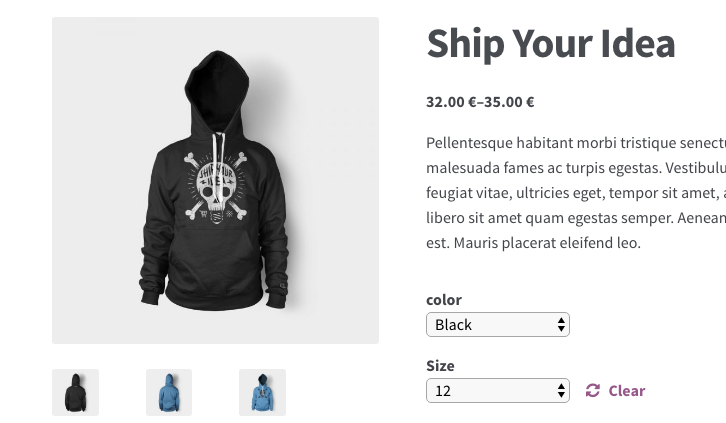
下面是我的测试服务器的屏幕截图:
具有所选属性的产品:
我在表单上得到了什么(我没有隐藏特殊的文本字段来显示jQuery所提取的数据):
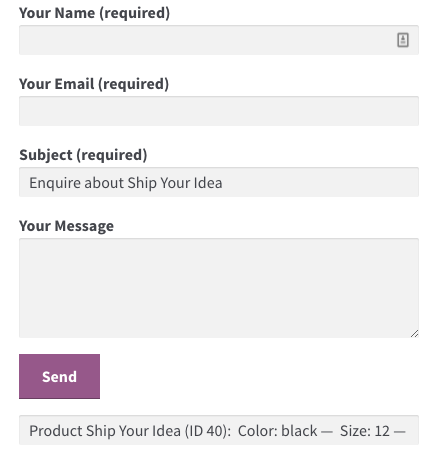
,如您所见,您需要在电子邮件…中发送所需的数据。
一旦我选择了该产品的属性并填写了该表单的其他字段,当我提交此表单时,将收到以下电子邮件:
出发地: John Smith j.smith@themain.com主题:询问您的想法产品:产品发货您的想法(ID 40):颜色:黑色大小: 12条消息正文:我发送这个关于这个非常好的产品…的请求我发送这个关于这个非常好的产品…的请求-这封电子邮件是从联络表格7发出的。
因此,每件事都如您所料,这是一个经过测试的工作示例。。
https://stackoverflow.com/questions/42165213
复制相似问题
腾讯云开发者

Copyright © 2013 - 2026 Tencent Cloud. All Rights Reserved. 腾讯云 版权所有
深圳市腾讯计算机系统有限公司 ICP备案/许可证号:粤B2-20090059  粤公网安备44030502008569号
腾讯云计算(北京)有限责任公司 京ICP证150476号 | 京ICP备11018762号