
在画布上剪辑视频最有效的方法是什么?
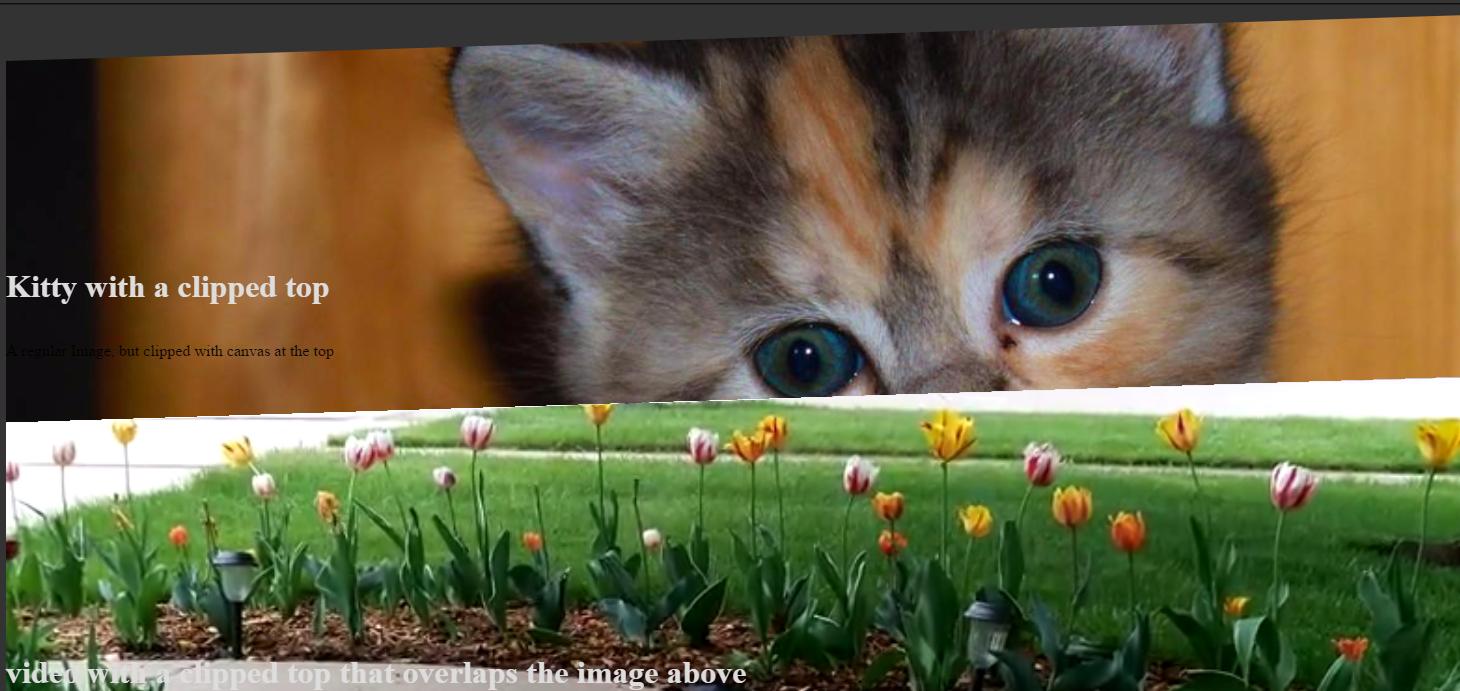
我有一个情况,我需要剪辑的图片或视频。图像或视频需要能够重叠。我们最初在SVG中尝试过这一点,但是由于各种原因,结果不太好,所以现在我们在画布上这样做了。
对于图像来说,这很好,但是当涉及到视频时,大约2分钟后,浏览器几乎就会停止运行。(从示例代码或链接中您看不到的是,当视频不在视图中,而选项卡不在视图时,我们也会暂停视频。)
下面是一个链接:http://codepen.io/paceaux/pen/egLOeR
最令人关切的是这种方法:
drawFrame () {
    if (this.isVideo && this.media.paused) return false;

    let x = 0;
    let width = this.media.offsetWidth;
    let y = 0;

    this.imageFrames[this.module.dataset.imageFrame](this.backContext);
    this.backContext.drawImage(this.media, x, y, width, this.canvas.height);

    this.context.drawImage(this.backCanvas, 0, 0);

    if (this.isVideo) {
        window.requestAnimationFrame(()=>{
            this.drawFrame();
        });
    }
}
您将看到浏览器立即减速。我不建议看太长时间的代码,因为任何地方的事情都会变得非常缓慢。
我正在使用"backCanvas“技术,但这似乎使事情变得更糟了。
我还尝试使用Path2D()保存剪辑路径,但这似乎也没有多大帮助。
        wedgeTop: (context, wedgeHeight = defaults.wedgeHeight) => {
        var wedge = new Path2D();

        wedge.moveTo(this.dimensions.width, 0);
        wedge.lineTo(this.dimensions.width, this.dimensions.height);
        wedge.lineTo(0, this.dimensions.height);
        wedge.lineTo(0, wedgeHeight);
        wedge.closePath();
        context.clip(wedge);
    },
还有其他的优化,我错过了吗?(保存视频的大小)。
let imageFrames =  function () {
	let defaults = {
		wedgeHeight: 50
	};
	return {
		defaults: defaults,

		//all wedges draw paths clockwise: top right, bottom right, bottom left, top left
		wedgeTop: (context, wedgeHeight = defaults.wedgeHeight) => {
			var wedge = new Path2D();

			wedge.moveTo(this.dimensions.width, 0);
			wedge.lineTo(this.dimensions.width, this.dimensions.height);
			wedge.lineTo(0, this.dimensions.height);
			wedge.lineTo(0, wedgeHeight);
			wedge.closePath();
			context.clip(wedge);
		},

		wedgeTopReverse: (context, wedgeHeight = defaults.wedgeHeight) => {
			var wedge = new Path2D();

			wedge.moveTo(this.dimensions.width, wedgeHeight);
			wedge.lineTo(this.dimensions.width, this.dimensions.height);
			wedge.lineTo(0, this.dimensions.height);
			wedge.lineTo(0, 0);
			wedge.closePath();
			context.clip(wedge);

		},

		wedgeBottom: (context, wedgeHeight = defaults.wedgeHeight) => {
			var wedge = new Path2D();

			wedge.moveTo(this.dimensions.width, 0);
			wedge.lineTo(this.dimensions.width, this.dimensions.height - wedgeHeight);
			wedge.lineTo(0, this.dimensions.height);
			wedge.lineTo(0,0);
			wedge.closePath();
			context.clip(wedge);
		},

		wedgeBottomReverse: (context, wedgeHeight = defaults.wedgeHeight) => {
			var wedge = new Path2D();

			wedge.moveTo(this.dimensions.width, 0);
			wedge.lineTo(this.dimensions.width, this.dimensions.height);
			wedge.lineto(0, this.dimensions.height - wedgeHeight);
			wedge.lineTo(0, 0);
			wedge.closePath();
			context.clip(wedge);
		}
	};
};

class ImageCanvasModule  {
	constructor(module) {
		this.module = module;
		this.imageFrames = imageFrames.call(this);

		if(this.isVideo) {
			/*drawFrame has a check where it'll only draw on reqAnimationFrame if video.paused === false,
			so we need to fire drawFrame on both events because that boolean will be false when it's paused, thus cancelling the animation frame
			*/
			this.media.addEventListener('play', ()=>{
				this.drawOnCanvas();
			});

			this.media.addEventListener('pause', ()=> {
				this.drawOnCanvas();
			});
		}
	}

	get isPicture() {
		return (this.module.nodeName === 'PICTURE');
	}

	get isVideo() {
		return (this.module.nodeName === 'VIDEO');
	}

	get media() {
		return this.isPicture ? this.module.querySelector('img') : this.module;
	}

	get context() {
		return this.canvas.getContext('2d');
	}

	get dimensions() {
		return {
			width: this.module.offsetWidth,
			height: this.module.offsetHeight
		};
	}

	createCanvas () {
		let canvas = document.createElement('canvas');

		this.module.parentNode.insertBefore(canvas, this.module.nextSibling);
		canvas.className = this.module.className;

		this.canvas = canvas;

		this.createBackContext();
	}

	createBackContext () {
		this.backCanvas = document.createElement('canvas');
		this.backContext = this.backCanvas.getContext('2d');

		this.backCanvas.width = this.dimensions.width;
		this.backCanvas.height = this.backCanvas.height;
	}

	sizeCanvas () {
		this.canvas.height = this.dimensions.height;
		this.canvas.width = this.dimensions.width;

		this.backCanvas.height = this.dimensions.height;
		this.backCanvas.width = this.dimensions.width;
	}

	drawFrame () {
		if (this.isVideo && this.media.paused) return false;

		let x = 0;
		let width = this.media.offsetWidth;
		let y = 0;

		this.imageFrames[this.module.dataset.imageFrame](this.backContext);
		this.backContext.drawImage(this.media, x, y, width, this.canvas.height);

		this.context.drawImage(this.backCanvas, 0, 0);

		if (this.isVideo) {
			window.requestAnimationFrame(()=>{
				this.drawFrame();
			});
		}
	}

	drawOnCanvas () {
		this.sizeCanvas();
		this.drawFrame();
	}

	hideOriginal () {
		//don't use display: none .... you can't get image dimensions when you do that.
		this.module.style.opacity = 0;
	}
}
console.clear();

window.addEventListener('DOMContentLoaded', ()=> {
	var els = document.querySelectorAll('.canvasify');
	var canvasified = [];

	for (el of els) {
		if (el.dataset.imageFrame) {
			let imageModule = new ImageCanvasModule(el);
			imageModule.createCanvas();
			imageModule.drawOnCanvas();
			imageModule.hideOriginal();
			canvasified.push(imageModule);
		}

	}
	console.log(canvasified);
});body {
background-color: #333;
}
.container {
height: 600px;
width: 100%;
position: relative;
display: flex;
flex-direction: column;
justify-content: center;
}
.container + .container {
margin-top: -150px;
}
.canvasify {
position:absolute;
top: 0;
left: 0;
right: 0;
bottom: 0;
width: 100%;
z-index: -1;
}
video {
width: 100%
}
h1 {
font-size: 2em;
color: #ddd;
}<div class="container">
<img class="canvasify" data-image-frame="wedgeTop" src="http://placekitten.com/1280/500" />
<h1>Kitty with a clipped top</h1>
</div>
<div class="container">
<video controls muted class="canvasify" loop autoplay data-image-frame="wedgeTop">
<source src="https://poc5.ssl.cdn.sdlmedia.com/web/635663565028367012PU.mp4">
</video>
<h1>video with a clipped top that overlaps the image above</h1>
</div>
问题是代码依赖(以及运行此代码的其他页面)非常慢。我缺少了哪些优化,或者使用不正确?
回答 1
Stack Overflow用户
发布于 2017-02-10 01:09:25
从将我的代码与其他人的代码在这种情况下的工作方式进行比较,我发现这个缺陷存在于我的drawFrame()方法中,我使用该方法将视频中的图像实际绘制到画布中。
有两个基本问题:
- requestAnimationFrame()运行大约60 runs,因为这是视频,所以只需要超过30。
- 我在绘制
drawFrame的每个实例中的剪贴画,而我不需要这样做。您可以裁剪画布一次,然后运行requestAnimationFrame
因此,新的drawFrame方法如下所示
    drawFrame () {
    if (this.isVideo && this.media.paused) return false;
    this.imageFrames[this.module.dataset.imageFrame]();

    var _this = this;
    var toggle = false;

    (function loop() {
        toggle= !toggle;

        if (toggle) {
            let x = 0;
            let width = _this.media.offsetWidth;
            let y = 0;

        _this.context.drawImage(_this.media, 0, 0, width, _this.canvas.height);
        }

        if (_this.isVideo) {
            window.requestAnimationFrame(loop);
        }

    })();
}问题1通过使用toggle变量仅在循环运行时每隔一次绘制一个映像来解决。
通过在循环之外剪切图像来解决问题2。
这两个更改使页面上的其他元素如何加载、动画和响应用户的方式发生了显著的变化。
现在看来这是显而易见的,但剪辑视频中的每一帧要比剪裁画布要昂贵得多。
非常感谢用户K3N,它的代码示例帮助我发现了问题。
https://stackoverflow.com/questions/42147443
复制相似问题
腾讯云开发者

Copyright © 2013 - 2026 Tencent Cloud. All Rights Reserved. 腾讯云 版权所有
深圳市腾讯计算机系统有限公司 ICP备案/许可证号:粤B2-20090059  粤公网安备44030502008569号
腾讯云计算(北京)有限责任公司 京ICP证150476号 | 京ICP备11018762号