
html,如何清楚地对齐它?
html,如何清楚地对齐它?
提问于 2017-02-09 12:24:56
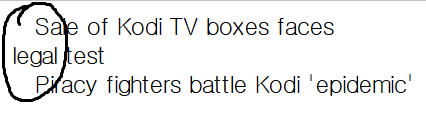
我想把它列清楚,但我就是不能。我该为它做什么?
<html>
<head>
<style type="text/css">
    .article-topic-list a {
        color: black;
        text-decoration: none;
        margin-left: 15px;
        margin-top: 20px;
    }`enter code here`
</style>
</head>
<body>
<div class="article-topic-list"> <a href="">Sale of Kodi TV boxes faces <br> legal test</a> </div>
<div class="article-topic-list"> <a href="">Piracy fighters battle Kodi 'epidemic'</a></div>
</body>
</html>回答 2
Stack Overflow用户
回答已采纳
发布于 2017-02-09 12:33:51
与其将css规则应用于标记,如果将该规则应用于整个div,我认为它应该正确地对齐。您的风格脚本将如下所示:
<style type="text/css">
.article-topic-list {
    color: black;
    text-decoration: none;
    margin-left: 15px;
    margin-top: 20px;
}
</style>输出将类似于这。

Stack Overflow用户
发布于 2017-02-09 12:41:46
为了得到你想要的结果,在设计上,你必须将边距样式移动到div,并将颜色和文字装饰保留在你的a-标记上。如果您只是从样式标记中删除'a‘,您将不会得到任何颜色或文本装饰的更改,因为浏览器(直接在a上)的样式将优先。
.article-topic-list {
  margin-left: 15px;
  margin-top: 20px;
}
.article-topic-list a {
  color: black;
  text-decoration: none;
}<body>
<div class="article-topic-list">
<a href="">Sale of Kodi TV boxes faces <br> legal test</a>
</div>
<div class="article-topic-list">
<a href="">Piracy fighters battle Kodi 'epidemic'</a>
</div>
</body>
看这个例子。
页面原文内容由Stack Overflow提供。腾讯云小微IT领域专用引擎提供翻译支持
原文链接:
https://stackoverflow.com/questions/42136671
复制相关文章
相似问题
腾讯云开发者

Copyright © 2013 - 2026 Tencent Cloud. All Rights Reserved. 腾讯云 版权所有
深圳市腾讯计算机系统有限公司 ICP备案/许可证号:粤B2-20090059  粤公网安备44030502008569号
腾讯云计算(北京)有限责任公司 京ICP证150476号 | 京ICP备11018762号