
在Linux上使用Eclipse中的箭头键在调用层次结构中导航
在Linux上使用Eclipse中的箭头键在调用层次结构中导航
提问于 2017-02-09 00:37:01
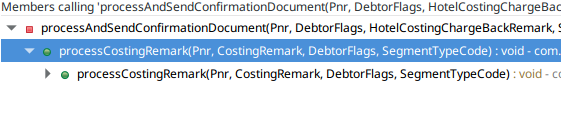
我试图使用箭头键(左/右)在Linux上的Eclipse中的“调用层次结构视图”中导航。这在Windows 10上运行得很好。Linux的版本有什么问题吗?你们中有谁面临类似的问题?有什么解决办法吗?我真的很想念这个功能。
干杯!PK.
月食
- 面向Web开发人员的Eclipse。
- 版本: Neon.2版(4.6.2)
- 生成编号: 20161208-0600
系统
- 分销商ID: LinuxMint
- 描述: Linux 18.1 Serena
- 释放: 18.1
- 代号: serena
回答 1
Stack Overflow用户
回答已采纳
发布于 2017-02-10 01:21:43
赞美@Meogi!我跟踪了评论中引用的@Meogi链接。
对gtk-2.0和gtk-3这两种在我的矿场中的配置都作了修改,地点是:
~/..config/gtkrc-2.0和~/..config/GTK-3.0/gtk.css
它就像一种魅力。
如下所示:~/. config /gtkrc-2.0
binding "gtk-binding-tree-view" {
    bind "j"        { "move-cursor" (display-lines, 1) }
    bind "k"        { "move-cursor" (display-lines, -1) }
    bind "h"        { "expand-collapse-cursor-row" (1,0,0) }
    bind "l"        { "expand-collapse-cursor-row" (1,1,0) }
    bind "o"        { "move-cursor" (pages, 1) }
    bind "u"        { "move-cursor" (pages, -1) }
    bind "g"        { "move-cursor" (buffer-ends, -1) }
    bind "y"        { "move-cursor" (buffer-ends, 1) }
    bind "p"        { "select-cursor-parent" () }
    bind "Left"     { "expand-collapse-cursor-row" (0,0,0) }
    bind "Right"    { "expand-collapse-cursor-row" (0,1,0) }
    bind "semicolon" { "expand-collapse-cursor-row" (0,1,1) }
    bind "slash"    { "start-interactive-search" () }
}
class "GtkTreeView" binding "gtk-binding-tree-view"
和~/..config/GTK-3.0/gtk.css
@binding-set MyTreeViewBinding
{
    bind "Left"     { "expand-collapse-cursor-row" (0,0,0) };
    bind "Right"    { "expand-collapse-cursor-row" (0,1,0) };
}

GtkTreeView
{
  gtk-key-bindings: MyTreeViewBinding;
}页面原文内容由Stack Overflow提供。腾讯云小微IT领域专用引擎提供翻译支持
原文链接:
https://stackoverflow.com/questions/42126233
复制相关文章
相似问题
腾讯云开发者

Copyright © 2013 - 2026 Tencent Cloud. All Rights Reserved. 腾讯云 版权所有
深圳市腾讯计算机系统有限公司 ICP备案/许可证号:粤B2-20090059  粤公网安备44030502008569号
腾讯云计算(北京)有限责任公司 京ICP证150476号 | 京ICP备11018762号