
NSAttributedString和表情符号:位置和长度的问题
我正在使用NSAttributedString对来自API的部分文本进行着色(如在Twitter上那样,请考虑“@提”)。
API为我提供了文本和一组实体,这些实体表示文本中提到的部分(或链接、标记等),这些部分应该被着色。
但有时,颜色会因为表情而被抵消。
例如,在这个文本中:
"@ericd一些文本@apero“
空气污染指数提供:
{“文本”:"ericd","len“:6,"pos”:0 },{ "text“:"apero","len”:6,"pos“:18 }
我使用NSAttributedString成功地将其转换为NSRange:
for m in entities.mentions {
    let r = NSMakeRange(m.pos, m.len)
    myAttributedString.addAttribute(NSForegroundColorAttributeName, value: someValue, range: r)
}我们看到"pos": 18是正确的,这就是"@apero“的起点。按预期,颜色部分是"@ericd“和"@apero”。
,但当在文本中使用一些特定的表情符号组合时,API不能很好地转换为NSATtributedString,颜色将被偏移。
"@ericd一些文本✌@apero“
给予:
{“文本”:"ericd","len“:6,"pos”:0 },{ "text“:"apero","len”:6,"pos“:22 }
"pos": 22:API作者说这是正确的,我理解他们的观点。
不幸的是,NSAttributedString不同意,我的颜色消失了:
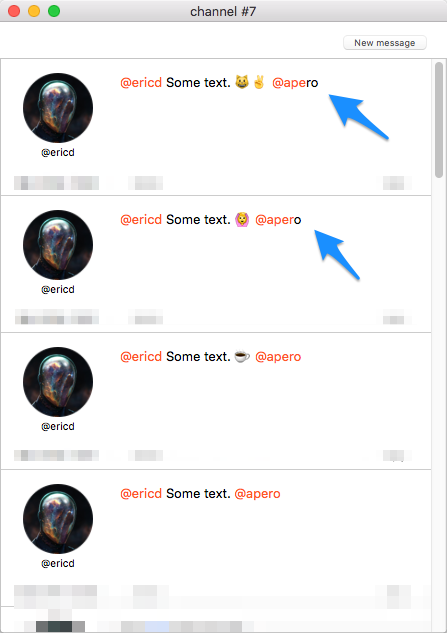
第二次提到的最后一个字符不是彩色的(因为"pos“太短了,因为有表情符号?)
正如您可能已经猜到的,我不能以任何方式改变API的行为方式,我必须在客户端进行调整。
除了那个..。我不知道该怎么办。当有问题的表情符号时,我是否应该试着检测文本中的表情符号,并手动修改提到的位置?但是,检测哪个表情符号会改变位置,哪个不会改变位置的标准是什么呢?以及如何决定我需要多少偏移量?也许问题是由NSAttributedString引起的?
据我所知,这与表情符号的长度有关,这些表情符号的长度曾经与离散字符的长度相比较,但是.好吧..。我迷路了。
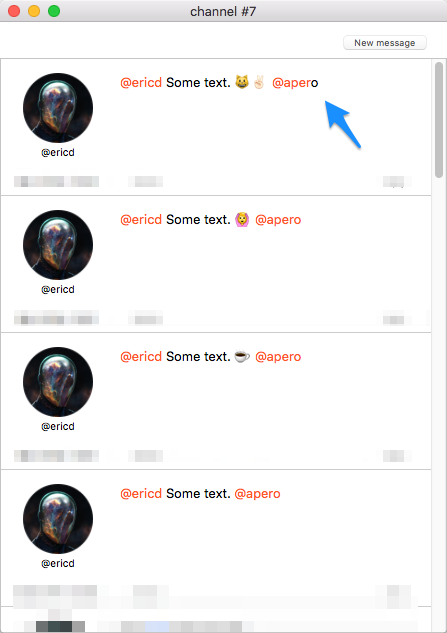
请注意,我尝试实现了一个类似于这东西的解决方案,因为我的API与这个API兼容,但它只是部分工作,一些表情符号仍然破坏了索引:
回答 1
Stack Overflow用户
发布于 2017-02-08 14:20:39
Swift String对其内容提供了不同的“视图”。在Swift博客中,“斯威夫特2中的字符串”给出了一个很好的概述:
characters是字符值的集合,或者是扩展的字素聚类。unicodeScalars是Unicode标量值的集合。utf8是UTF-8代码单元的集合.utf16是UTF-16代码单元的集合.
正如讨论中所显示的,API中的pos和len是Unicode标量视图中的索引。
另一方面,addAttribute()方法的NSMutableAttributedString采用NSRange,即与NSString中UTF-16码点的索引相对应的范围。
String提供了在不同视图的索引之间“转换”的方法(比较NSRange to Range):
let text = "@ericd Some text. ✌ @apero"
let pos = 22
let len = 6

// Compute String.UnicodeScalarView indices for first and last position:
let from32 = text.unicodeScalars.index(text.unicodeScalars.startIndex, offsetBy: pos)
let to32 = text.unicodeScalars.index(from32, offsetBy: len)

// Convert to String.UTF16View indices:
let from16 = from32.samePosition(in: text.utf16)
let to16 = to32.samePosition(in: text.utf16)

// Convert to NSRange by computing the integer distances:
let nsRange = NSRange(location: text.utf16.distance(from: text.utf16.startIndex, to: from16),
length: text.utf16.distance(from: from16, to: to16))这个NSRange是属性化字符串所需要的:
let attrString = NSMutableAttributedString(string: text)
attrString.addAttribute(NSForegroundColorAttributeName,
                        value: UIColor.red,
                        range: nsRange)
Swift 4的更新(Xcode 9):Swift 4中的,标准库提供了在Swift String范围和NSString范围之间转换的方法,因此计算简化为
let text = "@ericd Some text. ✌ @apero"
let pos = 22
let len = 6

// Compute String.UnicodeScalarView indices for first and last position:
let fromIdx = text.unicodeScalars.index(text.unicodeScalars.startIndex, offsetBy: pos)
let toIdx = text.unicodeScalars.index(fromIdx, offsetBy: len)

// Compute corresponding NSRange:
let nsRange = NSRange(fromIdx..<toIdx, in: text)https://stackoverflow.com/questions/42114872
复制相似问题
腾讯云开发者

Copyright © 2013 - 2026 Tencent Cloud. All Rights Reserved. 腾讯云 版权所有
深圳市腾讯计算机系统有限公司 ICP备案/许可证号:粤B2-20090059  粤公网安备44030502008569号
腾讯云计算(北京)有限责任公司 京ICP证150476号 | 京ICP备11018762号