
使用正在由对象填充的<select>验证parsley.js时遇到麻烦
我在验证表单上的<select>元素时遇到了问题。使用knockout.js选择位置,然后根据所选位置填充服务点。一旦按下提交按钮,表单将使用parsley.js进行验证。
我不断地得到“这个值是必需的”。在位置<select>上,当欧芹试图验证表单时。它填充得很好,当验证关闭时,当验证被打开时,当验证打开时,这些值会出现并返回到数据库,但是当验证打开时,就会抛出错误,说“这个值是必需的”。如果位置下拉列表中明显存在值,则无法选择服务点。
我对这些库非常陌生,但我的猜测与它被一个对象填充有关,尽管我不认为这会是一个问题,因为那里仍然有一个值。
希望我已经提供了足够的信息,如果你需要什么,我可以提供它。
任何想法都将不胜感激!
viewModelLocationAndServicePoint.data()
[
    {
        "ServicePoints": [
            {
                "ServicePoint": "ServicePoint1"
            }
        ],
        "Location": "Location1"
    },
    {
        "ServicePoints": [
            {
                "ServicePoint": "ServicePoint1"
            },
            {
                "ServicePoint": "ServicePoint2"
            },
            {
                "ServicePoint": "ServicePoint3"
            }
        ],
        "Location": "Location2"
    }
]
可观测种群
self.Location = ko.observable(data.Location().Location());
self.ServicePoint = ko.observable(data.ServicePoint());
viewModelTrackFiles输出
{
    "trackfile": {
        "Location": {
            "ServicePoints": [
                {
                    "ServicePoint": "ServicePoint1"
                }
            ],
            "Location": "Location1"
        },
        "TransactionMode": "",
        "ServicePoint": "ServicePoint1",
        "Status": "",
        "Comments": "",
        "Barcode": "",
        "BarcodeImageBase64": ""
    },
    "files": [],
    "printneeded": "no",
    "TransactionMode": "",
    "dispatchmode": false,
    "StaffName": "",
    "TransactionDate": "2017-02-06T16:29:49.914Z"
}<select id="cLocation"
data-parsley-required="true"
data-bind="options: viewModelLocationAndServicePoint.data(),
optionsCaption:'Choose Location',
optionsText: 'Location',
value: trackfile.Location">
</select>
<div data-field-span="1" data-bind="with: trackfile.Location">
<select id="cServicePoint"
data-parsley-required="true"
data-bind="options: ServicePoints,
optionsCaption:'Service Points',
optionsText: 'ServicePoint',
optionsValue: 'ServicePoint',
value: $parent.trackfile.ServicePoint">
</select>
</div>回答 1
Stack Overflow用户
发布于 2017-02-13 09:53:49
我已经想出了一个肮脏的解决方案,它现在起作用了,如果其他人能想出更好的方法,或者解释为什么欧芹没有意识到<select>中实际上有一个非常棒的值!
我已经创建了一个隐藏的文本<input>,当它发生变化时,它将由<select>填充。
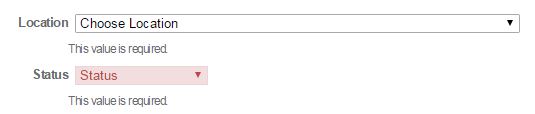
然后将验证放在文本<input>上。这使得欧芹错误信息出现在<select>下面,但不会改变<select>的背景颜色(见下面的截图),我现在可以接受。
<select id="cLocation"
    data-bind="options: viewModelLocationAndServicePoint.data(),
        optionsCaption:'Choose Location',
        optionsText: 'Location',
        value: trackfile.Location">
</select>
<input style="display: none" type="text" id="loc" data-parsley-required="true">
jQuery脚本
<script type="text/javascript">
    $(function () {
        $("#cLocation").on("change", function () {
            //Update hidden text input to fix issue
            //where ParsleyJS is not validating Location
            //dropdown possibly due to how it is being populated
            $("#loc").val($("#cLocation option:selected").text());
        });
    });
</script>
截图
https://stackoverflow.com/questions/42085762
复制相似问题
腾讯云开发者

Copyright © 2013 - 2026 Tencent Cloud. All Rights Reserved. 腾讯云 版权所有
深圳市腾讯计算机系统有限公司 ICP备案/许可证号:粤B2-20090059  粤公网安备44030502008569号
腾讯云计算(北京)有限责任公司 京ICP证150476号 | 京ICP备11018762号