
Angular2 [WDS]断开连接!带nignx
在将我的Angular2应用程序移到nginx之后,我在浏览器控制台中看到了以下内容:
GET https://localhost:4200/sockjs-node/info?t=1486305706324 net::ERR_CONNECTION_REFUSED
[WDS] Disconnected!
我的nginx代理是一个反向代理,它监听subdomain.domain.com端口443 (ssl),并为我的Angular2应用程序将其重定向到端口4200上的本地主机。因此,在我的客户端应用程序中,它试图解析localhost上的资源:4200而不是subdomain.domain.com端口443 (ssl)
我从我的客户开始:
ng serve 0.0.0.0我试过:
ng serve --host subdomain.domain.com --port 443没有任何运气。
我的package.json看起来是这样的:
..。
  "name": "app",
  "version": "0.0.0",
  "license": "MIT",
  "angular-cli": {},
  "scripts": {
    "ng": "ng",
    "start": "ng serve",
    "lint": "tslint \"src/**/*.ts\" --project src/tsconfig.json --type-check && tslint \"e2e/**/*.ts\" --project e2e/tsconfig.json --type-check",
    "test": "ng test",
    "pree2e": "webdriver-manager update --standalone false --gecko false",
    "e2e": "protractor"
  }
..。
我还尝试过编辑/node_modules/webpack-dev-server/client/webpack.config.js以包括:.
  entry: {
    'client': "webpack-dev-server/client?https://subdomain.domain.com"
  host: "https://subdomain.domain.com",
  port: 443,
  https: true

  },
  output: {
    publicPath: 'https://subdomain.domain.com'
  },
..。
用nginx配置更新:
server {
 listen 443 ssl;
 ssl_certificate /etc/letsencrypt/live/subdomain.domain.com/fullchain.pem;
 ssl_certificate_key /etc/letsencrypt/live/subdomain.domain.com/privkey.pem;
 server_name subdomain.domain.com;
 access_log /var/log/nginx.access.log;
 error_log /var/log/nginx_error.log debug;
 location / {
  include conf.d/proxy.conf;
  auth_basic "Restricted";
  auth_basic_user_file /etc/nginx/.htpasswd;
  proxy_pass http://localhost:4200/;

  proxy_http_version 1.1;
  proxy_set_header Upgrade $http_upgrade;
  proxy_set_header Connection "upgrade";
 }
}

server {
 listen 80;
 server_name subdomain.domain.com;
 return 301 https://$host$request_uri;
}
使用控制台日志和应用程序结构更新:


也没什么运气。对于如何告诉运行在本地高端口(4200)上的应用程序如何解决另一个端口上的公共域上的重新来源,有什么建议吗?
诚挚的问候。
回答 1
Stack Overflow用户
发布于 2017-02-05 14:58:28
我认为您可以构建生产,然后放入一个文件夹,然后配置您的nginx指向这个文件夹在subdomain.domain.com,ng服务运行开发服务器,它将实时加载到客户端,我们不需要在生产模式。然后,ng build --prod将dist文件夹复制到您的web域文件夹。
server {
    listen 80 subdomain.domain.com;
    listen [::]:80 subdomain.domain.com ipv6only=on;

    root /path/to/dist/or/path/to/copyof/dist;
    index index.html index.htm;

    server_name subdomain.domain.com;

    location / {
        try_files $uri $uri/ =404;
    }
}出于开发目的,您可以将subdomain.domain.com root path指向dist文件夹,然后运行ng build --prod --watch (此命令将生成您的项目并查看任何更改,然后再次生成),然后每当您想测试您所做的东西时,只需手动刷新浏览器即可。
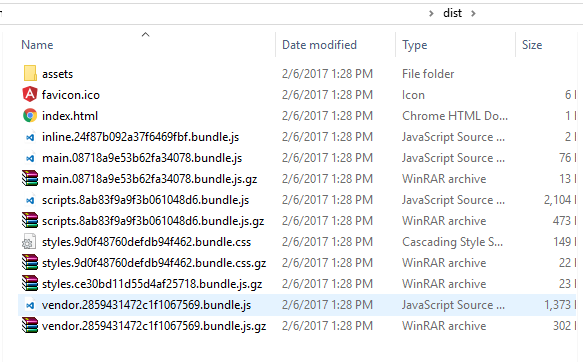
将root /path/to/dist/or/path/to/copyof/dist;指向类似于以下图像的文件夹
顺便说一句,在src/assets文件夹中包括你的css库,图像,字体等等。当CLI构建您的应用程序时,它会将src/assets文件夹复制到dist/assets文件夹,这不会破坏您的样式、图像等。
https://stackoverflow.com/questions/42053464
复制相似问题
腾讯云开发者

Copyright © 2013 - 2026 Tencent Cloud. All Rights Reserved. 腾讯云 版权所有
深圳市腾讯计算机系统有限公司 ICP备案/许可证号:粤B2-20090059  粤公网安备44030502008569号
腾讯云计算(北京)有限责任公司 京ICP证150476号 | 京ICP备11018762号