
锡兰运行:模块默认/不版本未找到
今天,我在我的macbook上安装了intelliJ锡兰IDE。在编译我的项目时,我会收到以下消息
/Library/Java/JavaVirtualMachines/jdk1.7.0_25.jdk/Contents/Home/bin/java "-Dceylon.system.repo=/Users/Laust/Library/ApplicationSupport/IdeaIC2016.3/CeylonIDEA/classes/embeddedDist/repo" -Didea.launcher.port=7533 "-Didea.launcher.bin.path=/Applications/IntelliJ IDEA CE.app/Contents/bin" -Dfile.encoding=UTF-8 -classpath "/Users/Laust/Library/Application Support/IdeaIC2016.3/CeylonIDEA/classes/embeddedDist/lib/ceylon-bootstrap.jar:/Applications/IntelliJ IDEA CE.app/Contents/lib/idea_rt.jar" com.intellij.rt.execution.application.AppMain com.redhat.ceylon.launcher.Bootstrap run --run main default/unversioned
ceylon run: Module default/unversioned not found in the following repositories:
 /Users/Laust/Library/Application Support/IdeaIC2016.
3/CeylonIDEA/classes/embeddedDist/repo
 /Users/Laust/.ceylon/cache
 https://modules.ceylon-lang.org/repo/1
 [Maven] Aether
 [NPM] npm

Process finished with exit code 1
代码在我的另一台计算机(windows 7)上执行得很好。
文件夹“模块”包含以下内容:
default
    default.car
    default.car.sha1
    default.src
default.src.sha1以及我的构建配置如下所示。

这是我的代码(在文件源代码/main.ceylon中)
shared void main() {
    print("Generating pretty sweet g-code:");

    {Gcommand+} myGcommands = {
        G00( Vector3(0.0, 0.0, 0.0) ),
        G00( Vector3(9.0, 0.0, 0.0) ),
        G00( Vector3(9.0, 9.0, 0.0) ),
        G00( Vector3(0.0, 9.0, 0.0) ),
        G00( Vector3(0.0, 0.0, 0.0) )
    };

    GcodeProgram myGcodeProgram = GcodeProgram( *myGcommands );

    print(myGcodeProgram.toString());
}

"A carthesian coordinate class"
alias X => Float;
alias Y => Float;
alias Z => Float;
class Vector3(shared X x, shared Y y, shared Z z) {
}

"An abstract spec class for all G-code command classes"
abstract class Gcommand() {
    shared formal String toString();
}

"G-code command for moving in a straight line at rapid speed"
class G00( Vector3 endPoint ) extends Gcommand() {
    toString() => "G0 " + "X" + endPoint.x.string
                        + "Y" + endPoint.y.string
                        + "Z" + endPoint.z.string + "\n";
}

class GcodeProgram( Gcommand+ gcommands ) {

    variable String stringifiedGcodeProgram = "";

    shared String toString() {
        for (gcommand in gcommands) {
            stringifiedGcodeProgram = stringifiedGcodeProgram + gcommand.toString();
        }
    return stringifiedGcodeProgram;
    }
}回答 4
Stack Overflow用户
发布于 2017-02-04 15:49:02
您提供的屏幕截图显示,运行配置不是基于任何IntelliJ模块(Use classpath of module设置为[none])。这意味着配置不会在modules目录所在的项目文件夹中运行。该目录包含已编译的代码,当您要求该目录运行ceylon run模块时,它将查找该目录。
一般来说,您应该避免手动创建运行配置。通过单击可运行函数名称旁边的绿色箭头,锡兰IDE将自动创建和配置正确的运行配置。
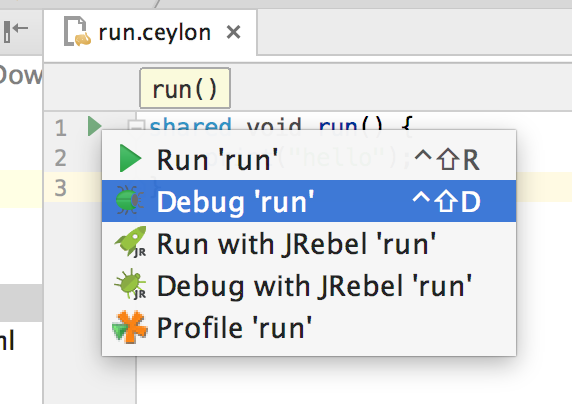
要修复现有的运行配置,只需在标记为IntelliJ的字段中选择包含代码的Use classpath of module模块即可。
有关如何开始使用用于IntelliJ的锡兰IDE的更多信息,请参见IntelliJ。
Stack Overflow用户
发布于 2017-02-04 11:31:05
这可能是IntelliJ插件没有正确处理“默认”模块的错误。我们倾向于不太使用默认模块,因为它们比普通模块更受限制。
尝试创建一个模块并将您的代码移到它上。THat很可能会解决这个问题。如果是这样,那么您可以打开一个问题,以便在这里修复这个bug:https://github.com/ceylon/ceylon-ide-intellij/issues/new
Stack Overflow用户
发布于 2017-02-04 13:37:12
在这个问题中,第一个(也是唯一的)答案告诉我们如何创建一个新模块。
我对这个答复有几点意见:
- 当开始一个新项目时,您可能不需要模块复杂的嵌套命名层次结构。如果您在模块名中使用句点,您将得到这个结果(例如。(
my.ceylon.example),所以我建议您坚持使用一个简单的名称,比如main。 - 在创建新模块时,您将被要求指定一个“可运行的单元名称”。这个字段的目的是告诉IntelliJ在启动程序时应该执行哪些模块的类。换句话说,这将成为程序的入口点。合适的名称也可以是
main。 - 锡兰项目分为模块,模块分为包,包分为类和顶层函数。创建模块时,将在此模块下自动创建包。这个模块下的代码文件的路径将是'source/moduleName/packageName‘。创建新模块时,不需要为模块中的第一个包指定名称。相反,包的名称与模块名称相同。因此,名为“main”的模块将具有以下路径:
source/main/main作为其代码文件的路径。 - 在你的新模块文件夹中。
source/main/main)将创建三个新文件。查找之前选择的“可运行单元名称”命名的文件。您的代码应该进入这个文件。此外,您的代码应该有一个类,其名称与您选择的“可运行单元名称”完全相同。 - 答案使用了一个花哨的术语“runnable unit”,他的意思是一个包含锡兰代码的文件。
- 在尝试运行新模块之前,请记住删除包含旧“默认”模块的文件。
- 模块名称不能以大写字母开头。
modules/是编译代码的输出目录。在构建项目时,将根据source/中的代码自动重新创建它。
https://stackoverflow.com/questions/42034455
复制相似问题
腾讯云开发者

Copyright © 2013 - 2026 Tencent Cloud. All Rights Reserved. 腾讯云 版权所有
深圳市腾讯计算机系统有限公司 ICP备案/许可证号:粤B2-20090059  粤公网安备44030502008569号
腾讯云计算(北京)有限责任公司 京ICP证150476号 | 京ICP备11018762号