
vscode多终端配置问题
vscode多终端配置问题
提问于 2017-02-03 20:08:03
我阅读了vscode 1.9的新特性,添加/使用了多个终端,但最终添加了多个相同类型的终端。例如cmd.
有没有办法选择我可以使用的终端类型,bash(git)、cmd (windows)或bash(Ubuntu)?因此,在vscode终端下拉之后,应该更改为:
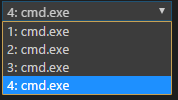
- cmd.exe
- bash.exe (Git)
- bash.exe (Ubuntu)
我试图将setting.json文件更改为"terminal.integrated.shell.windows",但是它只考虑了最后一个值。
回答 3
Stack Overflow用户
发布于 2017-02-04 08:27:25
目前看来这是不可能的。但是,在待办事项中有一个关于它的开放特性请求:#10893
Stack Overflow用户
发布于 2017-07-24 20:29:24
您可以使用扩展启动任何外壳。
其他选项是从默认shell内部打开所需的shell。如果你的道路上有所有你想要的东西,那就更容易了。
Stack Overflow用户
发布于 2022-08-18 02:56:08
当这个问题在2017年发布的时候,这真的是不可能的。现在已经通过使用终端配置文件- https://code.visualstudio.com/docs/terminal/profiles来解决这个问题。
示例配置:
"terminal.integrated.profiles.windows": {
  "Cmd": {
    "path": "C:\\Windows\\System32\\cmd.exe",
    "icon": "terminal-cmd"
  },
  "GitBash": {
    "path": "C:\\Program Files\\Git\\bin\\bash.exe", "icon": "terminal-bash",
    "icon": "terminal-bash"
  },
  "PowerShell": {
    "path": "C:\\Windows\\System32\\WindowsPowerShell\\v1.0\\powershell.exe"
    "icon": "terminal-powershell"
  },
},页面原文内容由Stack Overflow提供。腾讯云小微IT领域专用引擎提供翻译支持
原文链接:
https://stackoverflow.com/questions/42032232
复制相关文章
相似问题
腾讯云开发者

Copyright © 2013 - 2026 Tencent Cloud. All Rights Reserved. 腾讯云 版权所有
深圳市腾讯计算机系统有限公司 ICP备案/许可证号:粤B2-20090059  粤公网安备44030502008569号
腾讯云计算(北京)有限责任公司 京ICP证150476号 | 京ICP备11018762号