
安装- Visual Studio 2017 RC
正在尝试安装2017时遇到问题。每当我在中途尝试安装这个程序时,程序就会说:
“由于一个或多个包故障,该产品未能安装列出的工作负载和组件。”
不管怎么说,我能解决这个问题还是绕道而行?我不能简单地安装Visual。返回的命令列表如下。我该怎么解决这个问题?我已经试过卸载所有的东西了,我似乎什么都想不出来
The product failed to install the listed workloads and components due to one or more package failures.

Incomplete workloads
    .NET Core cross-platform development (Microsoft.VisualStudio.Workload.NetCoreTools,version=15.0.26127.0)
    .NET desktop development (Microsoft.VisualStudio.Workload.ManagedDesktop,version=15.0.26127.0)
    ASP.NET and web development (Microsoft.VisualStudio.Workload.NetWeb,version=15.0.26127.0)
    Azure development (Microsoft.VisualStudio.Workload.Azure,version=15.0.26109.1)
    Data storage and processing (Microsoft.VisualStudio.Workload.Data,version=15.0.26127.0)
    Desktop development with C++ (Microsoft.VisualStudio.Workload.NativeDesktop,version=15.0.26109.1)
    Game development with C++ (Microsoft.VisualStudio.Workload.NativeGame,version=15.0.26127.0)
    Mobile development with .NET (Preview) (Microsoft.VisualStudio.Workload.NetCrossPlat,version=15.0.26127.3)
    Mobile development with JavaScript (Microsoft.VisualStudio.Workload.WebCrossPlat,version=15.0.26109.1)
    Universal Windows Platform development (Microsoft.VisualStudio.Workload.Universal,version=15.0.26109.1)
    Visual Studio extension development (Microsoft.VisualStudio.Workload.VisualStudioExtension,version=15.0.26109.1)

Incomplete components
    .NET Core runtime (Microsoft.Component.NetFX.Core.Runtime,version=15.0.26109.1)
    .NET desktop development tools (Microsoft.VisualStudio.Component.ManagedDesktop.Prerequisites,version=15.0.26109.1)
    .NET Portable Library targeting pack (Microsoft.VisualStudio.Component.PortableLibrary,version=15.0.26109.1)
    ASP.NET and web development tools (Microsoft.VisualStudio.Component.Web,version=15.0.26127.0)
    Azure Cloud Services core tools (Microsoft.VisualStudio.Component.Azure.Waverton,version=15.0.26109.1)
    Azure Cloud Services tools (Microsoft.VisualStudio.ComponentGroup.Azure.CloudServices,version=15.0.26004.1)
    Azure Data Lake Tools (Microsoft.Component.Azure.DataLake.Tools,version=15.0.26109.1)
    Azure development prerequisites (Microsoft.VisualStudio.ComponentGroup.Azure.Prerequisites,version=15.0.26109.1)
    Azure Resource Manager core tools (Microsoft.VisualStudio.Component.Azure.ResourceManager.Tools,version=15.0.26109.1)
    Azure Resource Manager tools (Microsoft.VisualStudio.ComponentGroup.Azure.ResourceManager.Tools,version=15.0.26109.1)
    Data sources for SQL Server support (Microsoft.VisualStudio.Component.SQL.DataSources,version=15.0.26004.1)
    Managed Desktop Workload Core (Microsoft.VisualStudio.Component.ManagedDesktop.Core,version=15.0.26109.1)
    Redgate SQL Search (Component.Redgate.SQLSearch,version=15.0.26127.0)
    SQL Server Data Tools (Microsoft.VisualStudio.Component.SQL.SSDT,version=15.0.26109.1)
    Universal Windows Platform tools (2.0) (Microsoft.VisualStudio.Component.UWP.Support,version=15.0.26127.0)
    Universal Windows Platform tools for Cordova (2.0) (Microsoft.VisualStudio.ComponentGroup.UWP.Cordova,version=15.0.26109.1)
    Universal Windows Platform tools for Xamarin (2.0) (Microsoft.VisualStudio.ComponentGroup.UWP.Xamarin,version=15.0.26109.1)
    Visual Studio extension development prerequisites (Microsoft.VisualStudio.ComponentGroup.VisualStudioExtension.Prerequisites,version=15.0.26004.1)
    Windows 10 SDK (10.0.14393.0) (Microsoft.VisualStudio.Component.Windows10SDK.14393,version=15.0.26127.0)

You can search for solutions using the information below, modify your selections for the above workloads and components and retry the installation, or remove the product from your machine.

Following is a collection of individual package failures that led to the incomplete workloads and components above. To search for existing reports of these specific problems, please copy and paste the URL from each package failure into a web browser. If the issue has already been reported, you can find solutions or workarounds there. If the issue has not been reported, you can create a new issue where other people will be able to find solutions or workarounds.

Package 'Microsoft.PortableLibrary.TargetingPack.Msi.Resources,version=15.0.26109.1,language=en-US' failed to install.
    Search URL: aka(DOT - Need 10 Reputations)ms/VSSetupErrorReports?q=PackageId=Microsoft.PortableLibrary.TargetingPack.Msi.Resources;PackageAction=Install;ReturnCode=1714
    Impacted workloads
        .NET Core cross-platform development (Microsoft.VisualStudio.Workload.NetCoreTools,version=15.0.26127.0)
        .NET desktop development (Microsoft.VisualStudio.Workload.ManagedDesktop,version=15.0.26127.0)
        ASP.NET and web development (Microsoft.VisualStudio.Workload.NetWeb,version=15.0.26127.0)
        Azure development (Microsoft.VisualStudio.Workload.Azure,version=15.0.26109.1)
        Data storage and processing (Microsoft.VisualStudio.Workload.Data,version=15.0.26127.0)
        Mobile development with .NET (Preview) (Microsoft.VisualStudio.Workload.NetCrossPlat,version=15.0.26127.3)
        Universal Windows Platform development (Microsoft.VisualStudio.Workload.Universal,version=15.0.26109.1)
        Visual Studio extension development (Microsoft.VisualStudio.Workload.VisualStudioExtension,version=15.0.26109.1)
    Impacted components
        .NET desktop development tools (Microsoft.VisualStudio.Component.ManagedDesktop.Prerequisites,version=15.0.26109.1)
        .NET Portable Library targeting pack (Microsoft.VisualStudio.Component.PortableLibrary,version=15.0.26109.1)
        ASP.NET and web development tools (Microsoft.VisualStudio.Component.Web,version=15.0.26127.0)
        Azure Cloud Services core tools (Microsoft.VisualStudio.Component.Azure.Waverton,version=15.0.26109.1)
        Azure Cloud Services tools (Microsoft.VisualStudio.ComponentGroup.Azure.CloudServices,version=15.0.26004.1)
        Azure Data Lake Tools (Microsoft.Component.Azure.DataLake.Tools,version=15.0.26109.1)
        Azure development prerequisites (Microsoft.VisualStudio.ComponentGroup.Azure.Prerequisites,version=15.0.26109.1)
        Azure Resource Manager core tools (Microsoft.VisualStudio.Component.Azure.ResourceManager.Tools,version=15.0.26109.1)
        Azure Resource Manager tools (Microsoft.VisualStudio.ComponentGroup.Azure.ResourceManager.Tools,version=15.0.26109.1)
        Data sources for SQL Server support (Microsoft.VisualStudio.Component.SQL.DataSources,version=15.0.26004.1)
        Managed Desktop Workload Core (Microsoft.VisualStudio.Component.ManagedDesktop.Core,version=15.0.26109.1)
        Redgate SQL Search (Component.Redgate.SQLSearch,version=15.0.26127.0)
        SQL Server Data Tools (Microsoft.VisualStudio.Component.SQL.SSDT,version=15.0.26109.1)
        Universal Windows Platform tools (2.0) (Microsoft.VisualStudio.Component.UWP.Support,version=15.0.26127.0)
        Visual Studio extension development prerequisites (Microsoft.VisualStudio.ComponentGroup.VisualStudioExtension.Prerequisites,version=15.0.26004.1)
    Log
        C:\Users\Vishwadeep Singh.VishwadeepSingh\AppData\Local\Temp\dd_setup_20170201205921_131_Microsoft.PortableLibrary.TargetingPack.Msi.Resources.log
    Details
        MSI: C:\ProgramData\Microsoft\VisualStudio\Packages\Microsoft.PortableLibrary.TargetingPack.Msi.Resources,version=15.0.26109.1,language=en-US\portablelibrary_dtplp_sfx.msi, Properties:  REBOOT=ReallySuppress ARPSYSTEMCOMPONENT=1  MSIFASTINSTALL="7"  VSEXTUI="1"  EXTUI="1"
        Return code: 1714
        Return code details: The older version of Microsoft Portable Library Multi-Targeting Pack Language Pack - enu cannot be removed.  Contact your technical support group.

Package 'Microsoft.Net.CoreSDK.50,version=1.0.23907' failed to install.
    Search URL: aka(DOT - Need 10 Reputations)ms/VSSetupErrorReports?q=PackageId=Microsoft.Net.CoreSDK.50;PackageAction=Install;ReturnCode=1714
    Impacted workloads
        .NET Core cross-platform development (Microsoft.VisualStudio.Workload.NetCoreTools,version=15.0.26127.0)
        .NET desktop development (Microsoft.VisualStudio.Workload.ManagedDesktop,version=15.0.26127.0)
        ASP.NET and web development (Microsoft.VisualStudio.Workload.NetWeb,version=15.0.26127.0)
        Azure development (Microsoft.VisualStudio.Workload.Azure,version=15.0.26109.1)
        Data storage and processing (Microsoft.VisualStudio.Workload.Data,version=15.0.26127.0)
        Mobile development with .NET (Preview) (Microsoft.VisualStudio.Workload.NetCrossPlat,version=15.0.26127.3)
        Mobile development with JavaScript (Microsoft.VisualStudio.Workload.WebCrossPlat,version=15.0.26109.1)
        Universal Windows Platform development (Microsoft.VisualStudio.Workload.Universal,version=15.0.26109.1)
        Visual Studio extension development (Microsoft.VisualStudio.Workload.VisualStudioExtension,version=15.0.26109.1)
    Impacted components
        .NET Core runtime (Microsoft.Component.NetFX.Core.Runtime,version=15.0.26109.1)
        .NET desktop development tools (Microsoft.VisualStudio.Component.ManagedDesktop.Prerequisites,version=15.0.26109.1)
        .NET Portable Library targeting pack (Microsoft.VisualStudio.Component.PortableLibrary,version=15.0.26109.1)
        ASP.NET and web development tools (Microsoft.VisualStudio.Component.Web,version=15.0.26127.0)
        Azure Cloud Services core tools (Microsoft.VisualStudio.Component.Azure.Waverton,version=15.0.26109.1)
        Azure Cloud Services tools (Microsoft.VisualStudio.ComponentGroup.Azure.CloudServices,version=15.0.26004.1)
        Azure Data Lake Tools (Microsoft.Component.Azure.DataLake.Tools,version=15.0.26109.1)
        Azure development prerequisites (Microsoft.VisualStudio.ComponentGroup.Azure.Prerequisites,version=15.0.26109.1)
        Azure Resource Manager core tools (Microsoft.VisualStudio.Component.Azure.ResourceManager.Tools,version=15.0.26109.1)
        Azure Resource Manager tools (Microsoft.VisualStudio.ComponentGroup.Azure.ResourceManager.Tools,version=15.0.26109.1)
        Data sources for SQL Server support (Microsoft.VisualStudio.Component.SQL.DataSources,version=15.0.26004.1)
        Managed Desktop Workload Core (Microsoft.VisualStudio.Component.ManagedDesktop.Core,version=15.0.26109.1)
        Redgate SQL Search (Component.Redgate.SQLSearch,version=15.0.26127.0)
        SQL Server Data Tools (Microsoft.VisualStudio.Component.SQL.SSDT,version=15.0.26109.1)
        Universal Windows Platform tools (2.0) (Microsoft.VisualStudio.Component.UWP.Support,version=15.0.26127.0)
        Universal Windows Platform tools for Cordova (2.0) (Microsoft.VisualStudio.ComponentGroup.UWP.Cordova,version=15.0.26109.1)
        Visual Studio extension development prerequisites (Microsoft.VisualStudio.ComponentGroup.VisualStudioExtension.Prerequisites,version=15.0.26004.1)
    Log
        C:\Users\Vishwadeep Singh.VishwadeepSingh\AppData\Local\Temp\dd_setup_20170201205921_132_Microsoft.Net.CoreSDK.50.log
    Details
        MSI: C:\ProgramData\Microsoft\VisualStudio\Packages\Microsoft.Net.CoreSDK.50,version=1.0.23907\netfx_NETCoreSDK.msi, Properties:  REBOOT=ReallySuppress ARPSYSTEMCOMPONENT=1  MSIFASTINSTALL="7"
        Return code: 1714
        Return code details: The older version of Microsoft NetStandard SDK cannot be removed.  Contact your technical support group.

Package 'Win10SDK_10.0.14393.795,version=10.0.14393.79500' failed to install.
    Search URL: https://aka.ms/VSSetupErrorReports?q=PackageId=Win10SDK_10.0.14393.795;PackageAction=Install;ReturnCode=-2147023293
    Impacted workloads
        Desktop development with C++ (Microsoft.VisualStudio.Workload.NativeDesktop,version=15.0.26109.1)
        Game development with C++ (Microsoft.VisualStudio.Workload.NativeGame,version=15.0.26127.0)
        Mobile development with .NET (Preview) (Microsoft.VisualStudio.Workload.NetCrossPlat,version=15.0.26127.3)
        Mobile development with JavaScript (Microsoft.VisualStudio.Workload.WebCrossPlat,version=15.0.26109.1)
        Universal Windows Platform development (Microsoft.VisualStudio.Workload.Universal,version=15.0.26109.1)
    Impacted components
        Universal Windows Platform tools (2.0) (Microsoft.VisualStudio.Component.UWP.Support,version=15.0.26127.0)
        Universal Windows Platform tools for Cordova (2.0) (Microsoft.VisualStudio.ComponentGroup.UWP.Cordova,version=15.0.26109.1)
        Universal Windows Platform tools for Xamarin (2.0) (Microsoft.VisualStudio.ComponentGroup.UWP.Xamarin,version=15.0.26109.1)
        Windows 10 SDK (10.0.14393.0) (Microsoft.VisualStudio.Component.Windows10SDK.14393,version=15.0.26127.0)
    Log
        C:\Users\Vishwadeep Singh.VishwadeepSingh\AppData\Local\Temp\dd_setup_20170201205921_164_Win10SDK_10.0.14393.795.log
    Details
        Command executed: "c:\windows\syswow64\\windowspowershell\v1.0\powershell.exe" -NoLogo -NoProfile -ExecutionPolicy Unrestricted -InputFormat None -Command "& """C:\ProgramData\Microsoft\VisualStudio\Packages\Win10SDK_10.0.14393.795,version=10.0.14393.79500\WinSdkInstall.ps1""" -SetupExe sdksetup.exe -SetupLogFolder standalonesdk -PackageId Win10SDK_10.0.14393.795 -LogFile """C:\Users\Vishwadeep Singh.VishwadeepSingh\AppData\Local\Temp\dd_setup_20170201205921_164_Win10SDK_10.0.14393.795.log""" -SetupParameters """/features OptionId.WindowsSoftwareDevelopmentKit OptionId.WindowsSoftwareLogoToolkit OptionId.NetFxSoftwareDevelopmentKit /quiet /norestart"""; exit $LastExitCode"
        Return code: -2147023293
Return code details: Fatal error during installation.回答 1
Stack Overflow用户
发布于 2017-03-10 10:57:50
这仍然是RTM安装程序的一个问题。这些行向您提供了相关信息:
C:\ProgramData\Microsoft\VisualStudio\Packages\Microsoft.PortableLibrary.TargetingPack.Msi.Resources,version=15.0.26109.1,language=en-US\portablelibrary_dtplp_sfx.msi,Properties: REBOOT=ReallySuppress ARPSYSTEMCOMPONENT=1 MSIFASTINSTALL="7“VSEXTUI="1”EXTUI="1“ 返回代码: 1714 返回代码详细信息:无法删除多目标包语言包- enu的旧版本。与您的技术支持小组联系
和
C:\ProgramData\Microsoft\VisualStudio\Packages\Microsoft.Net.CoreSDK.50,version=1.0.23907\netfx_NETCoreSDK.msi,Properties: REBOOT=ReallySuppress ARPSYSTEMCOMPONENT=1 MSIFASTINSTALL="7“ 返回代码: 1714 返回代码详细信息:无法删除的旧版本。与您的技术支持小组联系。
这种情况可能有很多原因,但我怀疑最常见的原因是删除了相关的MSI,也许是为了用类似于CCleaner的东西来释放磁盘空间。
克服这个问题最简单的方法就是Windows安装程序清理工具--微软已经决定不再发布这个工具了(因为“格式化和重新安装”是一个更好的解决方案)。幸运的是,仍然存在镜像,比如通过MajorGeeks:
utility.html
安装并运行该工具以获得在Windows Installer中注册的所有包的列表,如下所示:
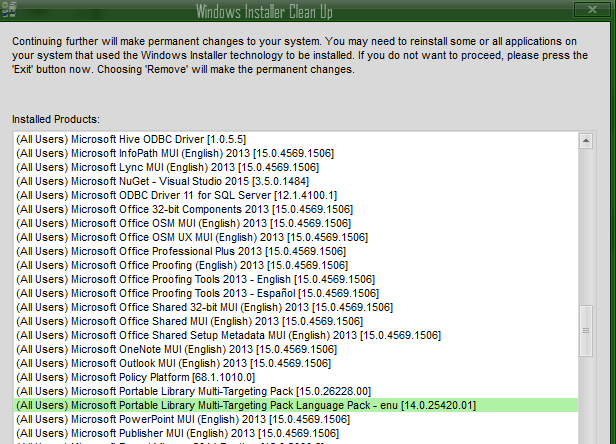
选择阻止VS安装继续和删除的软件包。现在你可以自由地重新安装,看看你接下来会遇到什么问题。
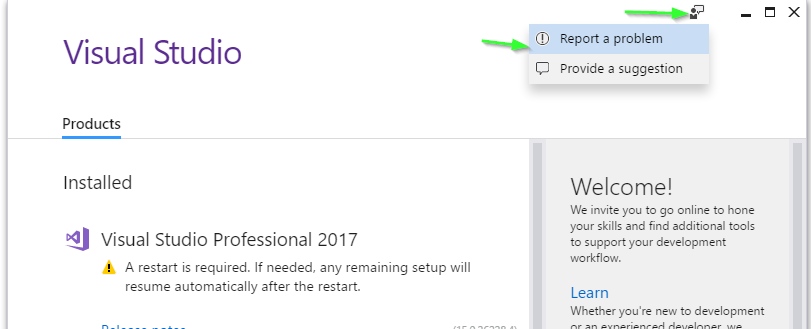
当你完成任务后,别忘了感谢微软提出了创新的新方法,让开发人员的生活更加艰难:
https://stackoverflow.com/questions/42031656
复制相似问题
腾讯云开发者

Copyright © 2013 - 2026 Tencent Cloud. All Rights Reserved. 腾讯云 版权所有
深圳市腾讯计算机系统有限公司 ICP备案/许可证号:粤B2-20090059  粤公网安备44030502008569号
腾讯云计算(北京)有限责任公司 京ICP证150476号 | 京ICP备11018762号