
PHAsset/PHAssetCollection/PHCollectionList和文件夹
我正在遵循苹果的示例代码'ExampleappusingPhotosframework'.
在PHAsset/PHAssetCollection的主题中,我注意到存在“文件夹”的可能性。这些可能出现在被创建的Mac的照片应用程序,或一个较老的iPhoto应用,等等.
有可能有一个文件夹是当前金额PHAssetCollection的,并且该文件夹可以包含未知级别的嵌套文件夹,最后是一张相册。
因此,即使在上面的示例项目崩溃,如果我有嵌套文件夹在照片库。大多数应用程序似乎忽略了这些文件夹,而根本不显示这些文件夹。
举个例子,让我们假设这个例子存在:
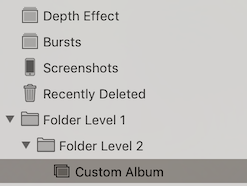
文件夹级别1>文件夹级别2>自定义相册> Image1、Image2
iOS Photos应用程序如何处理它:
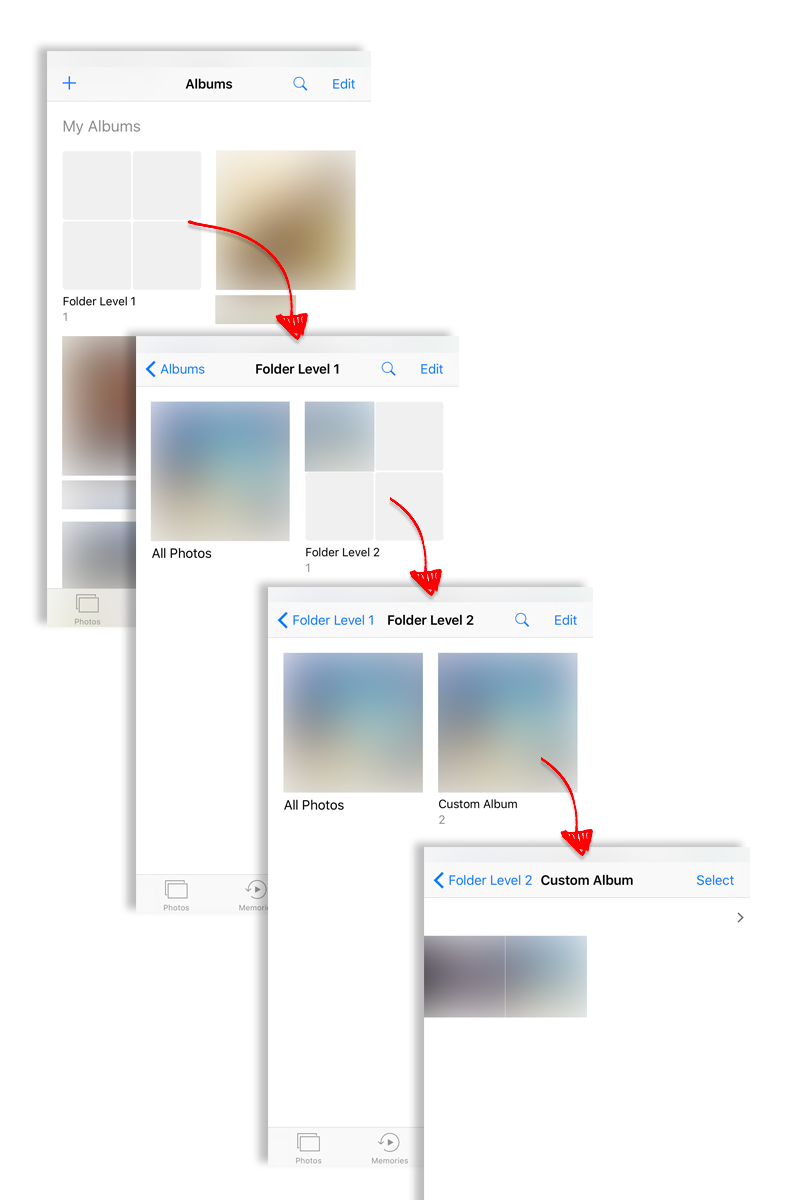
任务
在“根相册”列表中的“用户相册”下,应看到“文件夹级别1”。当它被点击时,我想列出来自所有子文件夹的所有图像,而不管子级别.
viewDidLoad
override func viewDidLoad() {
    super.viewDidLoad()

    let addButton = UIBarButtonItem(barButtonSystemItem: .add, target: self, action: #selector(self.addAlbum))
    self.navigationItem.rightBarButtonItem = addButton


    // Create a PHFetchResult object for each section in the table view.
    let allPhotosOptions = PHFetchOptions()
    allPhotosOptions.sortDescriptors = [NSSortDescriptor(key: "creationDate", ascending: true)]
    allPhotos = PHAsset.fetchAssets(with: allPhotosOptions)
    smartAlbums = PHAssetCollection.fetchAssetCollections(with: .smartAlbum, subtype: .albumRegular, options: nil)
    userCollections = PHCollectionList.fetchTopLevelUserCollections(with: nil)
    PHPhotoLibrary.shared().register(self)

}
cellForRowAt
override func tableView(_ tableView: UITableView, cellForRowAt indexPath: IndexPath) -> UITableViewCell {
    switch Section(rawValue: indexPath.section)! {
        case .allPhotos:
            let cell = tableView.dequeueReusableCell(withIdentifier: CellIdentifier.allPhotos.rawValue, for: indexPath)
            cell.textLabel!.text = NSLocalizedString("All Photos", comment: "")
            return cell

        case .smartAlbums:
            let cell = tableView.dequeueReusableCell(withIdentifier: CellIdentifier.collection.rawValue, for: indexPath)
            let collection = smartAlbums.object(at: indexPath.row)
            cell.textLabel!.text = collection.localizedTitle
            return cell

        case .userCollections:
            let cell = tableView.dequeueReusableCell(withIdentifier: CellIdentifier.collection.rawValue, for: indexPath)
            let collection = userCollections.object(at: indexPath.row)

            cell.textLabel!.text = collection.localizedTitle
            return cell
    }
}
Segue
override func prepare(for segue: UIStoryboardSegue, sender: Any?) {

    guard let destination = (segue.destination as? UINavigationController)?.topViewController as? AssetGridViewController
        else { fatalError("unexpected view controller for segue") }
    let cell = sender as! UITableViewCell

    destination.title = cell.textLabel?.text

    switch SegueIdentifier(rawValue: segue.identifier!)! {
        case .showAllPhotos:
            destination.fetchResult = allPhotos
        case .showCollection:

            // get the asset collection for the selected row
            let indexPath = tableView.indexPath(for: cell)!
            let collection: PHCollection
            switch Section(rawValue: indexPath.section)! {
                case .smartAlbums:
                    collection = smartAlbums.object(at: indexPath.row)
                case .userCollections:
                    collection = userCollections.object(at: indexPath.row)
                default: return // not reached; all photos section already handled by other segue
            }

            // configure the view controller with the asset collection
            guard let assetCollection = collection as? PHAssetCollection
                else { fatalError("expected asset collection") }
            destination.fetchResult = PHAsset.fetchAssets(in: assetCollection, options: nil)
            destination.assetCollection = assetCollection
    }
}
问题
assetCollection?.canContainCollections似乎是决定性因素。但是,如何获取文件夹中所有包含的PHAssets,而不考虑子级别/子文件夹?(这不可能,因为即使是股票应用程序有“所有照片”在第1级)
回答 1
Stack Overflow用户
发布于 2017-02-09 08:41:16
使用当前的developer (PhotoKit),没有一种简单的方法(比如一个请求)来列出文件夹(及其子文件夹/相册)中的所有资产。但是,您可以递归地枚举文件夹中的所有相册及其子文件夹,然后将结果放入一个数组中。但是,根据嵌套结构中包含的级别和资产的数量,这可能是缓慢的。请注意,任何级别上的文件夹也可以包含相册(例如,在“文件夹级别1”中,除了“文件夹级别2”外,还可以有一张相册)。苹果的Photos并没有使用PhotoKit,所以我想他们有办法用一个请求来完成这个任务。
https://stackoverflow.com/questions/42009732
复制相似问题
腾讯云开发者

Copyright © 2013 - 2026 Tencent Cloud. All Rights Reserved. 腾讯云 版权所有
深圳市腾讯计算机系统有限公司 ICP备案/许可证号:粤B2-20090059  粤公网安备44030502008569号
腾讯云计算(北京)有限责任公司 京ICP证150476号 | 京ICP备11018762号