
如何防止TFS移动vstest.console运行设置文件
我正在测试从TFS2015到TFS2017的升级,在运行单元测试时遇到了问题。
测试需要一个运行设置文件:

运行设置文件物理上位于C:\TFS\1\s,但出于某种原因,TFS2017将其复制到C:\Windows\ServiceProfiles\NetworkService\AppData\Local\Temp\tmpA03中,如日志中所示:
2017-02-01T21:04:44.9728814Z Working folder: C:\TFS\1\s
2017-02-01T21:04:44.9728814Z Executing C:\Program Files (x86)\Microsoft Visual Studio 14.0\Common7\IDE\CommonExtensions\Microsoft\TestWindow\vstest.console.exe "C:\TFS\1\s\SpecFlow2\bin\Debug\SpecFlowTests.dll" "C:\TFS\1\s\UnitTests\bin\Debug\UnitTests.dll" "C:\TFS\1\s\UnitTests-Analytics\bin\Debug\UnitTests-Analytics.dll"  /TestCaseFilter:"TestCategory!=MultiThreadedTests&TestCategory!=Purgatory" /Settings:"C:\Windows\ServiceProfiles\NetworkService\AppData\Local\Temp\tmpA03.tmp" /logger:trx
但是,我的运行设置包含对测试设置的引用:
<?xml version="1.0" encoding="utf-8"?>
<RunSettings>
  <RunConfiguration>
    <!-- 0 = As many processes as possible, limited by number of cores on machine, 1 = Sequential (1 process), 2-> Given number of processes up to limit by number of cores on machine-->
    <ResultsDirectory>.\TestResults</ResultsDirectory>
    <MaxCpuCount>3</MaxCpuCount>
    <TargetPlatform>x64</TargetPlatform>
  </RunConfiguration>

  <MSTest>
    <SettingsFile>SingleThreaded.testsettings</SettingsFile>
    <ForcedLegacyMode>true</ForcedLegacyMode>
  </MSTest>
</RunSettings>因为SingleThreaded.testsettings保留在C:\TFS\1\s中,所以测试运行失败,即使我手动复制文件,测试仍然失败,因为有些测试依赖于测试的工作目录。
如何防止TFS将运行设置文件移动到临时文件夹并从正确的目录执行?
回答 1
Stack Overflow用户
发布于 2017-02-03 06:41:29
在2017年TFS中,我无法在TFS中重现您的问题,其背景如下:
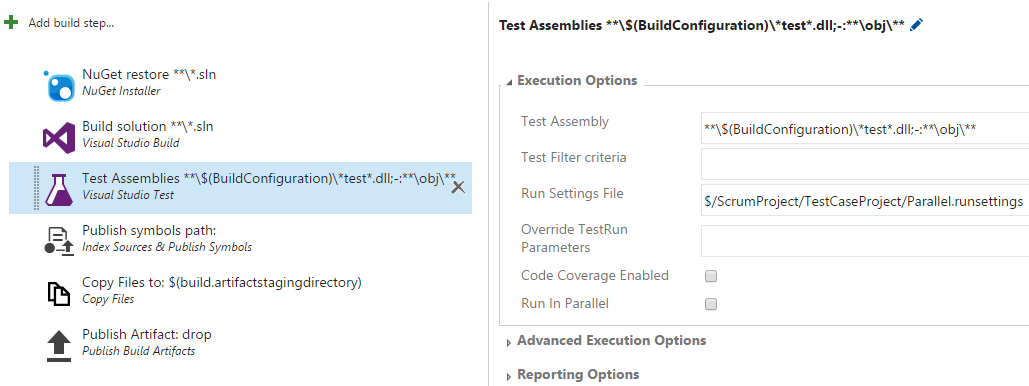
在日志中,运行设置文件来自C:\Agent\_work\10\s\Parallel.runsettings,因此TFS不会自动移动设置文件:
2017-02-03T06:08:37.8352139Z Working folder: C:\Agent\_work\10\s
2017-02-03T06:08:37.8352139Z Executing C:\Program Files (x86)\Microsoft Visual Studio 14.0\Common7\IDE\CommonExtensions\Microsoft\TestWindow\vstest.console.exe "C:\Agent\_work\10\s\ClassLibrary1\bin\Release\Microsoft.TeamFoundation.TestManagement.Client.dll" "C:\Agent\_work\10\s\TestCaseProject\bin\Release\Microsoft.TeamFoundation.Test.WebApi.dll" "C:\Agent\_work\10\s\TestCaseProject\bin\Release\Microsoft.TeamFoundation.TestManagement.Client.dll" "C:\Agent\_work\10\s\TestCaseProject\bin\Release\Microsoft.TeamFoundation.TestManagement.WebApi.dll" "C:\Agent\_work\10\s\UnitTestProject1\bin\Release\Microsoft.TeamFoundation.TestManagement.Client.dll" "C:\Agent\_work\10\s\UnitTestProject1\bin\Release\UnitTestProject1.dll" /Settings:"C:\Agent\_work\10\s\Parallel.runsettings" /logger:trx请检查是否在构建定义的Repository选项卡中映射了运行设置文件。并尝试清除构建代理上的缓存文件:C:\Users\username\AppData\Local\Microsoft\Team Foundation\7.0\Cache。
如果问题仍然存在,请尝试部署一个新的构建代理来查看它是如何工作的。
https://stackoverflow.com/questions/42001339
复制相似问题
腾讯云开发者

Copyright © 2013 - 2026 Tencent Cloud. All Rights Reserved. 腾讯云 版权所有
深圳市腾讯计算机系统有限公司 ICP备案/许可证号:粤B2-20090059  粤公网安备44030502008569号
腾讯云计算(北京)有限责任公司 京ICP证150476号 | 京ICP备11018762号