
在图像上叠加元素
在图像上叠加元素
提问于 2017-02-01 10:44:31
我有一个网格,包含一个图像(有2行,顶部和机器人,我将在以后使用)和另一个网格包含4个单选按钮。
当用户单击图像时,就会在单击的点上显示一个十字。
有一部分代码:
<Grid Grid.Column="2">
    <Grid.RowDefinitions>
        <RowDefinition Height="*"/>
        <RowDefinition Height="auto"/>
    </Grid.RowDefinitions>

    <Image Grid.Row="0"
           x:Name="ImageViewer"
           Source="{Binding Picture}"
           HorizontalAlignment="Stretch"
           VerticalAlignment="Stretch"
           MouseDown="Image_MouseDown"
           MouseMove="ImageViewer_MouseMove"
           MouseUp="Image_MouseUp"/>

    <local:Cross Grid.Row="0"
                 CenterPoint="{Binding Point1}"
                 Foreground="Red"/>

    <!-- Grid.Row="1" - Grid with RadioButtons -->
</Grid>
举办活动:
protected bool StartMove = false;
private void Image_MouseDown(object sender, MouseButtonEventArgs e)
{
    if (e.ChangedButton == MouseButton.Left)
    {
        StartMove = true;
        Point p = e.GetPosition(ImageViewer);
        DrawPoint(p);
    }
}
private void Image_MouseUp(object sender, MouseButtonEventArgs e)
{
    if (e.ChangedButton == MouseButton.Left)
    {
        StartMove = false;
    }
}
private void ImageViewer_MouseMove(object sender, MouseEventArgs e)
{
    if (e.LeftButton == MouseButtonState.Pressed && StartMove)
    {
        Point p = e.GetPosition(ImageViewer);
        DrawPoint(p);
    }
}
当图像尺寸完美(无边框)时,十字线将被正确绘制。点击我的猫眼就可以做到这一点:
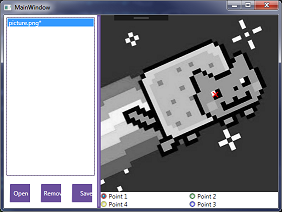
但如果我调整窗户的尺寸,十字架就会移动。考虑到空格,我猜坐标是计算出来的,但我不知道如何防止这种情况发生。
这就是同样的观点:
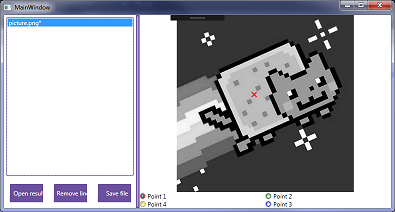
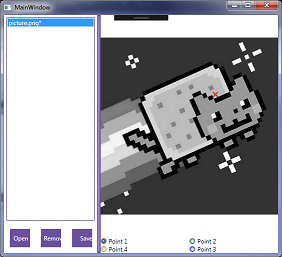
回答 2
Stack Overflow用户
回答已采纳
发布于 2017-02-01 11:09:01
交叉由local:Cross元素绘制。此元素布局与Image匹配,您希望它能够相对于Image绘制交叉图。
而且确实如此。
问题在于,Image (无视它的大小)也在扩展它的源图像。您可以尝试将Image.Stretch设置为填充或通过使用另一个布局来解决问题(例如,使Cross和Image的位置和大小相等)。
Stack Overflow用户
发布于 2017-02-01 11:08:53
事实上,是你的形象在移动而不是十字架。您的问题是,您正在捕获相对于Image元素的位置,所以当您调整主窗口的大小时,您也在调整Image元素的大小。
可能的解决办法:
- 固定尺寸像元
- 或者,在调整尺寸时重新计算十字架的位置。
- 或者,将图像与图像中的左上角对齐。
页面原文内容由Stack Overflow提供。腾讯云小微IT领域专用引擎提供翻译支持
原文链接:
https://stackoverflow.com/questions/41977729
复制相关文章
相似问题
腾讯云开发者

Copyright © 2013 - 2026 Tencent Cloud. All Rights Reserved. 腾讯云 版权所有
深圳市腾讯计算机系统有限公司 ICP备案/许可证号:粤B2-20090059  粤公网安备44030502008569号
腾讯云计算(北京)有限责任公司 京ICP证150476号 | 京ICP备11018762号