
StaggeredGridLayoutManager重新排序项目
我的项目有不同的布局,有时我通过拖动布局中的项目在RecyclerView上创建一个或多个空白。当我回过头来查看RecyclerView的顶部时,有些项目被重新排序,空白被填补。在这里捕捉到了行为:
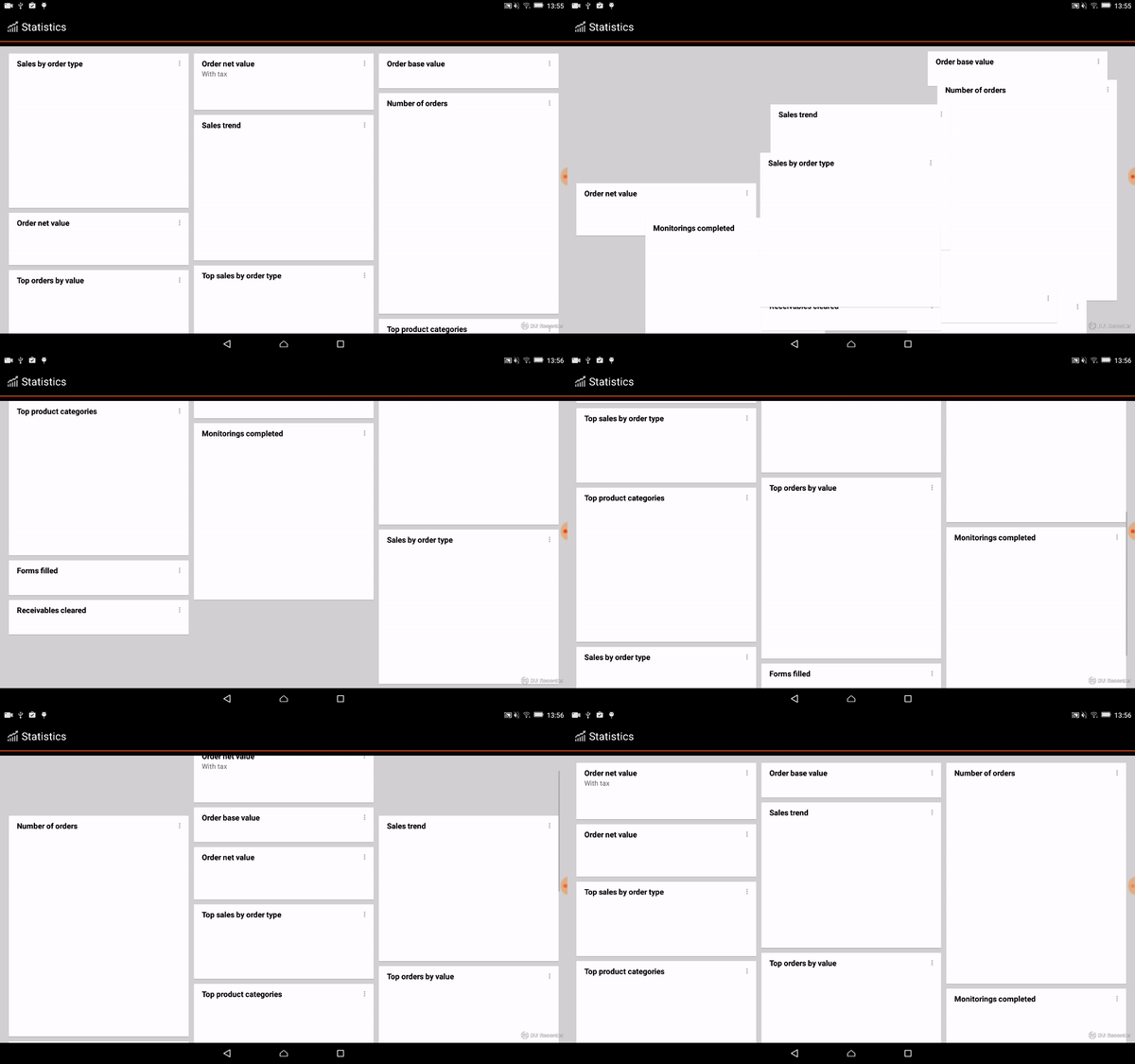
填补空白是可以的。当项目在拖动过程中更改位置时,也是可以的。问题是当滚动到顶端的时候。重新排序发生时,滚动结束-我不触摸屏幕。
我就是这样创建RECYCLERVIEW和布局管理器的
    recyclerView = (RecyclerView)layout.findViewById(R.id.recycler_view);

    stagaggeredGridLayoutManager =
        new StaggeredGridLayoutManager(
            getResources().getConfiguration().orientation == Configuration.ORIENTATION_LANDSCAPE ? 3 : 2, StaggeredGridLayoutManager.VERTICAL);

    recyclerView.setLayoutManager(stagaggeredGridLayoutManager);

    stagaggeredList = getListItemData();

    StatisticsGridViewAdapter rcAdapter = new StatisticsGridViewAdapter(this.getActivity(), stagaggeredList, recyclerView);

    ItemTouchHelper.Callback callback = new StatisticsTouchHelperCallback(rcAdapter);
    touchHelper = new ItemTouchHelper(callback);
    touchHelper.attachToRecyclerView(recyclerView);

    recyclerView.setAdapter(rcAdapter);
ItemTouchHelper类
public class StatisticsTouchHelperCallback extends ItemTouchHelper.Callback {

    private final ItemTouchHelperAdapter touchHelperAdapter;


    @Override
    public boolean isLongPressDragEnabled() {
        return true;
    }

    @Override
    public boolean isItemViewSwipeEnabled() {
        return false;
    }

    @Override
    public int getMovementFlags(RecyclerView recyclerView, RecyclerView.ViewHolder viewHolder) {
        int dragFlags = ItemTouchHelper.UP   | ItemTouchHelper.DOWN |
            ItemTouchHelper.LEFT | ItemTouchHelper.RIGHT;

        int swipeFlags = ItemTouchHelper.START | ItemTouchHelper.END;
        return makeMovementFlags(dragFlags, swipeFlags);
    }

    @Override
    public boolean onMove(RecyclerView recyclerView, RecyclerView.ViewHolder viewHolder,
        RecyclerView.ViewHolder target) {
        touchHelperAdapter.onItemMove(viewHolder.getAdapterPosition(), target.getAdapterPosition());
        return false;
    }

    @Override
    public void onSwiped(RecyclerView.ViewHolder viewHolder, int direction) {
        touchHelperAdapter.onItemDismiss(viewHolder.getAdapterPosition());
    }

    public StatisticsTouchHelperCallback(ItemTouchHelperAdapter adapter) {
        touchHelperAdapter = adapter;
    }
}
RecyclerView适配器
public class StatisticsGridViewAdapter extends RecyclerView.Adapter<StatisticsGridItemViewHolder> implements ItemTouchHelperAdapter {

    private List<Statistic> itemList;
    private Context context;

    @Override
    public StatisticsGridItemViewHolder onCreateViewHolder(ViewGroup parent, int viewType) {

        View layoutView = LayoutInflater.from(parent.getContext()).inflate(itemList.get(viewType).getStatisticType().getStringResourcesId(), null);
        StatisticsGridItemViewHolder rcv = new StatisticsGridItemViewHolder(layoutView, viewType);
        return rcv;
    }

    @Override
    public void onBindViewHolder(final StatisticsGridItemViewHolder holder, int position) {
        holder.getMenu().setOnClickListener(new OnClickListener() {
            @Override
            public void onClick(View v) {
                PopupMenu popup = new PopupMenu(v.getContext(), holder.getMenu());
                popup.getMenuInflater().inflate(R.menu.statistics__widget__popup_menu, popup.getMenu());
                Menu menu = popup.getMenu();
                MenuItem item = menu.add(R.string.statistics__widget__menu_item__pin_to_dashboard);
                //item.setOnMenuItemClickListener()
                popup.show();
            }
        });
    }

    @Override
    public int getItemCount() {
        return this.itemList.size();
    }

    @Override
    public boolean onItemMove(int fromPosition, int toPosition) {
        if (fromPosition < toPosition) {
            for (int i = fromPosition; i < toPosition; i++) {
                Collections.swap(itemList, i, i + 1);
            }
        } else {
            for (int i = fromPosition; i > toPosition; i--) {
                Collections.swap(itemList, i, i - 1);
            }
        }
        notifyItemMoved(fromPosition, toPosition);
        return true;
    }

    @Override
    public void onItemDismiss(int position) {
        itemList.remove(position);
        notifyItemRemoved(position);
    }

    @Override
    public int getItemViewType(int position) {return itemList.get(position).getStatisticType().getPosition();
    }

    public StatisticsGridViewAdapter(Context context, List<Statistic> itemList) {
        this.itemList = itemList;
        this.context = context;
    }
}
interface ItemTouchHelperAdapter {

    boolean onItemMove(int fromPosition, int toPosition);

    void onItemDismiss(int position);
}
现在我使用了12个结构相同的不同布局。只有高度不同才能模拟最终的小部件。
项目布局示例
<?xml version="1.0" encoding="utf-8"?>
<LinearLayout
    xmlns:android="http://schemas.android.com/apk/res/android"
    android:orientation="vertical"
    android:layout_width="match_parent"
    android:layout_height="wrap_content" >
    <LinearLayout
        android:id="@+id/statistics__widget__main_layout"
        android:layout_width="match_parent"
        android:layout_height="wrap_content"
        android:background="@drawable/order_tile_final"
        android:layout_marginLeft="5dp"
        android:layout_marginRight="5dp"
        android:layout_marginTop="2dp"
        android:layout_marginBottom="7dp"
        android:orientation="vertical">
        <LinearLayout
            android:layout_width="match_parent"
            android:layout_height="wrap_content"
            android:layout_marginLeft="17dp"
            android:orientation="horizontal">
            <TextView
                android:id="@+id/widget_title"
                android:layout_width="0dp"
                android:layout_height="wrap_content"
                android:text="@string/statistics__widget__forms_filled_title"
                style="@style/tablet_common_font__main_3"
                android:paddingTop="10dp"
                android:layout_weight="1"/>
            <ImageView
                android:id="@+id/widget_menu"
                android:layout_width="wrap_content"
                android:layout_height="23dp"
                android:layout_marginTop="7dp"
                android:paddingTop="5dp"
                android:layout_marginRight="8dp"
                android:src="@drawable/a_menu_dark"/>
        </LinearLayout>
        <TextView
            android:id="@+id/widget_value"
            android:layout_width="wrap_content"
            android:layout_height="wrap_content"
            style="@style/tablet_common_font__headline_2"
            android:layout_marginLeft="17dp"
            android:layout_marginBottom="6dp"/>
    </LinearLayout>
</LinearLayout>回答 4
Stack Overflow用户
发布于 2017-02-06 02:48:09
我认为这是StaggeredGridLayoutManager的常见行为
当滚动状态更改为SCROLL_STATE_IDLE时,StaggeredGrid将检查是否存在空白。如果它找到,它将重新布局和移动项目到正确的位置与动画。
您可以通过将策略更改为无来阻止填补空白的行为:
stagaggeredGridLayoutManager.setGapStrategy(
StaggeredGridLayoutManager.GAP_HANDLING_NONE);Stack Overflow用户
发布于 2017-02-08 11:19:24
我以前做过“回收视图”的工作,如果我理解了你的问题,我想下面的事情会解决这个问题。
@Override
public boolean onItemMove(int fromPosition, int toPosition) {
    if (fromPosition < toPosition) {
        for (int i = fromPosition; i < toPosition; i++) {
            Collections.swap(itemList, i, i + 1);
            notifyItemMoved(i, i+1);
        }
    } else {
        for (int i = fromPosition; i > toPosition; i--) {
            Collections.swap(itemList, i, i - 1);
            notifyItemMoved(i, i-1);
        }
    }

    return true;
}
如果有任何问题或我理解你的问题是错误的,请告诉我。
最佳赛区
Stack Overflow用户
发布于 2017-02-08 14:05:49
您必须扩展“回收器视图”以启用重新排序功能。
请遵循以下链接:https://gist.github.com/mohlendo/68b7e2f89d0b1b354abe
对于完整的示例,请使用以下链接:https://github.com/mohlendo/ReorderRecyclerView
https://stackoverflow.com/questions/41952215
复制相似问题
腾讯云开发者

Copyright © 2013 - 2026 Tencent Cloud. All Rights Reserved. 腾讯云 版权所有
深圳市腾讯计算机系统有限公司 ICP备案/许可证号:粤B2-20090059  粤公网安备44030502008569号
腾讯云计算(北京)有限责任公司 京ICP证150476号 | 京ICP备11018762号