
如何获得jfxmobile插件,例如,MagnetometerService
我想使用一些像磁力仪这样的“魔咒下”服务。
我不明白为什么MagnetometerService不能导入到我的Java类文件中。错误信息是
“导入com.gluonhq.charm.down.plugins.accelerometer无法解析”。
以前,在Eclipse Neon2软件站点中,我已经安装了e(Fx) -Available。您可以在安装细节中看到:
"e(fx)clipse - IDE - Update site" with http://download.eclipse.org/efxclipse/updates-released/2.4.0/site注意:我安装了GluonTools 2.4.0,包括e(Fx)MobileIDE2.3.0。以下是我的项目的build.gradle:
buildscript {
    repositories {
        jcenter()
    }
    dependencies {
        classpath 'org.javafxports:jfxmobile-plugin:2.4.0'
    }
}

plugins {
    id "com.github.hierynomus.license" version "0.13.1"
}

apply plugin: 'org.javafxports.jfxmobile'

repositories {
    jcenter()
    maven {
        url 'http://nexus.gluonhq.com/nexus/content/repositories/releases'
    }
}

mainClassName = 'com.gluonapplication.GluonApplication'

jfxmobile {
     downConfig {
        version '4.0.0'
        plugins 'accelerometer', 'compass', 'device', 'orientation', 'storage', 'vibration', 'display', 'lifecycle', 'statusbar', 'position'
    }

    android {
        applicationPackage = 'com.gluonapplication'
        manifest = 'src/android/AndroidManifest.xml'
        androidSdk = 'C:/Users/pascal/AppData/Local/Android/sdk'
        resDirectory = 'src/android/res'
        compileSdkVersion = '23'
        buildToolsVersion = '25.0.1'
    }
    ios {
        infoPList = file('src/ios/Default-Info.plist')
    }
}回答 1
Stack Overflow用户
发布于 2017-01-31 09:30:04
以下是在Eclipse上安装胶子插件2.4.0创建应用程序的步骤。
1.使用IDE插件
单击新建,选择胶子->胶子移动-单视图项目,填充所需的数据(项目名称,包,.),单击完成。
2.查看build.gradle文件
打开构建文件,并更新版本:当前 jfxmobile版本为1.3.2。胶子魅力为4.3.0,而胶子下插件使用3.2.0。
3.添加Down
将磁强计插件添加到downConfig。
这应该是您的build.gradle文件(除了主类名之外):
buildscript {
    repositories {
        jcenter()
    }
    dependencies {
        classpath 'org.javafxports:jfxmobile-plugin:1.3.2'
    }
}

apply plugin: 'org.javafxports.jfxmobile'

repositories {
    jcenter()
    maven {
        url 'http://nexus.gluonhq.com/nexus/content/repositories/releases'
    }
}

mainClassName = 'com.gluonhq.magnetometer.TestMagnetometer'

dependencies {
    compile 'com.gluonhq:charm:4.3.0'
}

jfxmobile {
    downConfig {
        version = '3.2.0'
        plugins 'display', 'lifecycle', 'magnetometer', 'statusbar', 'storage'
    }
    android {
        manifest = 'src/android/AndroidManifest.xml'
    }
    ios {
        infoPList = file('src/ios/Default-Info.plist')
        forceLinkClasses = [
                'com.gluonhq.**.*',
                'javax.annotations.**.*',
                'javax.inject.**.*',
                'javax.json.**.*',
                'org.glassfish.json.**.*'
        ]
    }
}请注意,您不需要添加任何进一步的插件依赖,downConfig为您做了。
4.将服务添加到基本视图中
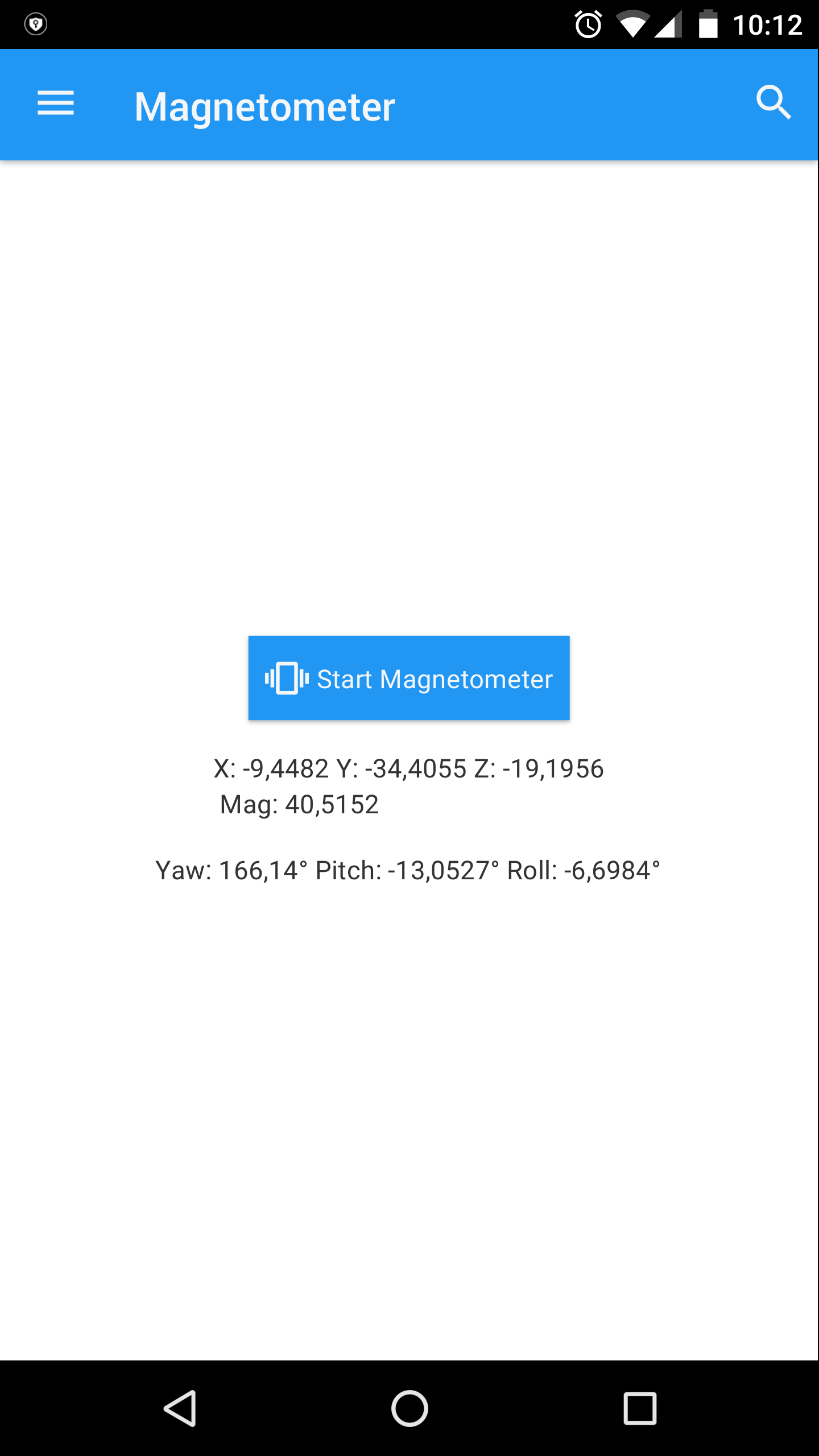
这是磁强计服务的一个简单用例:
package com.gluonhq.magnetometer;

import com.gluonhq.charm.down.Services;
import com.gluonhq.charm.down.plugins.MagnetometerService;
import com.gluonhq.charm.glisten.control.AppBar;
import com.gluonhq.charm.glisten.control.Icon;
import com.gluonhq.charm.glisten.mvc.View;
import com.gluonhq.charm.glisten.visual.MaterialDesignIcon;
import javafx.geometry.Pos;
import javafx.scene.control.Button;
import javafx.scene.control.Label;
import javafx.scene.layout.VBox;

public class BasicView extends View {

    public BasicView(String name) {
        super(name);

        Label label1 = new Label();
        Label label2 = new Label();

        Button button = new Button("Start Magnetometer");
        button.setGraphic(new Icon(MaterialDesignIcon.VIBRATION));

        button.setOnAction(e ->
            Services.get(MagnetometerService.class)
                .ifPresent(s -> s.readingProperty()
                        .addListener((obs, ov, nv) -> {
                            label1.setText(String.format("X: %.4f Y: %.4f Z: %.4f\n Mag: %.4f", nv.getX(), nv.getY(), nv.getZ(), nv.getMagnitude()));
                            label2.setText(String.format("Yaw: %.2f\u00b0 Pitch: %.4f\u00b0 Roll: %.4f\u00b0", Math.toDegrees(nv.getYaw()),
                                    Math.toDegrees(nv.getPitch()), Math.toDegrees(nv.getRoll())));
                        })));

        VBox controls = new VBox(15.0, button, label1, label2);
        controls.setAlignment(Pos.CENTER);

        setCenter(controls);
    }

    @Override
    protected void updateAppBar(AppBar appBar) {
        appBar.setNavIcon(MaterialDesignIcon.MENU.button(e -> System.out.println("Menu")));
        appBar.setTitleText("Magnetometer");
    }

}5.桌面上的测试
使用分级任务窗口,选择application->run
请注意,该服务在桌面上不可用,也无法工作,但您将检查应用程序运行时是否有错误。
6.在Android上部署
使用Gradle任务窗口,选择other->androidInstall。
在执行任务之前先把手机插上。如果一切顺利,您应该能够在您的设备上测试该应用程序:
https://stackoverflow.com/questions/41951730
复制相似问题
腾讯云开发者

Copyright © 2013 - 2026 Tencent Cloud. All Rights Reserved. 腾讯云 版权所有
深圳市腾讯计算机系统有限公司 ICP备案/许可证号:粤B2-20090059  粤公网安备44030502008569号
腾讯云计算(北京)有限责任公司 京ICP证150476号 | 京ICP备11018762号