
为什么IntelliJ不能识别我的Spek测试?
为什么IntelliJ不能识别我的Spek测试?
提问于 2017-01-31 07:13:41
我有一个基于Gradle的Kotlin项目,带有一些斯派克测试,这些测试基于JUnit,应该与Idea兼容。
但是我没有在上下文菜单中看到“运行”菜单项。
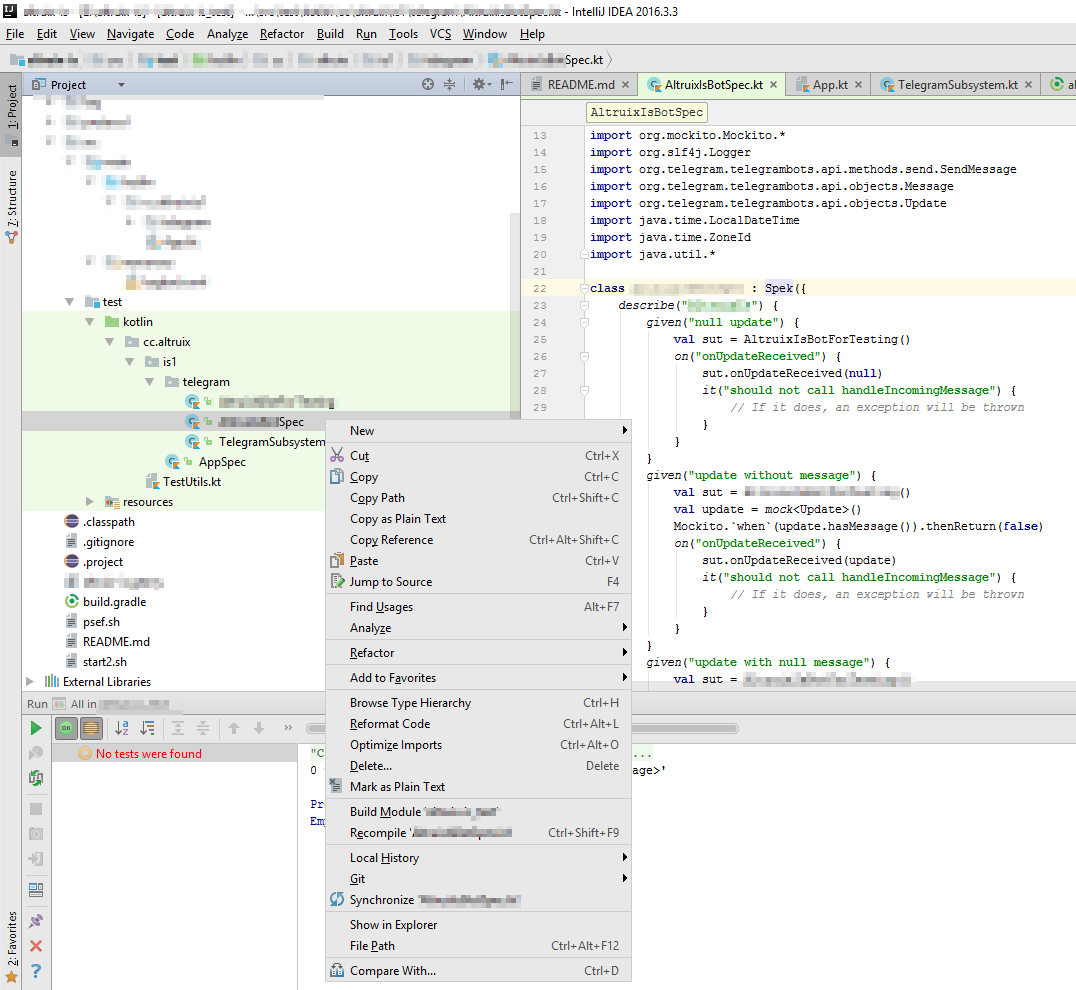
为什么?为了能够像其他JUnit测试一样在Idea中运行Spek测试,我需要做什么?
这是我的build.gradle
buildscript {
  ext.kotlin_version = '1.0.4'
  repositories {
    mavenCentral()
    maven {
        url "https://dl.bintray.com/jetbrains/spek"
    }
  }
  dependencies {
    classpath "org.jetbrains.kotlin:kotlin-gradle-plugin:$kotlin_version"
    classpath 'org.junit.platform:junit-platform-gradle-plugin:1.0.0-M3'
  }

}

apply plugin: "kotlin"
apply plugin: "application"
apply plugin: 'org.junit.platform.gradle.plugin'

junitPlatform {
    filters {
        engines {
            include 'spek'
        }
    }
}

mainClassName = "com.mycompany.myproduct.AppKt"

sourceSets {
  deploy
}

repositories {
  mavenCentral()
  maven {
    url "https://dl.bintray.com/jetbrains/spek"
  }

}

dependencies {
  compile "org.jetbrains.kotlin:kotlin-stdlib:$kotlin_version"
  compile 'org.telegram:telegrambots:2.4.2'
  compile group: 'org.apache.commons', name: 'commons-lang3', version: '3.0'
  compile group: 'ch.qos.logback', name: 'logback-core', version: '1.1.3'
  compile group: 'ch.qos.logback', name: 'logback-classic', version: '1.1.3'
  compile group: 'org.slf4j', name: 'slf4j-api', version: '1.6.1'
  testCompile  'junit:junit:4.11'
  testCompile "org.jetbrains.kotlin:kotlin-test-junit:$kotlin_version"
  testCompile group: 'org.mockito', name: 'mockito-all', version: '2.0.2-beta'
  testCompile 'org.jetbrains.spek:spek-api:1.1.19'
  testRuntime 'org.jetbrains.spek:spek-junit-platform-engine:1.1.19'
}

test.testClassesDir = project.tasks.compileTestKotlin.destinationDir

task wrapper(type: Wrapper) {
  gradleVersion="3.1"
}

run {
    jvmArgs = ["-Xmx100m", "-XX:+HeapDumpOnOutOfMemoryError", "-XX:HeapDumpPath=/[...]/log/memdump.log"]
}

jar {
    manifest {
        attributes 'Main-Class': mainClassName,
                   'Class-Path': configurations.runtime.files.collect {"$it.name"}.join(' ')
    }
}回答 2
Stack Overflow用户
回答已采纳
发布于 2017-01-31 10:04:18
您安装了用于IntelliJ的Spek插件吗?
只需在spek插件设置中搜索IntelliJ。
Stack Overflow用户
发布于 2017-07-08 15:25:38
由于您使用的是Junit 4.11,所以可以从build.gradle中删除它:
junitPlatform {
    filters {
        engines {
            include 'spek'
        }
    }
}
然后在测试类声明中添加以下内容:
@RunWith(JUnitPlatform::class)来源:http://spekframework.org/docs/latest/#setting-up-legacy
页面原文内容由Stack Overflow提供。腾讯云小微IT领域专用引擎提供翻译支持
原文链接:
https://stackoverflow.com/questions/41951683
复制相关文章
相似问题
腾讯云开发者

Copyright © 2013 - 2026 Tencent Cloud. All Rights Reserved. 腾讯云 版权所有
深圳市腾讯计算机系统有限公司 ICP备案/许可证号:粤B2-20090059  粤公网安备44030502008569号
腾讯云计算(北京)有限责任公司 京ICP证150476号 | 京ICP备11018762号