
角2命名出口:未明(承诺):错误:不能匹配任何路线。URL段:
角2命名出口:未明(承诺):错误:不能匹配任何路线。URL段:
提问于 2017-01-29 08:39:52
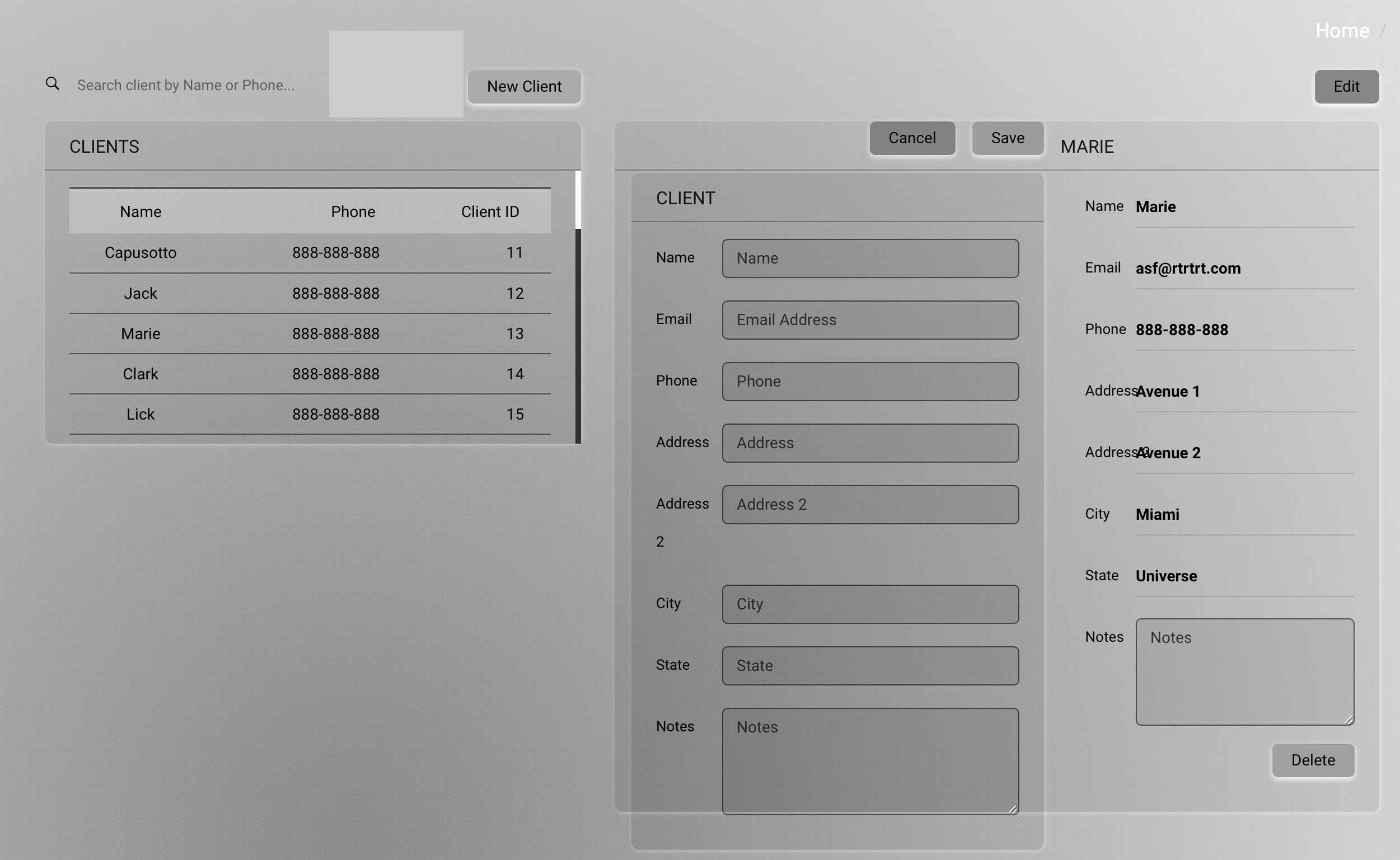
在一个客户管理应用程序中,我试图拥有以下内容:
- 客户端列表(页面左侧)
- 客户端详细信息(thePage的右侧)仪表板/client/id/
- 添加一个客户端(页面的右侧)。仪表板/客户/新的。
- 编辑一个客户端(页面的右侧)。仪表板/client/id/编辑
我想改变视图只在右边取决于用户点击什么。
路由器配置
//imports removed to make this shorter

const clientRoutes: Routes = [
  {
    path: '',
    component: ClientsComponent,
    children: [
      {
        path: '',
        component: ClientListComponent,
        children: [
          { path:'new',
            component: ClientNewComponent
          },
          { path: ':id',
            component: ClientDetailComponent,
            resolve: { client: ClientDetailResolver},
            children: [
              { path:'edit',
                outlet: 'section1',
                component: ClientEditComponent,
              },
            ]
          }
        ]
      }
    ]
  }
];

@NgModule({
  imports: [RouterModule.forChild(clientRoutes)],
  exports: [RouterModule ],
  providers: [ClientDetailResolver]
})
export class ClientRouting { }
客户端列表组件
<div class="col-md-5">
  <div class="row button-wrapper">
    <div class="search-client">
      <i class="search-strong" ></i>
      <input id="searchInput" [(ngModel)]="term" placeholder="Search client by Name or Phone..." type="text">
    </div>
    <button type="button" class="btn-client-details" (click)="onSelectNew()">New Client</button>
  </div>
  <div>
      <div *ngIf="(clients | async)?.length==0">Add a Client</div>
      <div *ngIf="(clients | async)?.length>0" class="vertical-scroll">
        <table class="table">
          <thead>
          <tr class="muted">
            <th>Name</th>
            <th>Phone</th>
            <th>Client ID</th>
          </tr>
          </thead>
          <tbody>
          <tr *ngFor="let item of clients | async | filter:term"
            (click)="onSelect(item)">
            <td>{{item.name}}</td>
            <td>{{item.phone}}</td>
            <td>{{item.id}}</td>
          </tr>
          </tbody>
        </table>
      </div>
  </div>
</div>
<router-outlet></router-outlet>
客户端详细组件
 onSelectEdit(): void {
 this.router.navigate([{ outlets: { 'section1' : ['edit'] } }], { relativeTo: this.route });
客户端详细组件
<div class="col-md-7">
 <div>
  <button type="button" class=" btn-client-details"
    (click)="onSelectEdit()">Edit</button>
</div>

<router-outlet name="section1"></router-outlet>

<div *ngIf="client">

//Show all client details for a selected client here {name}{address}etc
</div>
</div>
回答 2
Stack Overflow用户
发布于 2017-01-29 13:03:19
这是因为路径edit不存在。
您的模块中的路径是通过连接树中的所有路径(父+子+子.)来计算的,这意味着您将得到相对路径 :id/edit或绝对路径 /dashboard/client/:id/edit。
尝试使用以下代码:
// Note. An `id` property must be defined/accessible in your code.

// Relative path syntax
// NB. `ActivatedRoute` must be injected into the `route` property.
this.router.navigate([{ outlets: { 'section1' : [id, 'edit'] } }, { relativeTo: this.route }]);

// Absolute path syntax
this.router.navigate([{ outlets: { 'section1' : ['dashboard', 'client', id, 'edit'] } }]);Stack Overflow用户
发布于 2017-05-30 21:18:49
这是一个angular2 bug:空主段内部的次级子出口不匹配
您可以尝试的是更改
path: '',
component: ClientListComponent,
至
path: 'whatever',
component: ClientListComponent,页面原文内容由Stack Overflow提供。腾讯云小微IT领域专用引擎提供翻译支持
原文链接:
https://stackoverflow.com/questions/41919064
复制相关文章
相似问题
腾讯云开发者

Copyright © 2013 - 2026 Tencent Cloud. All Rights Reserved. 腾讯云 版权所有
深圳市腾讯计算机系统有限公司 ICP备案/许可证号:粤B2-20090059  粤公网安备44030502008569号
腾讯云计算(北京)有限责任公司 京ICP证150476号 | 京ICP备11018762号