
用于分支管理的Bash - GIT小片段
用于分支管理的Bash - GIT小片段
提问于 2017-01-28 10:57:21
愚蠢的周六早上的代码片段。
我在网上找到了一段代码,它允许我在PS1中获得当前的分支,太棒了!但是..。
我想要不同的颜色。
我说,“你对巴什一无所知,但应该很容易!只要.”
经过6个小时的测试,我们开始了。
有人能解释一下我的问题在哪里吗?
我知道在GitHub上有很多项目为我做这项工作,但我只想了解一下。
非常感谢
parse_git_branch() {
    git branch 2> /dev/null | sed -e '/^[^*]/d' -e 's/* \(.*\)/ (\1)/'

}

set_ps1_git_branch_color(){
    BRANCH=$(parse_git_branch)
    if [ $BRANCH == "(master)" ]; then
        echo -e "\W\[\033[35m\] $BRANCH \[\033[00m\]"
    fi
    if [ $BRANCH == "(test)" ]; then
        echo -e "\W\[\033[32m\] $BRANCH \[\033[00m\]"
    fi
}
export PS1="\u@\h $(set_ps1_git_branch_color) $ "只要在每次git操作之后执行source ~/.bash_profile (比如结帐),它就能工作。
但是,原始代码段parse_git_branch()可以在不使用源命令的情况下更改分支名称。
so...what我在这里失踪了?
回答 2
Stack Overflow用户
回答已采纳
发布于 2017-01-28 11:25:01
您几乎没有错误:
 export PS1="\u@\h $(set_ps1_git_branch_color) $ "

 # should be (added \ before $(set...))
 # the \ will execute the command during runtime and not right now.
 # without the \ it will executed and determined of first run and not every time
 export PS1="\u@\h \$(set_ps1_git_branch_color) $ "
颜色格式:
# Output colors
red='\033[0;31m';
green='\033[0;32m';
yellow='\033[0;33m';
default='\033[0;m';
使用颜色更新脚本:
set_ps1_git_branch_color(){
    ...
    echo -e "${green} $BRANCH ${default}"
}
修正要复制和粘贴的脚本
# Output colors
red='\033[0;31m';
green='\033[0;32m';
yellow='\033[0;33m';
default='\033[0;m';

parse_git_branch() {
    git branch 2> /dev/null | sed -e '/^[^*]/d' -e 's/* \(.*\)/ (\1)/'

}

set_ps1_git_branch_color(){
    BRANCH=$(parse_git_branch)
    if [ $BRANCH == "(master)" ]; then
        echo -e "${green} $BRANCH ${default}"
    fi
    if [ $BRANCH == "(test)" ]; then
        echo -e "${yellow} $BRANCH ${default}"
    fi
}

export PS1="\u@\h \$(set_ps1_git_branch_color) $ "
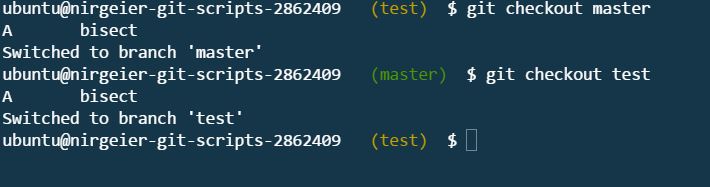
Stack Overflow用户
发布于 2017-01-28 14:51:40
以防有人感兴趣。
此脚本在PS1中显示分支,如果分支是“主”,名称将是红色的,如果分支是“测试”,则名称将是黄色和闪烁的。对其他枝条来说,颜色是白色的。
# Output colors
red='\033[31;5m';
white='\033[0;97m';
yellow='\033[33;5m';
default='\033[0;m';
blue='\033[0;34m';
magenta='\033[0;35m';
cyan='\033[0;36m';

parse_git_branch() {
    git branch 2> /dev/null | sed -e '/^[^*]/d' -e 's/* \(.*\)/ (\1)/'
}

set_ps1_git_branch_color(){
    BRANCH=$(parse_git_branch)
    if [ -z $BRANCH ]; then
        return 0
    fi
    if [ $BRANCH = "(master)" ]; then
        echo -e "${red}${BRANCH}${default}"
        return 0
    fi
    if [ $BRANCH = "(test)" ]; then
        echo -e "${yellow}${BRANCH}${default}"
        return 0
    fi
    echo -e "${white}${BRANCH}${default}"
}

export PS1="${cyan}\h ${magenta}\u ${blue}\w\$(set_ps1_git_branch_color)${default} \n\\$ \[$(tput sgr0)\]"
非常感谢CodeWizard!:)
页面原文内容由Stack Overflow提供。腾讯云小微IT领域专用引擎提供翻译支持
原文链接:
https://stackoverflow.com/questions/41908950
复制相关文章
相似问题
腾讯云开发者

Copyright © 2013 - 2026 Tencent Cloud. All Rights Reserved. 腾讯云 版权所有
深圳市腾讯计算机系统有限公司 ICP备案/许可证号:粤B2-20090059  粤公网安备44030502008569号
腾讯云计算(北京)有限责任公司 京ICP证150476号 | 京ICP备11018762号