
FtpWebRequest:远程服务器返回一个错误:(530)未登录
我一直在接收错误“远程服务器返回了一个错误:(530)没有登录。当调用FtpWebRequest.GetResponse()时。我怀疑这是因为我错误地配置了FTP站点以进行基本身份验证,但我不确定。我读过其他文章,但解决方案似乎围绕着NetworkCredential对象中指定的不正确凭据。我希望能够通过SSL向ftp站点传递凭据。我已经把问题隔离到一个测试项目上了。在这里,主要是从msdn https://msdn.microsoft.com/en-us/library/system.net.ftpwebrequest.enablessl(v=vs.110).aspx复制的。
public static void Main(string[] args)
{
    // Only use this to get around issues with self-signed certificates...
    ServicePointManager.ServerCertificateValidationCallback =
        delegate (object s, X509Certificate certificate, X509Chain chain,
        SslPolicyErrors sslPolicyErrors) { return true; };

    ListFilesOnServerSsl(new Uri("ftp://127.0.0.1:21"));

    Console.WriteLine("Press any key...");
    Console.ReadKey();
}

public static bool ListFilesOnServerSsl(Uri serverUri)
{
    // The serverUri should start with the ftp:// scheme.
    if (serverUri.Scheme != Uri.UriSchemeFtp)
    {
        return false;
    }
    // Get the object used to communicate with the server.
    FtpWebRequest request = (FtpWebRequest)WebRequest.Create(serverUri);
    request.Method = WebRequestMethods.Ftp.ListDirectory;
    request.UseBinary = false;
    request.EnableSsl = true;

    // Need to use credentials to log in...
    request.Credentials = new NetworkCredential("TestFtpUser", "IDontKnow");

    // Get the ServicePoint object used for this request, and limit it to one connection.
    // In a real-world application you might use the default number of connections (2),
    // or select a value that works best for your application.

    ServicePoint sp = request.ServicePoint;
    Console.WriteLine("ServicePoint connections = {0}.", sp.ConnectionLimit);
    sp.ConnectionLimit = 1;

    FtpWebResponse response = (FtpWebResponse)request.GetResponse();
    Console.WriteLine("The content length is {0}", response.ContentLength);
    // The following streams are used to read the data returned from the server.
    Stream responseStream = null;
    StreamReader readStream = null;
    try
    {
        responseStream = response.GetResponseStream();
        readStream = new StreamReader(responseStream, System.Text.Encoding.UTF8);

        if (readStream != null)
        {
            // Display the data received from the server.
            Console.WriteLine(readStream.ReadToEnd());
        }
        Console.WriteLine("List status: {0}", response.StatusDescription);
    }
    finally
    {
        if (readStream != null)
        {
            readStream.Close();
        }
        if (response != null)
        {
            response.Close();
        }
    }


    Console.WriteLine("Banner message: {0}",
        response.BannerMessage);

    Console.WriteLine("Welcome message: {0}",
        response.WelcomeMessage);

    Console.WriteLine("Exit message: {0}",
        response.ExitMessage);
    return true;
}
下面是在IIS中的本地主机上创建ftp站点的屏幕截图:
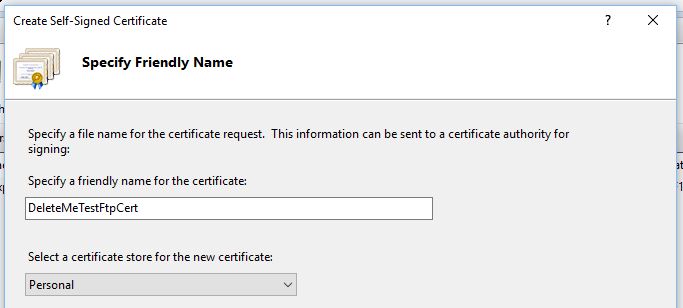
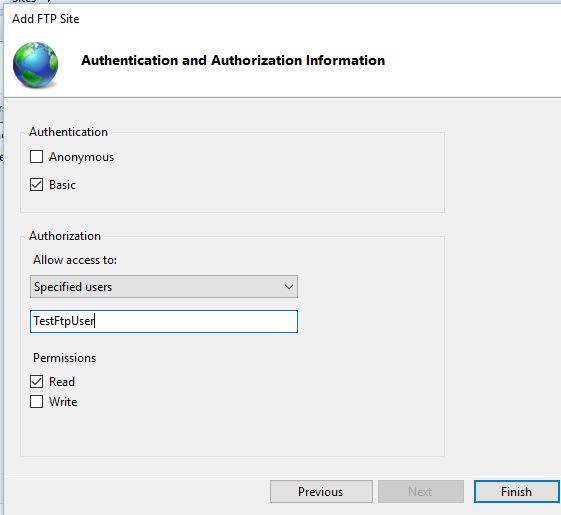
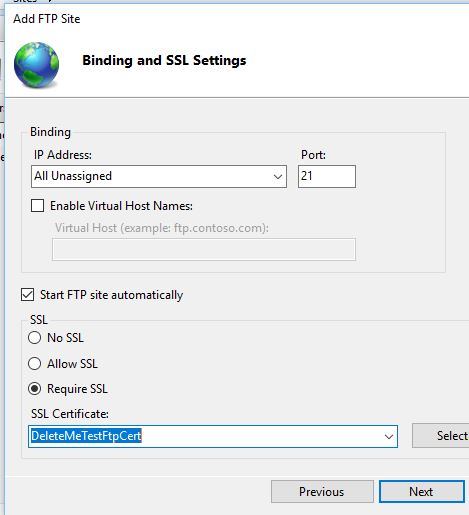
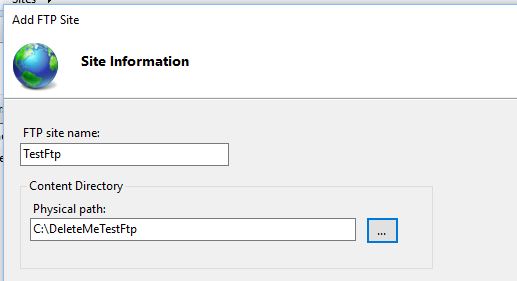
我注意到,在设置基本身份验证时,IIS没有向我询问密码。我不知道这是为什么。我不应该使用FTP站点的基本身份验证吗?
事先非常感谢!
回答 2
Stack Overflow用户
发布于 2017-01-27 18:32:42
结果发现,在IIS中配置ftp站点时,我没有在计算机上配置本地用户帐户来匹配“指定的用户”。在转到“控制面板”=>用户帐户“=>”用户帐户“=>”管理用户帐户“=>”管理用户帐户“=>添加”并将用户添加到本地计算机后,"(530)未登录“的消息就消失了。
Stack Overflow用户
发布于 2021-08-09 21:51:49
一般情况下,我在用C#代码连接到FTP服务器时遇到了问题,并得到了一个错误,比如FTPWebRequest 530错误:没有登录。
原来,当我可以用Filezilla连接到ftp时,我试图连接到的FTP站点使用FTP与TLS连接(证明我的凭据用户名和--有效):
状态:连接建立,等待欢迎信息..。状态:初始化TLS..。状态:验证证书..。状态:建立TLS连接。状态:登录
我只需在我的FtpWebRequest中添加request.EnableSSL = true;然后它工作了,不再收到530错误.示例:
FtpWebRequest request = (FtpWebRequest)WebRequest.Create(serverUri);
request.Method = WebRequestMethods.Ftp.ListDirectory;
request.EnableSsl = true;
希望这对外面的人有帮助!
TJ
https://stackoverflow.com/questions/41895741
复制相似问题
腾讯云开发者

Copyright © 2013 - 2026 Tencent Cloud. All Rights Reserved. 腾讯云 版权所有
深圳市腾讯计算机系统有限公司 ICP备案/许可证号:粤B2-20090059  粤公网安备44030502008569号
腾讯云计算(北京)有限责任公司 京ICP证150476号 | 京ICP备11018762号