
弹性布局100%高度太高了
弹性布局100%高度太高了
提问于 2017-01-27 08:19:26
我在玩曲棍球。我想要创建页眉内容区域和页脚的典型布局。
现在,当我将主体设置为100%高时,页脚被截断。这是一个内容区域吗,请参阅此普朗克
<html style="height: 100%">

<body style="height: 100%">
  <div style="height:100%;display:flex;background-color: lightblue;flex-direction:column">
    <div style="width: 600">Header</div>
    <div style="width: 500;display: flex;height: 100%">
      <div style="width:300">Nav</div>
      <div>Content</div>
    </div>
    <div style="height:50px">footer</div>
  </div>
</body>

</html>
[
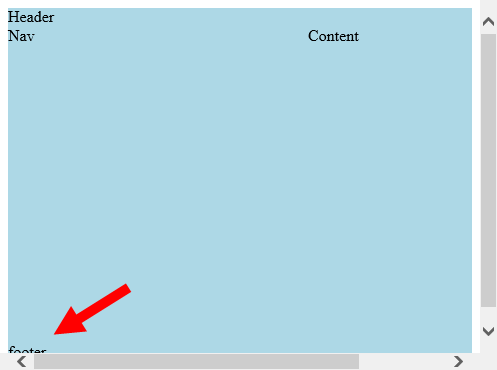
我遗漏了什么?
回答 3
Stack Overflow用户
回答已采纳
发布于 2017-01-27 08:28:15
只需添加以下css:
body {
    margin: 0;
}默认情况下,body有一个margin of 8px。
大多数浏览器将显示具有以下默认值的元素:
body {
    display: block;
    margin: 8px;
}

body:focus {
    outline: none;
}抄袭自W3C -标记。
Stack Overflow用户
发布于 2017-01-27 08:36:51
这是你的一个该死的起点:
它提供了一个完全反应灵活的设计与页眉和页脚。
body,html{
  margin:0;padding:0;
  height:100%;
}
.Flx{
  display:-webkit-flex;
  display:-ms-flex;
  display:flex;
}
.Wrap{
  margin:0 auto;
  height:100%;
  max-width:600px;
  -webkit-flex-direction:column;
  -ms-flex-direction:column;
  flex-direction:column;
}
.Header{
  -webkit-flex:0 50px;
  -ms-flex:1;flex:0 50px;
  background:#ccc;
}
.Content{
  -webkit-flex:1;
  -ms-flex:1;
  flex:1;
}
nav{
  -webkit-flex:0 1 300px;
  -ms-flex:0 1 300px;
  flex:0 1 300px;
  background:#eee;
}
.Footer{
  -webkit-flex:0 50px;
  -ms-flex:1;flex:0 50px;
  background:#ccc;
}<div class="Flx Wrap">
<div class="Flx Header">Header</div>
<div class="Flx Content">
<nav class="Flx">Nav</nav>
<div>Content</div>
</div>
<div class="Flx Footer">footer</div>
</div>
Stack Overflow用户
发布于 2017-01-27 08:55:53
你想去掉你身体标签上的空白处。
为了确保在每个浏览器中都能看到它,您可以做一个所谓的css重置。
浏览器可以有不同的默认样式。此短css文件将所有默认样式重置为相同。
解决方案
body {
  margin: 0;
}<html style="height: 100%">
<body style="height: 100%">
<div style="height:100%;display:flex;background-color: lightblue;flex-direction:column">
<div style="width: 600">Header</div>
<div style="width: 500;display: flex;height: 100%">
<div style="width:300">Nav</div>
<div>Content</div>
</div>
<div style="height:50px">footer</div>
</div>
</body>
</html>
页面原文内容由Stack Overflow提供。腾讯云小微IT领域专用引擎提供翻译支持
原文链接:
https://stackoverflow.com/questions/41889517
复制相关文章
相似问题
腾讯云开发者

Copyright © 2013 - 2026 Tencent Cloud. All Rights Reserved. 腾讯云 版权所有
深圳市腾讯计算机系统有限公司 ICP备案/许可证号:粤B2-20090059  粤公网安备44030502008569号
腾讯云计算(北京)有限责任公司 京ICP证150476号 | 京ICP备11018762号