
viewController不符合协议UIPickerViewDataSource,我的代码有什么问题?
viewController不符合协议UIPickerViewDataSource,我的代码有什么问题?
提问于 2017-01-26 06:47:15
我看了很多问题和答案,我找不到为什么我的应用不断失败的原因。不好意思给您带来不便有人能帮我吗?我用的是斯威夫特3号。
import UIKit
import MapKit
import CoreLocation

class ViewController: UIViewController, CLLocationManagerDelegate, UIPickerViewDelegate, UIPickerViewDataSource {

    //Distance
    @IBOutlet weak var setDistance: UIPickerView!

    var distance = ["1/2 Mile", "1 Mile", "2 Miles", "5 Miles"]

    //Map
    @IBOutlet weak var map: MKMapView!


    let manager = CLLocationManager()

    func locationManager(_ manager: CLLocationManager, didUpdateLocations locations: [CLLocation])
    {
        let location = locations[0]

        let span:MKCoordinateSpan = MKCoordinateSpanMake(0.01, 0.01)
        let myLocation:CLLocationCoordinate2D = CLLocationCoordinate2DMake(location.coordinate.latitude, location.coordinate.longitude)
        let region:MKCoordinateRegion = MKCoordinateRegionMake(myLocation, span)
        map.setRegion(region, animated: true)

        print(location.altitude)
        print(location.speed)

        self.map.showsUserLocation = true
    }


    override func viewDidLoad()
    {
        super.viewDidLoad()

        //Distance Stuff
        setDistance.delegate = self
        setDistance.dataSource = self

    }

        func numberOfComponents(in: UIPickerView) -> Int {
            return 1
        }
        func setDistance(_ setDistance: UIPickerView, numberOfRowsInComponent component: Int) -> Int {
            return distance.count
        }
        func setDistance(_ setDistance: UIPickerView, titleForRow row: Int, forComponent component: Int) -> String {
            return distance[row]
        }


        //Map Stuff
        manager.delegate = self
        manager.desiredAccuracy = kCLLocationAccuracyBest
        manager.requestWhenInUseAuthorization()
        manager.startUpdatingLocation()


    override func didReceiveMemoryWarning() {
        super.didReceiveMemoryWarning()
    }

}回答 2
Stack Overflow用户
回答已采纳
发布于 2017-01-26 07:00:04
您应该实现委托,就像below.the问题说的那样,您包含了below.the,但没有实现它们的数据源。
import UIKit
import MapKit
import CoreLocation

class TestViewController: UIViewController, CLLocationManagerDelegate, UIPickerViewDelegate, UIPickerViewDataSource {

    //Distance
    @IBOutlet weak var setDistance: UIPickerView!

    var distance = ["1/2 Mile", "1 Mile", "2 Miles", "5 Miles"]

    //Map
    @IBOutlet weak var map: MKMapView!


    let manager = CLLocationManager()

    func locationManager(_ manager: CLLocationManager, didUpdateLocations locations: [CLLocation])
    {
        let location = locations[0]

        let span:MKCoordinateSpan = MKCoordinateSpanMake(0.01, 0.01)
        let myLocation:CLLocationCoordinate2D = CLLocationCoordinate2DMake(location.coordinate.latitude, location.coordinate.longitude)
        let region:MKCoordinateRegion = MKCoordinateRegionMake(myLocation, span)
        map.setRegion(region, animated: true)

        print(location.altitude)
        print(location.speed)

        self.map.showsUserLocation = true
    }


    override func viewDidLoad()
    {
        super.viewDidLoad()

        //Distance Stuff
        setDistance.delegate = self
        setDistance.dataSource = self
        manager.delegate = self
        manager.desiredAccuracy = kCLLocationAccuracyBest
        manager.requestWhenInUseAuthorization()
        manager.startUpdatingLocation()


    }

   /* func numberOfComponents(in: UIPickerView) -> Int {
        return 1
    }
    func setDistance(_ setDistance: UIPickerView, numberOfRowsInComponent component: Int) -> Int {
        return distance.count
    }
    func setDistance(_ setDistance: UIPickerView, titleForRow row: Int, forComponent component: Int) -> String {
        return distance[row]
    }
 */
    func numberOfComponents(in: UIPickerView) -> Int {
        return 1
    }
    func pickerView(_ pickerView: UIPickerView, numberOfRowsInComponent component: Int) -> Int {
       return distance.count
    }
    func pickerView(_ pickerView: UIPickerView, titleForRow row: Int, forComponent component: Int) -> String? {
         return distance[row]
    }

    override func didReceiveMemoryWarning() {
        super.didReceiveMemoryWarning()
    }

}Stack Overflow用户
发布于 2017-01-26 10:22:37
由于Xcode无法实现或建议所需的函数,我发现识别它们的最佳方法是使用文档和API引用。
您可以显示有关协议的快速帮助(选项+单击),然后单击协议引用:
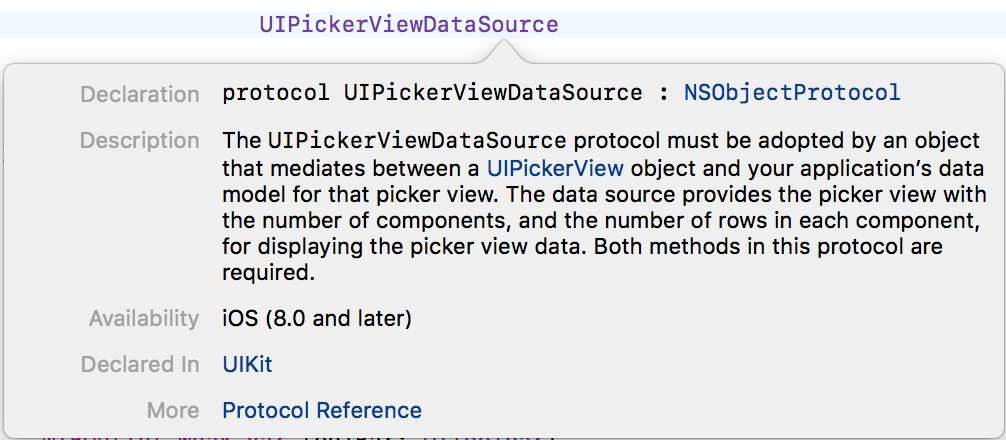
这将打开文档和API引用,这将告诉您更多关于所需函数的信息:
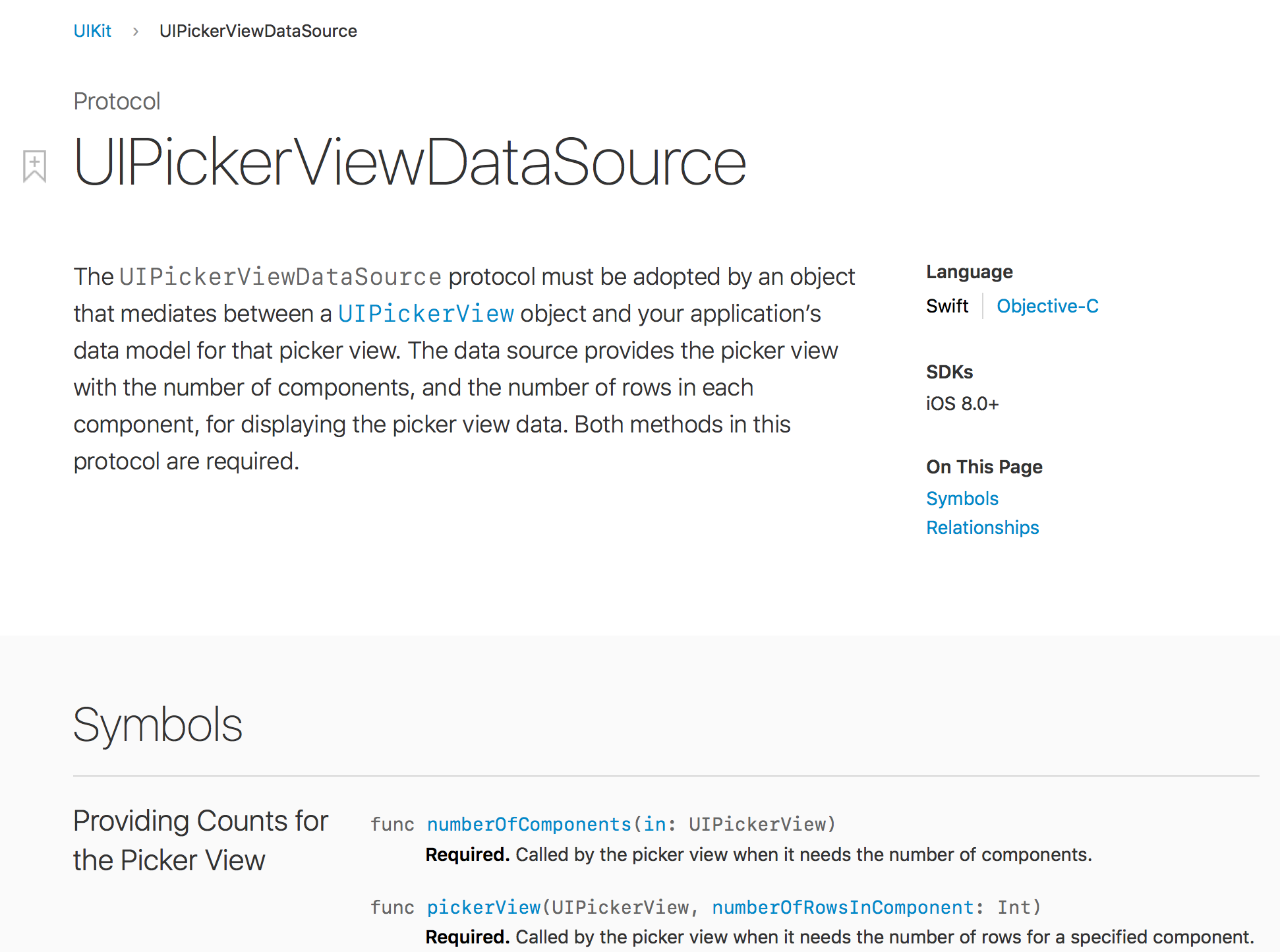
您还可以搜索所需的关键工作(CMD + F)和搜索字段中所需的类型。
然后,您可以在您的类中实现它们:
func numberOfComponents(in pickerView: UIPickerView) -> Int {
    return 1
}

func pickerView(_ pickerView: UIPickerView, numberOfRowsInComponent component: Int) -> Int {
    return dataset.count
}Xcode帮助您找到相关的函数,例如,开始键入pickerview,它将向您提供协议函数的列表:

就这样。
页面原文内容由Stack Overflow提供。腾讯云小微IT领域专用引擎提供翻译支持
原文链接:
https://stackoverflow.com/questions/41868126
复制相关文章
相似问题
腾讯云开发者

Copyright © 2013 - 2026 Tencent Cloud. All Rights Reserved. 腾讯云 版权所有
深圳市腾讯计算机系统有限公司 ICP备案/许可证号:粤B2-20090059  粤公网安备44030502008569号
腾讯云计算(北京)有限责任公司 京ICP证150476号 | 京ICP备11018762号