
在iOS 10中使用远程通知(富媒体推送通知)在通知栏中显示图像
我已经集成了APNS,并希望在远程通知中显示图像,如下所示;
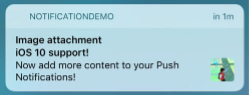
我使用了下面的代码与参考link;
AppDelegate.h
#import <UserNotifications/UserNotifications.h>
@interface AppDelegate : UIResponder <UIApplicationDelegate,UNUserNotificationCenterDelegate>
AppDelegate.m
- (BOOL)application:(UIApplication *)application didFinishLaunchingWithOptions:(NSDictionary *)launchOptions {
     [self registerForRemoteNotification];
     UIStoryboard *storyboard = [UIStoryboard storyboardWithName:@"Main" bundle:nil];
     UIViewController *vc1 = [storyboard instantiateViewControllerWithIdentifier:@"mainscreen"];
     self.window.rootViewController = vc1;
     return YES;
}

- (void)registerForRemoteNotification
{
        if(SYSTEM_VERSION_GRATERTHAN_OR_EQUALTO(@"10.0")) {
            UNUserNotificationCenter *center = [UNUserNotificationCenter currentNotificationCenter];
            center.delegate = self;
            [center requestAuthorizationWithOptions:(UNAuthorizationOptionSound | UNAuthorizationOptionAlert | UNAuthorizationOptionBadge) completionHandler:^(BOOL granted, NSError * _Nullable error){

                 [[UIApplication sharedApplication] registerForRemoteNotifications];
            }];
        }
        else {
            [[UIApplication sharedApplication] registerUserNotificationSettings:[UIUserNotificationSettings settingsForTypes:(UIUserNotificationTypeSound | UIUserNotificationTypeAlert | UIUserNotificationTypeBadge) categories:nil]];
            [[UIApplication sharedApplication] registerForRemoteNotifications];
        }
}

- (void)application:(UIApplication *)application didRegisterForRemoteNotificationsWithDeviceToken:(NSData *)deviceToken{

            DeviceToken = [[NSString alloc]initWithFormat:@"%@",[[[deviceToken description] stringByTrimmingCharactersInSet:[NSCharacterSet characterSetWithCharactersInString:@"<>"]] stringByReplacingOccurrencesOfString:@" " withString:@""]];
            NSLog(@"Device Token = %@",DeviceToken);
}然后,我用UNNotificationServiceExtension创建了新的目标,创建了新的包id“com.RichPush.app.ServiceExtension”,我还为UNNotificationServiceExtension创建了新的证书和提供配置文件。
NotificationService.h
#import <UserNotifications/UserNotifications.h>
@interface NotificationService : UNNotificationServiceExtension
@end
NotificationService.m
#import "NotificationService.h"

@interface NotificationService ()

@property (nonatomic, strong) void (^contentHandler)(UNNotificationContent *contentToDeliver);
@property (nonatomic, strong) UNMutableNotificationContent *bestAttemptContent;

@end

@implementation NotificationService

- (void)didReceiveNotificationRequest:(UNNotificationRequest *)request withContentHandler:(void (^)(UNNotificationContent * _Nonnull))contentHandler {
    self.contentHandler = contentHandler;
    self.bestAttemptContent = [request.content mutableCopy];

    // Modify the notification content here...
    //self.bestAttemptContent.body = [NSString stringWithFormat:@"%@ [modified]", self.bestAttemptContent.body];

    // check for media attachment, example here uses custom payload keys mediaUrl and mediaType
    NSDictionary *userInfo = request.content.userInfo;
    if (userInfo == nil) {
        [self contentComplete];
        return;
    }

    NSString *mediaUrl = userInfo[@"mediaUrl"];
    NSString *mediaType = userInfo[@"mediaType"];

    if (mediaUrl == nil || mediaType == nil) {
        [self contentComplete];
        return;
    }

    // load the attachment
    [self loadAttachmentForUrlString:mediaUrl
                            withType:mediaType
                   completionHandler:^(UNNotificationAttachment *attachment) {
                       if (attachment) {
                           self.bestAttemptContent.attachments = [NSArray arrayWithObject:attachment];
                       }
                       [self contentComplete];
                   }];

}

- (void)serviceExtensionTimeWillExpire {
    // Called just before the extension will be terminated by the system.
    // Use this as an opportunity to deliver your "best attempt" at modified content, otherwise the original push payload will be used.
    [self contentComplete];
}

- (void)contentComplete {
    self.contentHandler(self.bestAttemptContent);
}

- (NSString *)fileExtensionForMediaType:(NSString *)type {
    NSString *ext = type;

    if ([type isEqualToString:@"image"]) {
        ext = @"jpg";
    }
   return [@"." stringByAppendingString:ext];
}

- (void)loadAttachmentForUrlString:(NSString *)urlString withType:(NSString *)type completionHandler:(void(^)(UNNotificationAttachment *))completionHandler  {

    __block UNNotificationAttachment *attachment = nil;
    NSURL *attachmentURL = [NSURL URLWithString:urlString];
    NSString *fileExt = [self fileExtensionForMediaType:type];

    NSURLSession *session = [NSURLSession sessionWithConfiguration:[NSURLSessionConfiguration defaultSessionConfiguration]];
    [[session downloadTaskWithURL:attachmentURL
                completionHandler:^(NSURL *temporaryFileLocation, NSURLResponse *response, NSError *error) {
                    if (error != nil) {
                        NSLog(@"%@", error.localizedDescription);
                    } else {
                        NSFileManager *fileManager = [NSFileManager defaultManager];
                        NSURL *localURL = [NSURL fileURLWithPath:[temporaryFileLocation.path stringByAppendingString:fileExt]];
                        [fileManager moveItemAtURL:temporaryFileLocation toURL:localURL error:&error];

                        NSError *attachmentError = nil;
                        attachment = [UNNotificationAttachment attachmentWithIdentifier:@"" URL:localURL options:nil error:&attachmentError];
                        if (attachmentError) {
                        NSLog(@"%@", attachmentError.localizedDescription);
                        }
                    }
                    completionHandler(attachment);
                }] resume];
}
@end
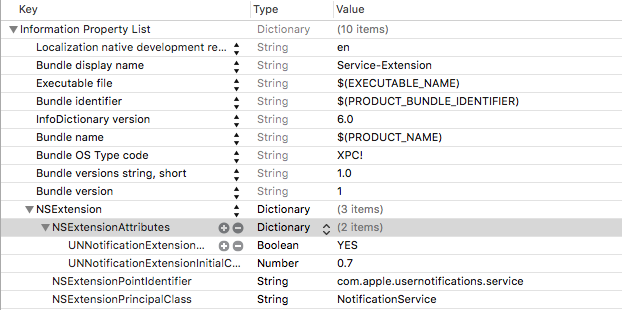
我使用下面的plist作为服务扩展:
我的玩乐是;
    {
    "aps": {
        "alert": {
            "title": "title",
            "body": "Your message Here",
            "mutable-content": "1",
            "category": "myNotificationCategory"
        }
    },
    "mediaUrl": "https://upload.wikimedia.org/wikipedia/commons/thumb/2/2a/FloorGoban.JPG/1024px-FloorGoban.jpg",
    "mediaType": "image"
 }
请让我知道我哪里错了。
提前谢谢。
回答 3
Stack Overflow用户
发布于 2017-02-08 16:48:54
您需要在负载中放置“可变内容”:"1",在“警报”-object之外标记。
Stack Overflow用户
发布于 2017-01-25 09:16:35
你犯了一个错误:
然后,我用UNNotificationServiceExtension创建了新的目标,创建了新的包id“com.RichPush.app.ServiceExtension”,我还为UNNotificationServiceExtension创建了新的证书和提供配置文件。
使用UNNotificationContentExtension而不是UNNotificationServiceExtension
创建新目标后,xcode将创建快速(obj- c)文件和故事板接口。
我有一个关于快速代码的简单示例,它加载图像并显示在大型推送通知视图上。
class NotificationViewController: UIViewController, UNNotificationContentExtension {


//image provided from storyboard
@IBOutlet weak var image: UIImageView!

override func viewDidLoad() {
    super.viewDidLoad()

    // Do any required interface initialization here.
}

func didReceive(_ notification: UNNotification) {
    let userInfo = notification.request.content.userInfo
    // get image url
   // and load image here
}
}
苹果文档:
UNNotificationServiceExtension在将远程通知传递给用户之前会修改它们的内容。
和
UNNotificationContentExtension为交付的本地或远程通知提供自定义接口。
Stack Overflow用户
发布于 2017-09-13 05:52:18
通知有效负载应该如下所示:
   aps =     {
        alert =         {
            body = Testing;
            title = Dining;
        };
        badge = 1;
        "content-available" = 1;
        "mutable-content" = 1;
        sound = "Bleep-Sound.wav";
    };

}
内容可用和可变内容应该在警报之外,您也应该添加警徽计数.
https://stackoverflow.com/questions/41845900
复制相似问题
腾讯云开发者

Copyright © 2013 - 2026 Tencent Cloud. All Rights Reserved. 腾讯云 版权所有
深圳市腾讯计算机系统有限公司 ICP备案/许可证号:粤B2-20090059  粤公网安备44030502008569号
腾讯云计算(北京)有限责任公司 京ICP证150476号 | 京ICP备11018762号