
ItemsControl.ItemContainerGenerator.ContainerFromItem()返回null?
ItemsControl.ItemContainerGenerator.ContainerFromItem()返回null?
提问于 2017-01-23 08:32:58
我有一些奇怪的行为,我似乎无法解决。当我迭代我的ItemsControl.ItemsSource属性中的项时,我似乎无法得到容器?我希望看到一个Button返回,但我只得到null。
有什么想法吗?
<!-- MyWindow.xaml -->
    <Window
            xmlns="http://schemas.microsoft.com/winfx/2006/xaml/presentation"
            xmlns:x="http://schemas.microsoft.com/winfx/2006/xaml"
            Title="Window1" Height="300" Width="300" Foreground="White" Name="mainPanel">

        <ItemsControl x:Name="ItemsControl_1" Margin="20">
        <!-- ItemsPanelTemplate -->
        <ItemsControl.ItemsPanel>
            <ItemsPanelTemplate>
                <UniformGrid Columns="2" />
            </ItemsPanelTemplate>
        </ItemsControl.ItemsPanel>

        <!-- ItemTemplate -->
        <ItemsControl.ItemTemplate>
            <DataTemplate>
                <Button Content="{Binding Path=Prop_1}"/>
            </DataTemplate>
        </ItemsControl.ItemTemplate>
    </ItemsControl>

    </Window>
我的代码不起作用。返回空
    public static void StartWindow()
            {

                // MyWindow
                System.Windows.Window win;
                // Load MyWindow
                using (FileStream fs = new FileStream(@"C:\MyWindow.xaml", FileMode.Open))
                {
                    object obj = System.Windows.Markup.XamlReader.Load(fs);
                    win = (System.Windows.Window)obj;
                }

                //This code set ItemsSource
                foreach (DependencyObject fe in FindLogicalChildren<DependencyObject>(win))
                {
                    ItemsControl itemscontrol = fe as ItemsControl;
                    if (fe is ItemsControl)
                    {
                        itemscontrol.ItemsSource = new List<My_Class>() {
                            new My_Class("Button1"),
                            new My_Class("Button2"),
                            new My_Class("Button3") };

                    }
                }
         // This  code get ItemsSource<DependencyObject>
                foreach (DependencyObject fe in FindLogicalChildren<DependencyObject>(win))
                {

                    if (fe is ItemsControl)
                    {
                        ItemsControl itemsControl = fe as ItemsControl;
                        itemsControl.UpdateLayout();
                        for (int i = 0; i < itemsControl.Items.Count; i++)
                        {
                            DependencyObject c = (DependencyObject)itemsControl.ItemContainerGenerator.ContainerFromIndex(i);
                            **//This code return NULL !!!**
                            if (c != null)
                                Display.MsgBox(c.GetType().Name);
                            else
                                Display.MsgBox("NULL");
                        }
                    }
                }
                win.ShowDialog();

            }


public class My_Class
{
    public string Prop_1 { get; set; }

    public My_Class(string prop1)
    {
        Prop_1 = prop1;
    }
}

            public static IEnumerable<T> FindLogicalChildren<T>(DependencyObject depObj) where T : DependencyObject
            {
                if (depObj != null)
                {
                    foreach (object rawChild in LogicalTreeHelper.GetChildren(depObj))
                    {
                        if (rawChild is DependencyObject)
                        {
                            DependencyObject child = (DependencyObject)rawChild;
                            if (child is T)
                            {
                                yield return (T)child;
                            }

                            foreach (T childOfChild in FindLogicalChildren<T>(child))
                            {
                                yield return childOfChild;
                            }
                        }
                    }
                }
            }
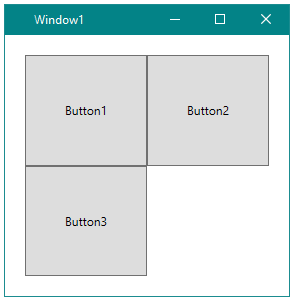
窗口被加载了
回答 1
Stack Overflow用户
发布于 2017-01-23 11:12:03
ContainerFromIndex方法将返回一个ContentPresenter。您可以获得这样的按钮引用:
ItemsControl itemsControl = ItemsControl_1;
for (int i = 0; i<itemsControl.Items.Count; i++)
{
    ContentPresenter cp = itemsControl.ItemContainerGenerator.ContainerFromIndex(i) as ContentPresenter;
    if (cp != null && VisualTreeHelper.GetChildrenCount(cp) > 0)
    {
        Button button = VisualTreeHelper.GetChild(cp, 0) as Button;
        //...
    }
}编辑:您还应该等待窗口加载,容器在尝试访问它们之前已经实际创建:
public static void StartWindow()
{
    // MyWindow
    System.Windows.Window win;
    // Load MyWindow
    using (FileStream fs = new FileStream(@"C:\MyWindow.xaml", FileMode.Open))
    {
        object obj = System.Windows.Markup.XamlReader.Load(fs);
        win = (System.Windows.Window)obj;
    }

    win.Loaded += (ss, ee) =>
    {
        //access the containers here...
    };

    win.ShowDialog();
}页面原文内容由Stack Overflow提供。腾讯云小微IT领域专用引擎提供翻译支持
原文链接:
https://stackoverflow.com/questions/41801974
复制相关文章
相似问题
腾讯云开发者

Copyright © 2013 - 2026 Tencent Cloud. All Rights Reserved. 腾讯云 版权所有
深圳市腾讯计算机系统有限公司 ICP备案/许可证号:粤B2-20090059  粤公网安备44030502008569号
腾讯云计算(北京)有限责任公司 京ICP证150476号 | 京ICP备11018762号