
如何自动化xceed updown控件
如何自动化xceed updown控件
提问于 2017-01-22 12:06:18
对于我的WPF应用程序,我正在使用TestStack.White进行UI自动测试。
我在我的应用程序中使用xceed工具箱中的DoubleUpDown控件。
如何在UI自动化测试中访问DoubleUpDown控件?
回答 1
Stack Overflow用户
回答已采纳
发布于 2017-02-01 17:10:53
通过使用UIA验证,您可以看到DoubleUpDown控件被看作是三个没有层次结构信息的控件,下面的AutomationIds如下:
- AutoSelectTextBox
- Part_IncreaseButton
- Part_DecreaseButton
因此,您可以将它们自动化为普通控件,但如果在同一个窗口中有多个DoubleUpDown控件,则会出现问题,因为所有控件都将具有相同的AutomationIds。
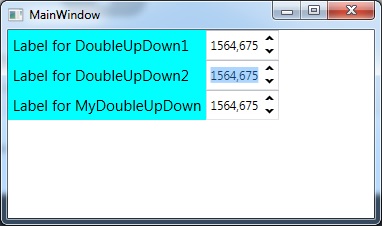
下面是一个示例应用程序,其中第一个文本框是DoubleUpDown控件,第三个是为自动化设计的自定义应用程序。
...
<Label Content="Label for DoubleUpDown1" Grid.Row="0" Grid.Column="0"
                    FontSize="15" Background="Aqua"/>

<xctk:DoubleUpDown Name="test1" Grid.Row="0" Grid.Column="1"
                   FormatString="F3" Value="1564.6749586" Increment=".001"  Maximum="200000.599"
                   AutomationProperties.AutomationId="006" AutomationProperties.Name="NormalDoubleUpDown1" />

<Label Content="Label for DoubleUpDown2" Grid.Row="1" Grid.Column="0"
                    FontSize="15" Background="Aqua"/>

<xctk:DoubleUpDown Name="test2" Grid.Row="1" Grid.Column="1"
                   FormatString="F3" Value="1564.6749586" Increment=".001"  Maximum="300000.751"
                   AutomationProperties.AutomationId="007" AutomationProperties.Name="NormalDoubleUpDown2" />

<Label Content="Label for MyDoubleUpDown" Grid.Row="2" Grid.Column="0" FontSize="15" Background="Aqua" />

<local:MyDoubleUpDown x:Name="test3"  Grid.Row="2" Grid.Column="1"
                   FormatString="F3" Value="1564.7749586" Increment=".001"  Maximum="200000.599"
                   AutomationProperties.AutomationId="008" AutomationProperties.Name="My Custom DoubleUpDown" />
...
在UIA验证中,正常的DoubleUpDown控件以相同的AutomationIds出现。出现自定义层次结构时,可以使用在XAML中设置的AutomationId (此处为008)。
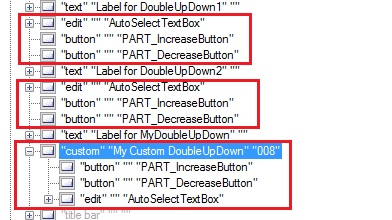
自定义控件Xceed的MyDoubleUpDown,简单子类,但具有一个自动化对等体。
public class MyDoubleUpDown : Xceed.Wpf.Toolkit.DoubleUpDown
{
    protected override AutomationPeer OnCreateAutomationPeer()
    {
        return new MyDoubleUpDownAutomationPeer(this);
    }
}

public class MyDoubleUpDownAutomationPeer : FrameworkElementAutomationPeer
{
    public MyDoubleUpDownAutomationPeer(MyDoubleUpDown owner)
        : base(owner)
    {
    }
}
下面是在窗口中自动化唯一DoubleUpDown控件的默认方法。
// link to the application and retrieve the main window
Application application = Application.Attach("WpfTestApplication1");
var windows = application.GetWindows();
var window = windows.FirstOrDefault();

// get the child components
TextBox theEdit = window.Get<TextBox>("AutoSelectTextBox");
Button increaseButton = window.Get<Button>("PART_IncreaseButton");
Button decreaseButton = window.Get<Button>("PART_DecreaseButton");

// define the value
theEdit.SetValue("600");

// increase and decrease the value
increaseButton.Click();
increaseButton.Click();
increaseButton.Click();
decreaseButton.Click();
这是基于Xceed的自定义控件自动化的代码。
// retrieve the custom control
IUIItem theCustomControl = window.Get(SearchCriteria.ByAutomationId("008"));

// get the childs items
if(theCustomControl is CustomUIItem)
{
    // retrieve the custom control container
    IUIItemContainer foundCustomControl = (theCustomControl as CustomUIItem).AsContainer();

    // get the child components
    TextBox theEdit3 = foundCustomControl.Get<TextBox>("AutoSelectTextBox");
    Button increaseButton3 = foundCustomControl.Get<Button>("PART_IncreaseButton");
    Button decreaseButton3 = foundCustomControl.Get<Button>("PART_DecreaseButton");

    // perform actions...
    theEdit3.SetValue("800");
    increaseButton3.Click();
    increaseButton3.Click();
}页面原文内容由Stack Overflow提供。腾讯云小微IT领域专用引擎提供翻译支持
原文链接:
https://stackoverflow.com/questions/41790681
复制相关文章
相似问题
腾讯云开发者

Copyright © 2013 - 2026 Tencent Cloud. All Rights Reserved. 腾讯云 版权所有
深圳市腾讯计算机系统有限公司 ICP备案/许可证号:粤B2-20090059  粤公网安备44030502008569号
腾讯云计算(北京)有限责任公司 京ICP证150476号 | 京ICP备11018762号