
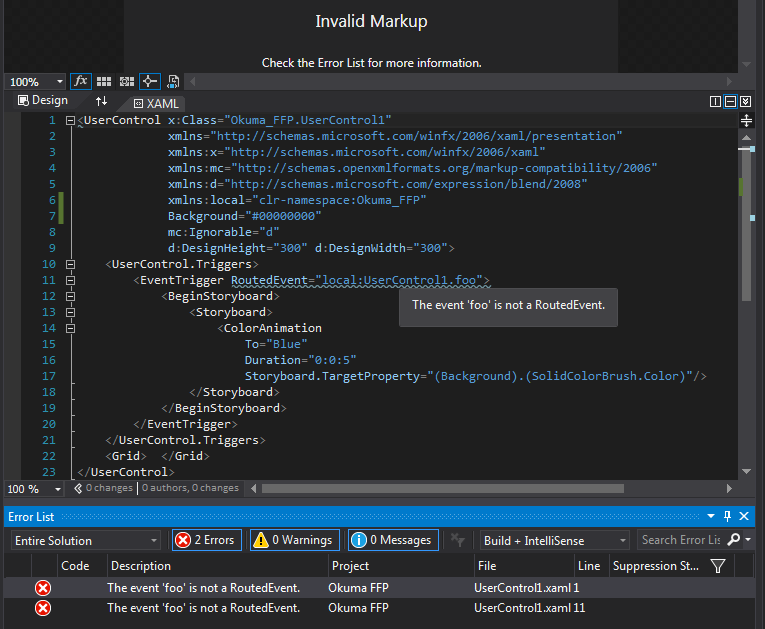
事件'foo‘不是RoutedEvent
事件'foo‘不是RoutedEvent
提问于 2017-01-18 22:13:17
我尝试在现有项目的用户控件中创建一个路由事件,并得到错误消息The event 'foo' is not a RoutedEvent.
为了确保我没有疯,我只使用违规代码(a Minimal, Complete, and Verifiable example")制作了一个示例项目。
只是在我的示例项目中没有收到任何错误消息。但代码完全一样!
有人知道怎么回事吗?
即使有错误消息,项目也会编译,RoutedEvent也能工作!
我试着清理这个项目,重建,重新启动VS和我的PC,但是不管我做了什么,这个错误信息仍然存在。
我相信这只是IDE的问题。
我正在使用2015版本14.0.25431.01更新3
UserControl1.xaml.cs
namespace Okuma_FFP
{
    using System.Windows;
    using System.Windows.Controls;

    public partial class UserControl1 : UserControl
    {
        public UserControl1()
        {
            InitializeComponent();
            RaiseEvent(new RoutedEventArgs(fooEvent, this));
        }

        public static readonly RoutedEvent fooEvent = EventManager.RegisterRoutedEvent(
            "foo", RoutingStrategy.Direct, typeof(RoutedEventHandler), typeof(UserControl1));

        // Provide CLR accessors for the event
        public event RoutedEventHandler foo
        {
            add { AddHandler(fooEvent, value); }
            remove { RemoveHandler(fooEvent, value); }
        }
    }
}
UserControl1.xaml
<UserControl x:Class="Okuma_FFP.UserControl1"
             xmlns="http://schemas.microsoft.com/winfx/2006/xaml/presentation"
             xmlns:x="http://schemas.microsoft.com/winfx/2006/xaml"
             xmlns:mc="http://schemas.openxmlformats.org/markup-compatibility/2006"
             xmlns:d="http://schemas.microsoft.com/expression/blend/2008"
             xmlns:local="clr-namespace:Okuma_FFP"
             mc:Ignorable="d"
             d:DesignHeight="300" d:DesignWidth="300">
    <UserControl.Triggers>
        <EventTrigger RoutedEvent="local:UserControl1.foo">
            <BeginStoryboard>
                <Storyboard>
                    <ColorAnimation
                        To="Blue"
                        Duration="0:0:5"
                        Storyboard.TargetProperty="(Background).(SolidColorBrush.Color)"/>
                </Storyboard>
            </BeginStoryboard>
        </EventTrigger>
    </UserControl.Triggers>
    <Grid>  </Grid>
</UserControl>回答 1
Stack Overflow用户
回答已采纳
发布于 2017-01-19 13:23:17
这是IDE的错误。
可能重复:Visual Studio displaying errors even if projects build
我从this answer那里得到了一个提示,并确保在清理解决方案和构建过程中退出VS。
- 删除所有obj、bin、release和调试文件夹
- 删除
Project_Folder\.vs\Project_Name\v14\.suo - 在Visual中打开解决方案
- 清洁溶液
- 退出
- 再次打开解决方案
- 建,建,建..。
- 确认它修好了然后去喝杯咖啡
页面原文内容由Stack Overflow提供。腾讯云小微IT领域专用引擎提供翻译支持
原文链接:
https://stackoverflow.com/questions/41730378
复制相关文章
相似问题
腾讯云开发者

Copyright © 2013 - 2026 Tencent Cloud. All Rights Reserved. 腾讯云 版权所有
深圳市腾讯计算机系统有限公司 ICP备案/许可证号:粤B2-20090059  粤公网安备44030502008569号
腾讯云计算(北京)有限责任公司 京ICP证150476号 | 京ICP备11018762号