
在github上部署Hexo
我试图将Hexo部署到我的GithubPage上。
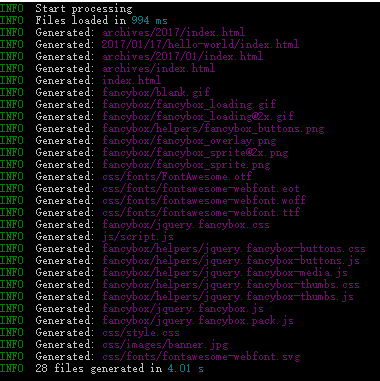
生成过程看起来很好,但是当我将它部署到我的GithubPage上时会发生错误。
下面是_config.yml中的部署部分
# Deployment
## Docs: https://hexo.io/docs/deployment.html
deploy:
type: git
repo: https://github.com/ZhangYuef/ZhangYuef.github.io.git
# branch: Hexo
生成
部署
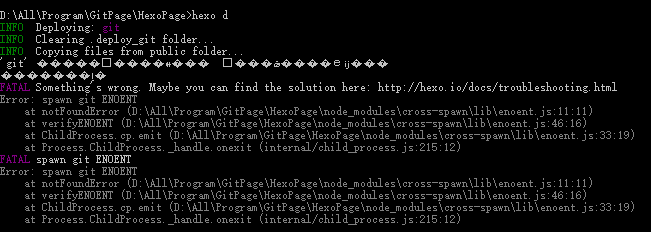
那里发生了什么事?寻求帮助!:)
回答 3
Stack Overflow用户
发布于 2017-02-05 01:46:14
你在问题中提供的上下文是不够的.
但是根据屏幕截图上的无效字符,我认为您的中文文件路径可能是原因。
参考文献:
Stack Overflow用户
发布于 2017-08-05 09:02:36
尝试像这样更新_config.yml:
deploy:
  type: git
  repository: https://github.com/fakeYanss/fakeYanss.github.io.git
  branch: master
yaml非常严格,缩进是很重要的!
Stack Overflow用户
发布于 2017-10-05 02:41:19
不确定导致此错误的原因是什么。检查您的环境是否设置了这些东西。我想可能是你的配置类型错了。
- 安装hexo-deployer-git --保存
- git存储库设置,如
通过这种方式,您不仅可以部署您的博客,还可以备份您的博客文件,您可以使用命令deploy: - type: git repo: git@github.com:xxx.git branch: master - type: git repo: git@github.com:xxx.git branch: src extend_dirs: / ignore_hidden: false ignore_pattern: public: .在另一台机器上获取博客文件。-设置ssh ssh-keygen -t rsa -C "yourEmail@icloud.com" ssh-agent -s chmod id_rsa 600 ssh-add id_rsa (you need to add the id_rsa.pub to the github's deployer key) ssh -T git@github.com
- 有时它可能有几个gits,让部署人员感到困惑。尝试删除
.git目录,并确保在其他目录中没有任何git。 - 编码。可能是编码不同。在我的例子中,我让所有的文件都属于
UTF-8。 - 顺便说一句,您的文件可以是error.try
npm install hexo-server --save和hexo server来检测网站是否可以部署。(http://localhost:4000/xx)
https://stackoverflow.com/questions/41692484
复制相似问题
腾讯云开发者

Copyright © 2013 - 2026 Tencent Cloud. All Rights Reserved. 腾讯云 版权所有
深圳市腾讯计算机系统有限公司 ICP备案/许可证号:粤B2-20090059  粤公网安备44030502008569号
腾讯云计算(北京)有限责任公司 京ICP证150476号 | 京ICP备11018762号