
LegalCopyRight在FileVersionInfo C#中总是空的?
我在windows中有一个SFX(自解压缩可执行文件)文件(用7z、WinRar、.等压缩工具创建)提供以下详细资料:

我想在CopyRight中获得C#文本,所以我编写了以下代码:
var fileVersionInfo = FileVersionInfo.GetVersionInfo(filePath);
Console.Write(fileVersionInfo.LegalCopyright)fileVersionInfo.LegalCopyright总是空的!有什么问题吗?
编辑:
我的原始代码:
var fileVersionInfo = FileVersionInfo.GetVersionInfo(filePath1);
var properties = typeof(FileVersionInfo).GetProperties(BindingFlags.Public | BindingFlags.Instance);
foreach (var propertyInfo in properties)
{
    var value = propertyInfo.GetValue(fileVersionInfo);
    Console.WriteLine("{0} = {1}", propertyInfo.Name, value);
}
Console.ReadKey();
结果:
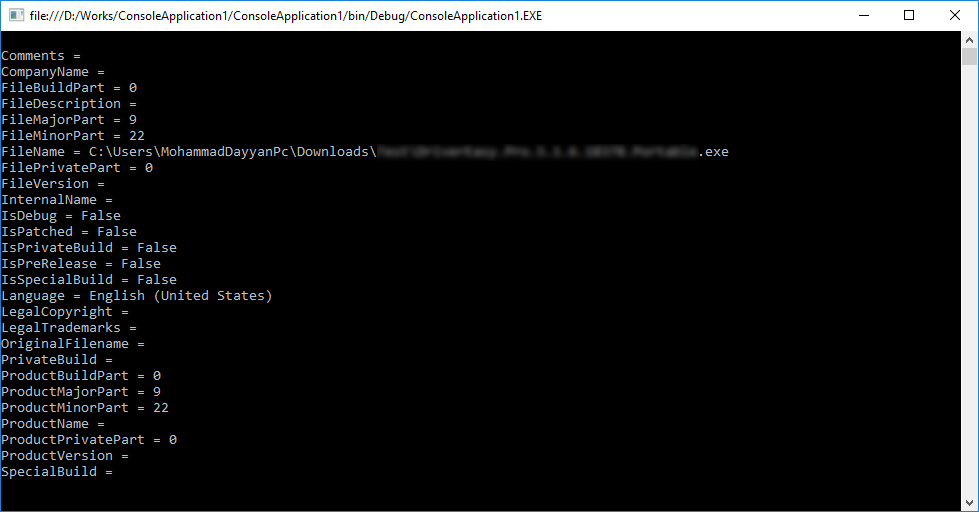
回答 3
Stack Overflow用户
发布于 2017-01-27 05:07:41
最后,我可以找到一个解决方案:
1.首先安装以下软件包:
Microsoft.WindowsAPICodePack.Shell它有一个依赖程序包,Nuget自动安装它为Microsoft.WindowsAPICodePack.Core
2.现在我们可以像下面的代码一样获得文件属性
using System;
using System.Reflection;
using Microsoft.WindowsAPICodePack.Shell.PropertySystem;

namespace ConsoleApplication1
{
    internal class Program
    {
        private static void Main()
        {
            const string filePath1 = @"C:\Users\Mohammad\Downloads\Test\.....exe";
            var shellFile = Microsoft.WindowsAPICodePack.Shell.ShellObject.FromParsingName(filePath1);
            foreach (var propertyInfo in typeof(ShellProperties.PropertySystem).GetProperties(BindingFlags.Public | BindingFlags.Instance))
            {
                var shellProperty = propertyInfo.GetValue(shellFile.Properties.System, null) as IShellProperty;
                if (shellProperty?.ValueAsObject == null) continue;
                var shellPropertyValues = shellProperty.ValueAsObject as object[];
                if (shellPropertyValues != null && shellPropertyValues.Length > 0)
                {
                    foreach (var shellPropertyValue in shellPropertyValues)
                        Console.WriteLine("{0} = {1}", propertyInfo.Name, shellPropertyValue);
                }
                else
                    Console.WriteLine("{0} = {1}", propertyInfo.Name, shellProperty.ValueAsObject);
            }
            Console.ReadKey();
        }
    }
}Stack Overflow用户
发布于 2017-01-17 08:04:08
(我的名声太低了,不能发表评论,所以我在这里发了出来)
我刚刚测试了下面的代码,它对我来说正常工作。
var fileVersionInfo = FileVersionInfo.GetVersionInfo(@"C:\Users\usr\Desktop\Game\steamIntegration\steam_api.dll");
Console.Write(fileVersionInfo.LegalCopyright);
Console.ReadLine();
也许您的权限不足以满足该文件的需要。将*.manifest添加到项目中,将requestedExecutionLevel更改为:
<requestedExecutionLevel level="requireAdministrator" uiAccess="false" />也许这能解决你的问题。
Stack Overflow用户
发布于 2017-01-26 12:05:30
您所观察到的行为是由于Microsoft.NET框架类FileVersionInfo的第411行中的私有函数FileVersionInfo的实现存在缺陷,目前在4.6.2版本中,而且可能更早:
// fileVersion is chosen based on best guess. Other fields can be used if appropriate.
return (fileVersion != string.Empty);引用源的引用(注释他们的引用)意味着如果函数的fileVersion成员为空(块的成员,而不是标头中的成员,这就增加了混乱),则函数将放弃其他正确猜测的特定于代码页的版本信息。
您的exe文件就是这样的:
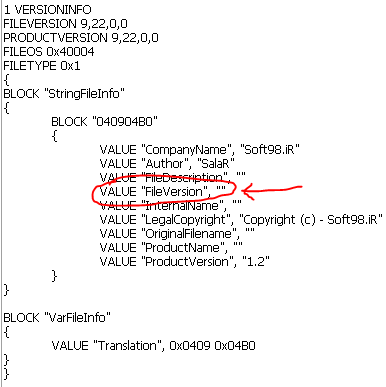
当我们用这个修补框架时.
return (productVersion != string.Empty);...it按预期工作(在控制台和Windows应用程序中都进行了测试):
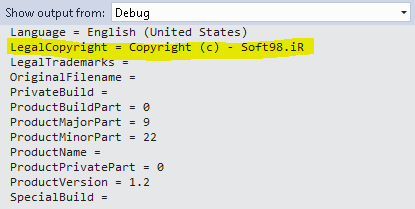
因此,有两个选择:
- 编译exe,这样它的FileVersion就不会变成空的。希望不传输这些信息不是压缩工具的错误。
- 向Microsoft提交一个bug。我从他们的参考资料来源牌照上搜集到的资料,是不容许将衍生作品包括在任何产品内。
https://stackoverflow.com/questions/41690893
复制相似问题
腾讯云开发者

Copyright © 2013 - 2026 Tencent Cloud. All Rights Reserved. 腾讯云 版权所有
深圳市腾讯计算机系统有限公司 ICP备案/许可证号:粤B2-20090059  粤公网安备44030502008569号
腾讯云计算(北京)有限责任公司 京ICP证150476号 | 京ICP备11018762号