
隐藏10000下拉菜单的最佳方法
上下文-
我有一个聊天组件,每个单独的聊天消息都有一个下拉列表。
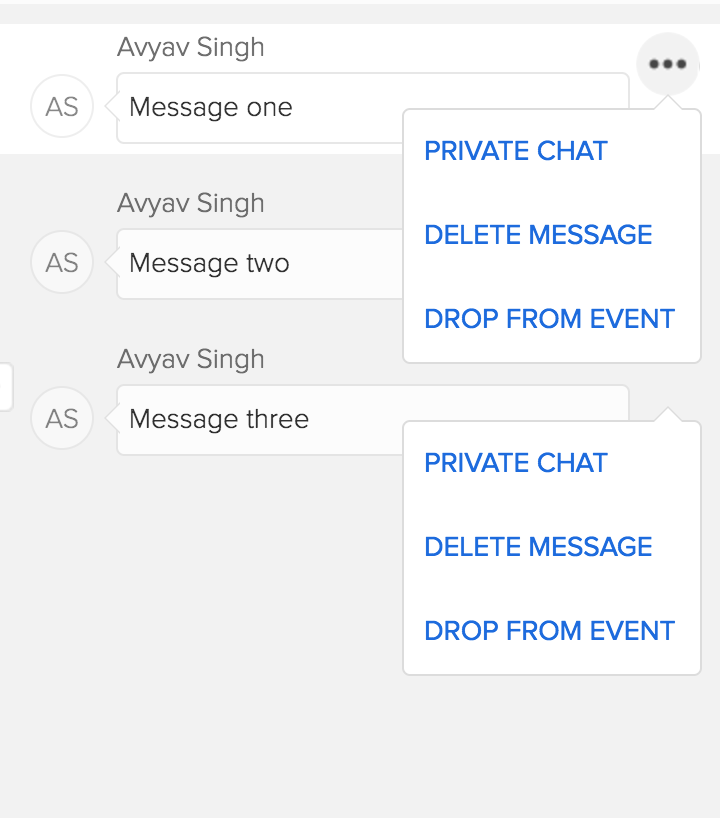
并通过单击“更多选项”图标(3个点)打开下拉菜单。
每个单独的聊天消息都是一个“主干项视图”。
一种解决方案是收听单击"body",循环遍历所有菜单,然后通过删除下拉菜单上的一个类来关闭下拉列表。
$("body").on("click", function() {
  $(".drop-down-menu").each(function(idx, item) {
      $(item).removeClass("open"); // open class indicated it is open via CSS
  });
});
社联-
.drop-down-menu {
    visibility: hidden;
    opacity: 0;
    &.open {
       opacity: 1;
       visibility: visible;
    }
}
如果有10,000条或更多的消息,会对性能产生影响吗?
因此,我正在寻找最好的解决方案,以隐藏下降,如果用户点击屏幕上的任何地方。谢谢。
回答 3
Stack Overflow用户
发布于 2017-01-12 08:59:23
您可以进行一些琐碎的更改,以提高代码的性能。第一件事是没有理由像你所做的那样循环。jQuery对象是集合,jQuery操作通常循环在jQuery对象的元素上。所以:
$("body").on("click", function() {
  $(".drop-down-menu").removeClass("open");
});这将自动从选择器open匹配的所有元素中删除类".drop-down-menu"。jQuery仍然会在内部遍历一个循环,但是让jQuery自己迭代比让.each调用您自己的回调更快,然后在回调中创建一个新的jQuery对象来调用.removeClass。
此外,您在逻辑上知道,从没有该类的元素中删除open类是没有意义的。因此,您可以将操作缩小到那些删除open有意义的元素:
$("body").on("click", function() {
  $(".drop-down-menu.open").removeClass("open");
});
这些原则是广泛适用的,而且执行成本很小。更多的东西都会进入优化的领域,这些优化可能有缺点,应该通过实际分析代码来支持。您可以将jQuery代码替换为只使用股票DOM调用的代码,但是如果您需要对旧浏览器的支持,那么处理这个问题的成本和怪癖可能不值得。如果您使用的是股票DOM方法,有不同的方法可能会导致不同的性能提高,而代价是代码复杂性。
Stack Overflow用户
发布于 2017-01-12 18:33:20
路易提供了一个快速修复和高效的jQuery选择器。
从长远来看,我建议将每条消息设置为具有MessageView组件的ContextMenuView组件。这样,每个视图只有一个菜单需要处理。
捕捉元素外部的单击
然后,使用以下ClickOutside视图作为上下文菜单基视图。它看起来很复杂,但它只封装了blur和focus DOM事件,以了解您是否在视图之外单击。
它为视图本身提供了一个简单的onClickOutside回调,并提供了一个在元素上触发的click:outside事件。
菜单视图现在只需实现以下内容:
var ContextMenuView = ClickOutside.extend({
    toggle: function(val) {
        this.$el.toggleClass("open", val);
        this.focus(); // little requirement
    },
    // here's where the magic happens!
    onClickOutside: function() {
        this.$el.removeClass("open");
    }
});
见演示
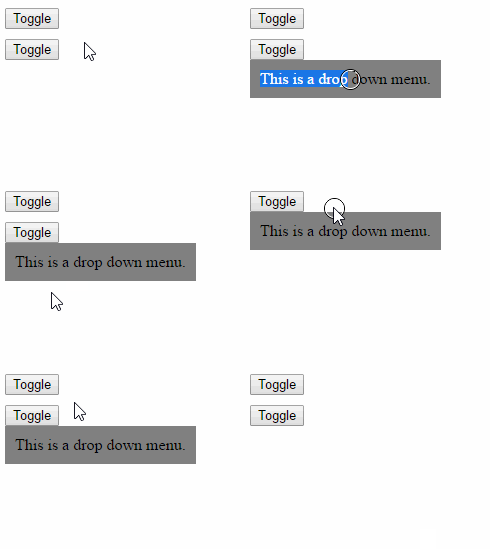
var app = {};

(function() {

  var $body = Backbone.$(document.body);
  /**
   * Backbone view mixin that enables the view to catch simulated
   * "click:outside" events (or simple callback) by tracking the
   * mouse and focusing the element.
   *
   * Additional information: Since the blur event is triggered on a mouse
   * button pressed and the click is triggered on mouse button released, the
   * blur callback gets called first which then listen for click event on the
   * body to trigger the simulated outside click.
   */
  var ClickOutside = app.ClickOutside = Backbone.View.extend({
    events: {
      "mouseleave": "_onMouseLeave",
      "mouseenter": "_onMouseEnter",
      "blur": "_onBlur",
    },
    /**
     * Overwrite the default constructor to extends events.
     */
    constructor: function() {

      this.mouseInside = false;

      var proto = ClickOutside.prototype;
      this.events = _.extend({}, proto.events, this.events);

      ClickOutside.__super__.constructor.apply(this, arguments);
      this.clickOnceEventName = 'click.once' + this.cid;
    },

    /**
     * Hijack this private method to ensure the element has
     * the tabindex attribute and is ready to be used.
     */
    _setElement: function(el) {
      ClickOutside.__super__._setElement.apply(this, arguments);

      var focusEl = this.focusEl;

      if (focusEl && !this.$focusElem) {
        this.$focusElem = focusEl;
        if (!(focusEl instanceof Backbone.$)) {
          this.$focusElem = Backbone.$(focusEl);
        }
      } else {
        this.$focusElem = this.$el;
      }
      this.$focusElem.attr('tabindex', -1);
    },

    focus: function() {
      this.$focusElem.focus();
    },

    unfocus: function() {
      this.$focusElem.blur();
      $body.off(this.clickOnceEventName);
    },

    isMouseInside: function() {
      return this.mouseInside;
    },

    ////////////////////////////
    // private Event handlers //
    ////////////////////////////
    onClickOutside: _.noop,
    _onClickOutside: function(e) {
      this.onClickOutside(e);
      this.$focusElem.trigger("click:outside", e);
    },

    _onBlur: function(e) {
      var $focusElem = this.$focusElem;
      if (!this.isMouseInside() && $focusElem.is(':visible')) {
        $body.one(this.clickOnceEventName, this._onClickOutside.bind(this));
      } else {
        $focusElem.focus(); // refocus on inside click
      }
    },

    _onMouseEnter: function(e) {
      this.mouseInside = true;
    },
    _onMouseLeave: function(e) {
      this.mouseInside = false;
    },

  });

  var DropdownView = app.Dropdown = ClickOutside.extend({
    toggle: function(val) {
      this.$el.toggle(val);
      this.focus();
    },
    onClickOutside: function() {
      this.$el.hide();
    }
  });


})();


var DemoView = Backbone.View.extend({
  className: "demo-view",
  template: $("#demo-template").html(),
  events: {
    "click .toggle": "onToggleClick",
  },
  initialize: function() {
    this.dropdown = new app.Dropdown();
  },
  render: function() {
    this.$el.html(this.template);
    this.dropdown.setElement(this.$(".dropdown"));
    return this;
  },
  onToggleClick: function() {
    this.dropdown.toggle(true);
  },

});

$("#app")
  .append(new DemoView().render().el)
.append(new DemoView().render().el);html,
body {
height: 100%;
width: 100%;
}
.demo-view {
position: relative;
margin-bottom: 10px;
}
.dropdown {
z-index: 2;
position: absolute;
top: 100%;
background-color: gray;
padding: 10px;
outline: none;
}<script src="https://cdnjs.cloudflare.com/ajax/libs/jquery/3.1.1/jquery.min.js"></script>
<script src="https://cdnjs.cloudflare.com/ajax/libs/underscore.js/1.8.3/underscore-min.js"></script>
<script src="https://cdnjs.cloudflare.com/ajax/libs/backbone.js/1.3.3/backbone-min.js"></script>
<div id="app"></div>
<script type="text/template" id="demo-template">
<button type="button" class="toggle">Toggle</button>
<div class="dropdown" style="display:none;">
This is a drop down menu.
</div>
</script>
检测元素外部单击的替代方法
如果您不需要,或者不能使用blur和focus事件,请查看如何检测到元素外部的单击?的替代技术。
视图的延迟初始化
使SPA更有效的另一种方法是将新视图的创建推迟到需要它的时候,。相反,创建10k上下文菜单视图,等待用户第一次单击切换按钮,如果还不存在,则创建一个新视图。
toggleMenu: function(){
    var menuView = this.menuView;
    if (!menuView) {
        menuView = this.menuView = new ContextMenuView();
        this.$('.dropdown').html(menuView.render().el);
    }
    menuView.toggle();
}
分页
在网页内部通过一定的HTML阈值后,浏览器就开始滞后,阻碍了用户体验。与其将10k视图转储到div中,不如只显示100,或覆盖可见空间的最小值。
然后,当滚动到边缘(顶部或底部)时,根据需要追加或添加新视图。就像任何基于网络的聊天应用程序中的消息列表,比如messenger.com。
Stack Overflow用户
发布于 2017-01-12 04:59:11
由于一次只打开一个下拉菜单,也许可以保留一个指向它所连接元素的元素或索引的指针,而不是循环遍历所有菜单。
https://stackoverflow.com/questions/41605303
复制相似问题
腾讯云开发者

Copyright © 2013 - 2026 Tencent Cloud. All Rights Reserved. 腾讯云 版权所有
深圳市腾讯计算机系统有限公司 ICP备案/许可证号:粤B2-20090059  粤公网安备44030502008569号
腾讯云计算(北京)有限责任公司 京ICP证150476号 | 京ICP备11018762号