
配置Jenkins使用3.0.1 Maven TestNG
我一直试图让詹金斯在我的自动化测试中使用Chrome。当我在本地运行测试时,我能够让它在JDK选项中通过-Dbrowser=chrome使用Chrome。
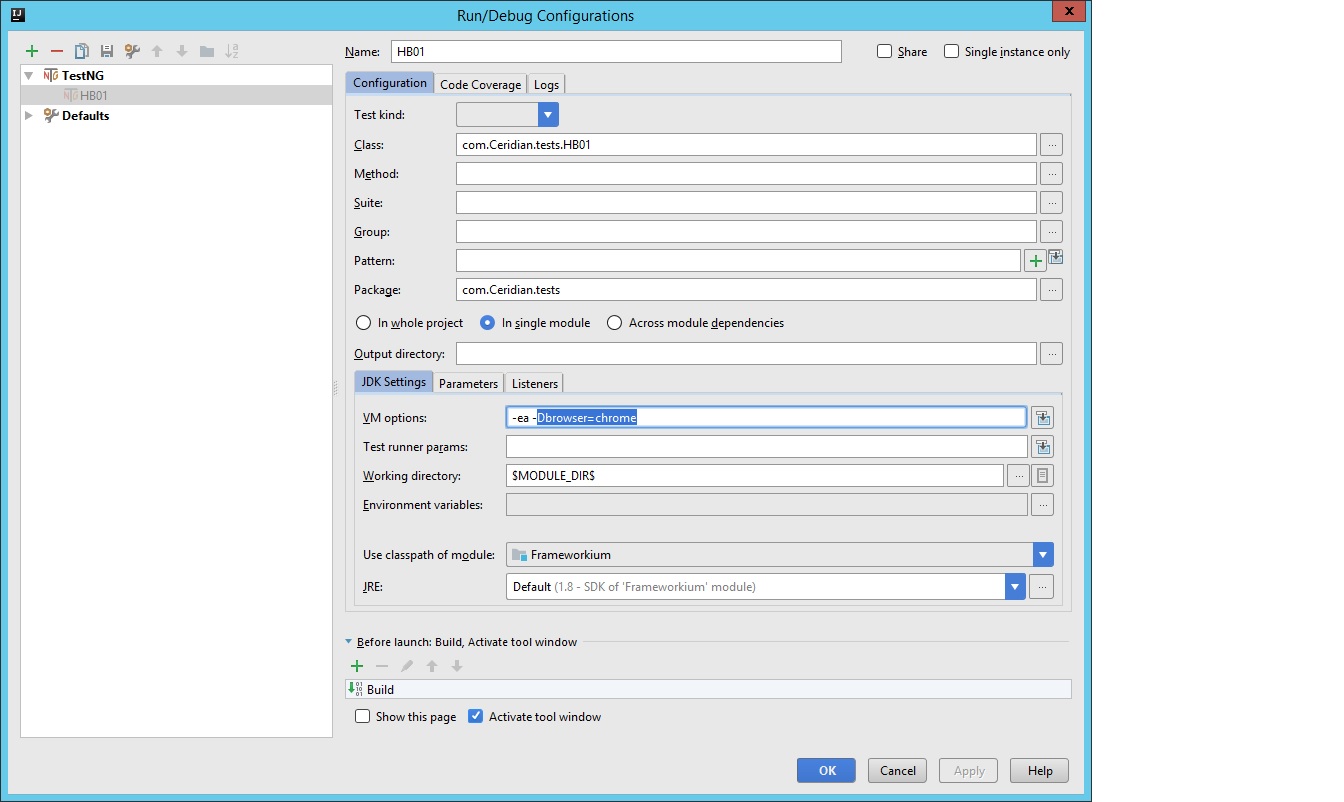
出于某种原因,不管我尝试了什么,它似乎都被困在使用Firefox上了。
这是我以前的方法
@BeforeMethod(
    alwaysRun = true
)
public static void configureBrowserBeforeTest(Method testMethod) {
    try {
        ((Driver)driver.get()).resetBrowser();
        wait.set(newDefaultWait());
        userAgent = determineUserAgent();
        initialiseNewScreenshotCapture(testMethod);
    } catch (Exception var2) {
        logger.error("Failed to configure browser.", var2);
        throw new RuntimeException("Failed to configure browser.", var2);
    }
}
和POM文件
<project xmlns="http://maven.apache.org/POM/4.0.0"
         xmlns:xsi="http://www.w3.org/2001/XMLSchema-instance"
         xsi:schemaLocation="http://maven.apache.org/POM/4.0.0 http://maven.apache.org/xsd/maven-4.0.0.xsd">
    <modelVersion>4.0.0</modelVersion>

    <groupId>com.frameworkium</groupId>
    <artifactId>Frameworkium</artifactId>
    <packaging>jar</packaging>
    <version>2.0.5</version>

    <name>Frameworkium</name>
    <description>
        A template designed to get up and running quickly with Selenium and Appium.
    </description>
    <url/>
    <inceptionYear/>
    <organization/>
    <licenses/>

    <developers/>
    <contributors/>

    <prerequisites>
        <maven>3.1.1</maven>
    </prerequisites>

    <modules/>

    <scm/>
    <issueManagement/>
    <ciManagement/>
    <distributionManagement/>

    <properties>
        <project.build.sourceEncoding>UTF-8</project.build.sourceEncoding>
        <env.config>local</env.config>
        <threads>1</threads>
        <groups/>
        <aspectj.version>1.8.9</aspectj.version>
    </properties>

    <repositories>
        <repository>
            <id>jitpack.io</id>
            <url>https://jitpack.io</url>
        </repository>
    </repositories>

    <dependencies>
        <dependency>
            <groupId>org.testng</groupId>
            <artifactId>testng</artifactId>
            <version>6.9.8</version>
            <scope>test</scope>
        </dependency>
        <dependency>
            <groupId>org.apache.poi</groupId>
            <artifactId>poi-ooxml</artifactId>
            <version>3.11</version>
        </dependency>
        <dependency>
            <groupId>org.apache.poi</groupId>
            <artifactId>poi</artifactId>
            <version>3.14</version>
        </dependency>
        <dependency>
            <groupId>com.github.Frameworkium</groupId>
            <artifactId>frameworkium-core</artifactId>
            <version>2.3.0</version>
        </dependency>
        <dependency>
            <groupId>org.seleniumhq.selenium</groupId>
            <artifactId>selenium-remote-driver</artifactId>
            <version>3.0.1</version>
            <scope>test</scope>
        </dependency>
        <dependency>
            <groupId>org.seleniumhq.selenium</groupId>
            <artifactId>selenium-java</artifactId>
            <version>3.0.1</version>
        </dependency>
        <dependency>
            <groupId>org.seleniumhq.selenium</groupId>
            <artifactId>selenium-server</artifactId>
            <version>3.0.1</version>
        </dependency>
    </dependencies>

    <build>
        <plugins>
            <plugin>
                <groupId>org.apache.maven.plugins</groupId>
                <artifactId>maven-compiler-plugin</artifactId>
                <configuration>
                    <source>1.8</source>
                    <target>1.8</target>
                </configuration>
            </plugin>
        </plugins>
        <testSourceDirectory>src/test/java</testSourceDirectory>
        <resources>
            <resource>
                <directory>
                    src/main/resources
                </directory>
            </resource>
        </resources>
    </build>
    <profiles>
        <profile>
            <id>tests</id>
            <activation>
                <activeByDefault>true</activeByDefault>
            </activation>
            <build>

                <plugins>
                    <plugin>
                        <groupId>org.apache.maven.plugins</groupId>
                        <artifactId>maven-compiler-plugin</artifactId>
                        <version>3.5.1</version>
                        <configuration>
                            <source>1.8</source>
                            <target>1.8</target>
                        </configuration>
                    </plugin>
                    <plugin>
                        <groupId>org.apache.maven.plugins</groupId>
                        <artifactId>maven-surefire-plugin</artifactId>
                        <version>2.19.1</version>
                        <configuration>
                            <parallel>methods</parallel>
                            <threadCount>${threads}</threadCount>
                            <systemProperties>
                                <screenshotDirectory>
                                    ${project.build.directory}/screenshots
                                </screenshotDirectory>
                                <allure.issues.tracker.pattern>
                                    /browse/%s
                                </allure.issues.tracker.pattern>
                            </systemProperties>
                            <suiteXmlFiles>
                                <suiteXmlFile>testng.xml</suiteXmlFile>
                            </suiteXmlFiles>
                            <includes>
                                <include>**/Test*.java</include>
                                <include>**/*Tests*.java</include>
                                <include>**/*Tests.java</include>
                                <include>**/*Test.java</include>
                                <include>**/*TestCase.java</include>
                            </includes>
                            <groups>${groups}</groups>
                            <testFailureIgnore>false</testFailureIgnore>
                            <argLine>
                                -javaagent:"${settings.localRepository}/org/aspectj/aspectjweaver/${aspectj.version}/aspectjweaver-${aspectj.version}.jar"
                            </argLine>
                        </configuration>
                    </plugin>
                </plugins>

            </build>
        </profile>
    </profiles>
</project>
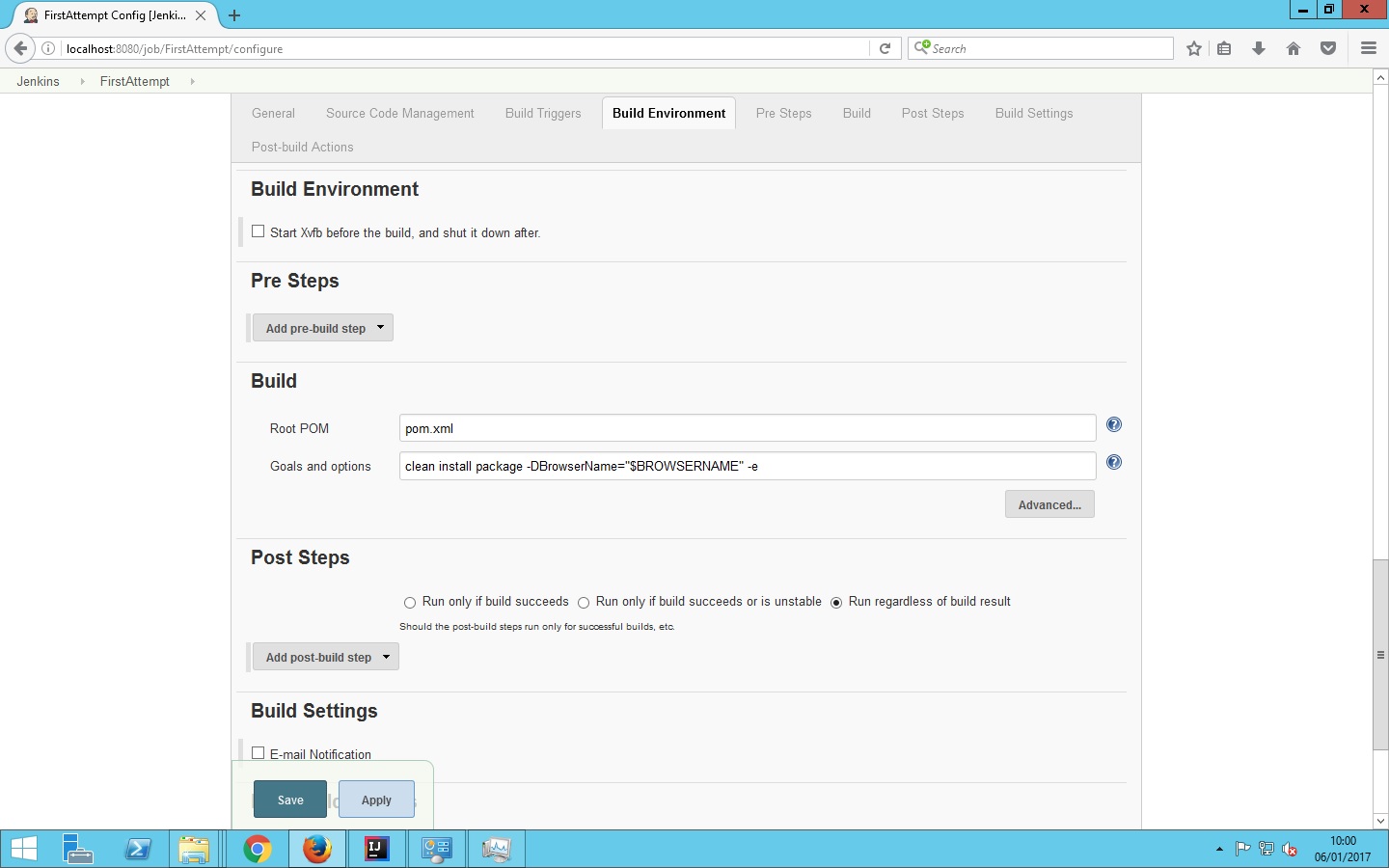
我确信解决方案很简单,我让Jenkins作为服务运行,并使用本地管理帐户。我已经为jenkins安装了chromedriver以及Selenium插件。测试是可以的,但是他们使用的是Firefox,FF版本50似乎无法在Selenium 3.0.1上与壁虎驱动程序一起工作,所以我宁愿使用Chrome,因为我知道Chrome工作得很好,但对于我的生活,我不知道如何告诉Jenkins使用Chrome而不是FF。提前感谢您的帮助!如果我漏掉了什么就道歉。
操作系统- Windows 2012 Maven TestNG Selenium 3.0.1
回答 1
Stack Overflow用户
发布于 2017-01-10 03:15:38
我猜想,定义使用的默认浏览器是firefox,您的测试代码无法找到要使用的浏览器风格(通过命令行(或) JVM args (或)通过参数),因此它默认使用它所知道的内容,即firefox。
我注意到,在您的IntelliJ运行配置屏幕截图中,您已经使用JVM参数-Dbrowser=chrome指定了浏览器风格,但出于某种原因,我在您的Jenkins配置页面屏幕截图中没有看到相同的内容。
你好像有个类似clean install package -DBrowserName="$BROWSERNAME" -e的东西
请您将其更改为clean install package -Dbrowser=$BROWSERNAME -e (我认为您不需要在$BROWSERNAME中加上引号,并且假设BROWSERNAME引用了詹金斯配置页面中的有效参数)。
基本上应该能解决你的问题。
https://stackoverflow.com/questions/41551437
复制相似问题
腾讯云开发者

Copyright © 2013 - 2026 Tencent Cloud. All Rights Reserved. 腾讯云 版权所有
深圳市腾讯计算机系统有限公司 ICP备案/许可证号:粤B2-20090059  粤公网安备44030502008569号
腾讯云计算(北京)有限责任公司 京ICP证150476号 | 京ICP备11018762号