
Javascript流程图
Javascript流程图
提问于 2017-01-09 11:43:47
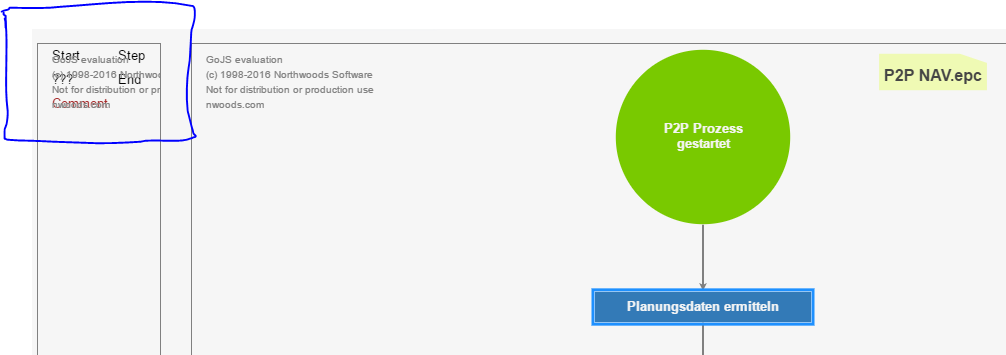
我正在使用来自http://gojs.net/latest/samples/flowchart.html的Flowchart,它运行得很好。它唯一的问题是,它也没有t display the toolbar symbols which are shown in the example. Have someone usedFlowchart``并且有同样的问题?
var $ = go.GraphObject.make;

myPalette =
                    $(go.Palette, "myPaletteDiv",  // must name or refer to the DIV HTML element
                        {
                            "animationManager.duration": 800, // slightly longer than default (600ms) animation
                            nodeTemplateMap: myDiagram.nodeTemplateMap,  // share the templates used by myDiagram
                            model: new go.GraphLinksModel([  // specify the contents of the Palette
                                {category: "Start", text: "Start"},
                                {text: "Step"},
                                {text: "???", figure: "Diamond"},
                                {category: "End", text: "End"},
                                {category: "Comment", text: "Comment"}
                            ])
                        });
问题
回答 1
Stack Overflow用户
回答已采纳
发布于 2017-01-09 13:16:59
在初始化图表及其Diagram.nodeTemplateMap.之前,我认为您正在初始化调色板这实际上意味着调色板没有使用自定义模板,因此调色板中的节点使用默认节点模板。
如果您查看流程图示例中的源代码,您将看到以下内容:
// initialize the Palette that is on the left side of the page
myPalette =
  $(go.Palette, "myPaletteDiv",  // must name or refer to the DIV HTML element
    {
      "animationManager.duration": 800, // slightly longer than default (600ms) animation
nodeTemplateMap: myDiagram.nodeTemplateMap, // share the templates used by myDiagram页面原文内容由Stack Overflow提供。腾讯云小微IT领域专用引擎提供翻译支持
原文链接:
https://stackoverflow.com/questions/41547324
复制相关文章
相似问题
腾讯云开发者

Copyright © 2013 - 2026 Tencent Cloud. All Rights Reserved. 腾讯云 版权所有
深圳市腾讯计算机系统有限公司 ICP备案/许可证号:粤B2-20090059  粤公网安备44030502008569号
腾讯云计算(北京)有限责任公司 京ICP证150476号 | 京ICP备11018762号