
JavaFX 8,如何获取滚动窗格视图端口的中心位置
JavaFX 8,如何获取滚动窗格视图端口的中心位置
提问于 2017-01-08 17:31:52
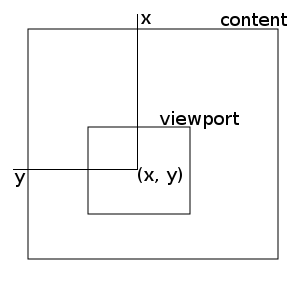
问题
我试图找出一种方法来获取内容节点中滚动窗格的视图集中在哪个点。
为了详细说明上面的图片,大矩形是内容(比如大图像),小矩形是滚动窗格显示的部分。我试图找到x和y,这是内容左上角的坐标。
我试过什么
我的第一个想法是使用滚动窗格的getViewportBounds()方法,并使用它的minX和maxX属性来确定中心x点:
Bounds b = scrollPane.getViewportBounds();
double centerX = (b.getMinX() + b.getMaxX()) / 2;
double centerY = (b.getMinY() + b.getMaxY()) / 2;但是,这不起作用,因为这些数字是负数,而且似乎没有准确地描述我正在寻找的x和y。
我的下一个想法是使用滚动窗格的hValue和vValue获取相对于内容的视图左上角:
Bounds b = scrollPane.getViewportBounds();
double centerX = scrollPane.getHvalue() + b.getWidth() / 2;
double centerY = scrollPane.getVvalue() + b.getHeight() / 2;但这也不起作用,因为hValue和vValue看起来太大了(当我只滚动几个像素时,我得到的数字就像1600个)。
我的问题
对于视图如何使用滚动窗格,我似乎有一个根本的误解。
我在这里做错什么了?有人能解释一下这些数字是从哪里来的吗?如何在上面的图片中找到x和y?
回答 1
Stack Overflow用户
回答已采纳
发布于 2017-01-08 19:02:27
将(x, y)设为视图中显示的顶部和左点的be坐标。你可以把这个写成
((contentWidth - viewportWidth) * hValueRel, (contentHeight - viewportHeight) * vValueRel)

vValueRel = vValue / vMax
hValueRel = hValue / hMax这意味着假设hmin和vmin保持为0,您可以在下面的中间保持一个圆圈:
// update circle position to be centered in the viewport
private void update() {
    Bounds viewportBounds = scrollPane.getViewportBounds();
    Bounds contentBounds = content.getBoundsInLocal();

    double hRel = scrollPane.getHvalue() / scrollPane.getHmax();
    double vRel = scrollPane.getVvalue() / scrollPane.getVmax();

    double x = Math.max(0, (contentBounds.getWidth() - viewportBounds.getWidth()) * hRel) + viewportBounds.getWidth() / 2;
    double y = Math.max(0, (contentBounds.getHeight() - viewportBounds.getHeight()) * vRel) + viewportBounds.getHeight() / 2;

    Point2D localCoordinates = content.parentToLocal(x, y);
    circle.setCenterX(localCoordinates.getX());
    circle.setCenterY(localCoordinates.getY());
}

private Circle circle;
private Pane content;
private ScrollPane scrollPane;

@Override
public void start(Stage primaryStage) {
    // create ui
    circle = new Circle(10);
    content = new Pane(circle);
    content.setPrefSize(4000, 4000);
    scrollPane = new ScrollPane(content);
    Scene scene = new Scene(scrollPane, 400, 400);

    // add listener to properties that may change
    InvalidationListener l = o -> update();
    content.layoutBoundsProperty().addListener(l);
    scrollPane.viewportBoundsProperty().addListener(l);
    scrollPane.hvalueProperty().addListener(l);
    scrollPane.vvalueProperty().addListener(l);
    scrollPane.hmaxProperty().addListener(l);
    scrollPane.vmaxProperty().addListener(l);
    scrollPane.hminProperty().addListener(l);
    scrollPane.vminProperty().addListener(l);

    primaryStage.setScene(scene);
    primaryStage.show();
}页面原文内容由Stack Overflow提供。腾讯云小微IT领域专用引擎提供翻译支持
原文链接:
https://stackoverflow.com/questions/41535624
复制相关文章
相似问题
腾讯云开发者

Copyright © 2013 - 2026 Tencent Cloud. All Rights Reserved. 腾讯云 版权所有
深圳市腾讯计算机系统有限公司 ICP备案/许可证号:粤B2-20090059  粤公网安备44030502008569号
腾讯云计算(北京)有限责任公司 京ICP证150476号 | 京ICP备11018762号