
更改内容-用于ng文件上载的类型
更改内容-用于ng文件上载的类型
提问于 2017-01-06 11:45:25
我正在尝试用ng文件上传文件。我的大部分工作都是这样的,但是API中有一个错误正在被调用,这意味着.xlsx文件不能正确上传。其他文件类型也能工作。我被告知,强制在有效负载中的内容-类型‘应用程序/x压缩压缩’允许文件上传。不幸的是,我不知道如何改变这一点。有效载荷如下所示:
------WebKitFormBoundary9rVv6WxE2BM7vFxz
Content-Disposition: form-data; name="file[0]"; filename="My Excel File.xlsx"
Content-Type: application/vnd.openxmlformats-officedocument.spreadsheetml.sheet


------WebKitFormBoundary9rVv6WxE2BM7vFxz--
但要像这样:
------WebKitFormBoundary9rVv6WxE2BM7vFxz
Content-Disposition: form-data; name="file[0]"; filename="My Excel File.xlsx"
Content-Type: application/x-zip-compressed


------WebKitFormBoundary9rVv6WxE2BM7vFxz--
有谁能帮忙做这个改变吗?我尝试过更改文件对象的type属性,但没有进行更改。
上传的功能是
$scope.uploadThenRun = function (file) {
    Upload.upload({
        url: 'https://'+ ppService.ppServer+ ':'+ ppService.sslPort + '/jobs/',
        data: {file: file}
    }).then(function (resp) {
        var jobID = resp.data.data.value;
        $scope.loadParentFormulation(jobID);
    }, function (resp) {
    }, function (evt) {
    });
它是从这样的div调用的:
<div class="my-drop-zone">
      <div ngf-drop="uploadThenRun($files)" class="drop-box well"
       ngf-drag-over-class="'dragover'" ngf-multiple="true">Drop your file here</div>
</div>
这是发送的网络请求。需要更改的是有效负载中的内容类型。
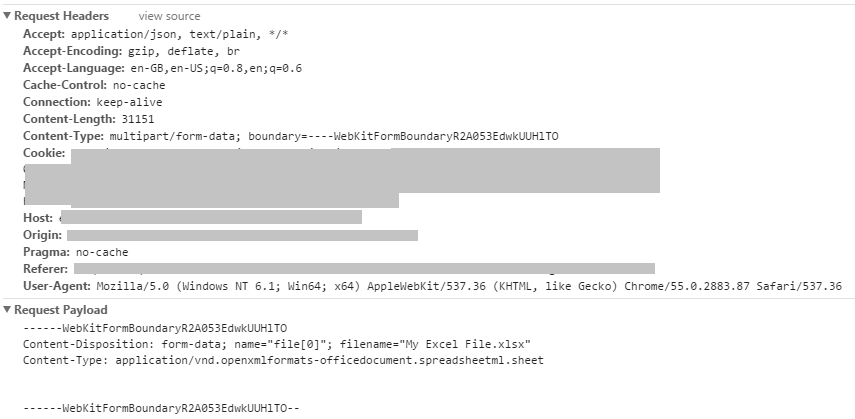
希望有人能帮忙
回答 2
Stack Overflow用户
回答已采纳
发布于 2017-01-18 00:33:46
可以在上传之前更改文件类型,如下所示:
if (file.type === 'application/vnd.openxmlformats-officedocument.spreadsheetml.sheet') {
  file = file.slice(0, file.size, "application/x-zip-compressed")
}
Upload.upload({..., data: {file: file}, ...})
这将使新类型的文件具有相同的内容。
Stack Overflow用户
发布于 2017-01-06 12:47:53
可以使用标头定义内容类型。
$scope.uploadThenRun = function (file) {
    Upload.upload({
        url: 'https://'+ ppService.ppServer+ ':'+ ppService.sslPort + '/jobs/',
        data: {file: file},
        headers : {'Content-Type': 'application/x-zip-compressed'}
    }).then(function (resp) {
        var jobID = resp.data.data.value;
        $scope.loadParentFormulation(jobID);
    }, function (resp) {
    }, function (evt) {
});页面原文内容由Stack Overflow提供。腾讯云小微IT领域专用引擎提供翻译支持
原文链接:
https://stackoverflow.com/questions/41505016
复制相关文章
相似问题
腾讯云开发者

Copyright © 2013 - 2026 Tencent Cloud. All Rights Reserved. 腾讯云 版权所有
深圳市腾讯计算机系统有限公司 ICP备案/许可证号:粤B2-20090059  粤公网安备44030502008569号
腾讯云计算(北京)有限责任公司 京ICP证150476号 | 京ICP备11018762号