
动态组件注入和动态组件属性的访问
我有以下代码:
search.component.ts
import { CoreComponent }  from './../../core/components/core.component';
import { SearchDropDownComponent } from './search.dropdown.component';
import { Component,Input,EventEmitter, Output, ViewChild}  from "@angular/core";


@Component({
            selector:'search',
            templateUrl:'app/templates/search.component.html',
            styleUrls:['app/templates/css/search.component.css']
           })

export class SearchComponent
{
   @Input()  core    : CoreComponent;
   @Output() onSearch : EventEmitter<any> = new EventEmitter();
   @ViewChild(SearchDropDownComponent) dropdown: SearchDropDownComponent;

   private searchText:String="";

   search(event:any) : void
   {
     if (+event.keyCode==13 || event.type=="click")
     {
        this.onSearch.emit(event);
        return;
     }
   }

}
search.component.html
<div class="input-group" id="search">
   <input class="form-control kblue-background-pale" [(ngModel)]="searchText" (keypress)=search($event) placeholder="Search" list="search-dropdown" type="text">
     <search-dropdown [core]="this.core" [typed]="this.searchText"></search-dropdown>
     <div class="input-group-btn">
       <div class="btn-group" role="group">
         <button (click)="search($event)" type="button" class="btn kblue-background-pale">
           <span class="glyphicon glyphicon-search kblue" aria-hidden="true">
           </span>
         </button>
       </div>
     </div>
</div>
search.dropdown.component.ts
import { CoreBase } from './../../core/components/core.base';
import { ComponentFactoryService } from './../../services/services/component.fac';
import { SearchResultComponent } from './search.result.component';
import { CoreComponent } from './../../core/components/core.component';

import { Component,
         Input,AfterViewInit ,
         ContentChildren,ContentChild,
         Output,Inject,forwardRef,OnChanges,ElementRef,ViewChild,ViewContainerRef,ViewChildren,QueryList } from "@angular/core";

@Component(
           {
            selector:'search-dropdown',
            templateUrl:'app/templates/search.dropdown.component.html',
            styleUrls:['app/templates/css/search.dropdown.component.css']
           }
          )

export class SearchDropDownComponent  implements AfterViewInit , OnChanges
{

   @Input()     core : CoreComponent;
   @ViewChild('searchresult', {read: ViewContainerRef}) p: ViewContainerRef;
   @ViewChildren(SearchResultComponent) t:  QueryList<any>;
   @ViewChild('parent', {read: ViewContainerRef}) children: ViewContainerRef;
   private MLENGTH=2;
   private RLENGTH=0;
   private searchLength=0;

   constructor(private factory:ComponentFactoryService) {


   }

   @Input()
   set typed(typed:string)
   {
     if (typed.length>this.searchLength)
     {
       if (typed.length>this.MLENGTH)
       {
         this.core.webservice(this.result,"communities",{search:typed});
       }
       this.searchLength=typed.length;
     }
     else
     {
       if (typed.length==this.RLENGTH)
       {
         this.p.clear();
         this.searchLength=0;
       }
     }

      console.log(this.p.length);
      console.log(this.children);
     // for(var index = 0; index < this.p.length; index++)
      //{
       // console.log(this.t);
     // }
   }

   ngAfterViewInit() {

    }

    ngOnChanges()
    {
      console.log(this.p.element.nativeElement.childNodes);
      console.log(this.children);
    }

   public result=(data:any)=>
   {
    data.forEach((item:any)=>
    {
      this.factory.getComponent(this.p,SearchResultComponent,item);
    });
   }
}
search.dropdown.component.html:
<datalist id="search-dropdown" #searchresult></datalist>search.result.component.ts:
import { CoreBase } from './../../core/components/core.base';
import { Component,OnInit,TemplateRef} from "@angular/core";


@Component({
            selector:'search-result',
            templateUrl:'app/templates/search.result.component.html',
            styleUrls:['app/templates/css/search.result.component.css']
           })


export class SearchResultComponent extends CoreBase implements OnInit
{
   private suggestions:String;


   constructor()
   {
    super();
   }

   ngOnInit()
   {
     this.suggestions=this.parameters["search"];
   }
}
search.result.component.html:
<option>{{suggestions}}</option>component.fac.ts (组件工厂服务):
import { CoreBase } from './../../core/components/core.base';
import {
         Injectable,
         ReflectiveInjector,
         ViewContainerRef,
         ComponentFactoryResolver
        }  from '@angular/core';

@Injectable()
export class ComponentFactoryService
{

  constructor(private componentFactoryResolver: ComponentFactoryResolver)
  {

  }


  public getComponent(refDOM:ViewContainerRef, component:any,parameters:any)
  {
     let factory  = this.componentFactoryResolver.resolveComponentFactory(component);
     let injector = ReflectiveInjector.fromResolvedProviders([], refDOM.parentInjector);
     let comp     = factory.create(injector);
     (<CoreBase>comp.instance).parameters=parameters;
     comp.changeDetectorRef.detectChanges();

     refDOM.insert(comp.hostView,0);
     return comp.instance;
  }

}
我希望在角2中开发一个搜索下拉建议小部件,当用户在输入框占位符中键入3个字符时,向后端发出请求并返回一个json响应。每个搜索建议元素都动态加载在search.dropdown.component中,特别是在search.dropdown.component.html的#搜索结果中。
组件search.result.component被动态注入,但呈现在外部:

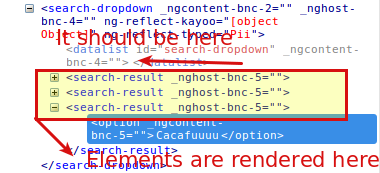
我希望在datalist中注入动态组件,然后能够使用search.result.component api访问属性建议ViewChildren。
问题是搜索结果组件是在datalist之外呈现的。如果我在html中放置一个div或模板标记来呈现动态元素,视图就会正确地呈现,但是ViewChildren api不会检索动态注入的组件。
如何访问在div标记中呈现的ViewChildren api组件?
谢谢
回答 3
Stack Overflow用户
发布于 2017-01-09 10:35:22
所以你所看到的是类似于角度路由器本身的东西,不是吗?请看一下以下消息来源:outlet.ts:
activate(...): void {
    ...
    const component: any = <any>snapshot._routeConfig.component;
    const factory = resolver.resolveComponentFactory(component);
    ...
    this.activated = this.location.createComponent(factory, this.location.length, inj, []);
    ...
}很快,您就有了一个ViewContainerRef,它将当前组件引用为容器和ComponentFactoryResolver.它们都是构造函数注入的。
上面的componentFactory (const factory in )是用ComponentFactoryResolver.resolveComponentFactory(desiredComponent)方法创建的。
然后,使用方法desiredComponent (此处为doc:https://angular.io/docs/ts/latest/api/core/index/ViewContainerRef-class.html#!#createComponent-anchor)将this.activated(在上面的this.activated)添加到容器中。
因此,在代码中,替换:
refDOM.insert(comp.hostView,0);
return comp.instance;
通过:
refDOM.createComponent(factory, refDOM.length, injector);Stack Overflow用户
发布于 2017-01-12 10:31:56
这方面有棘手的解决办法。现在,在角rc5之后,没有办法按照您的需要实现嵌套标记,但是如果您更改了:
search.dropdown.component.html:
<datalist id="search-dropdown">
   <template #searchresult />
</datalist>
您应该在html代码中实现这样的功能:
<data-list id="search-dropdown">
   <!-- template -->
   <search-result ... />
   <search-result ... />
   <search-result ... />
   ...
</data-list>
模板标签不是由角呈现的,它被更改为注释(任何其他标记f.ex )。div将显示为空div。
Stack Overflow用户
发布于 2017-01-05 15:27:42
我不明白你为什么要用@ViewChild..。您的search.dropdown.component.html可能类似于:
<datalist id="search-dropdown" #searchresult>
  <div *ngFor="let result of results">
    <search-result1 *ngIf="result.type==1" [suggestions]="result" ...></search-result1>
    <search-result2 *ngIf="result.type==2" [suggestions]="result" ...></search-result2>
    ...
  </div>
</datalist>
然后将您的建议作为组件中的输入,以便在其中删除内容:
export class SearchResultComponent extends CoreBase implements OnInit
{
   @Input() private suggestions:string;
...并在search.dropdown.component.ts中添加一个包含建议的字段:
export class SearchDropDownComponent  implements AfterViewInit , OnChanges
{

   private results: string[] = [];

   onChange() {
     updateResultsHere();
   }
...https://stackoverflow.com/questions/41486351
复制相似问题
腾讯云开发者

Copyright © 2013 - 2026 Tencent Cloud. All Rights Reserved. 腾讯云 版权所有
深圳市腾讯计算机系统有限公司 ICP备案/许可证号:粤B2-20090059  粤公网安备44030502008569号
腾讯云计算(北京)有限责任公司 京ICP证150476号 | 京ICP备11018762号