
绘制Pandas中的不同邮政编码房价中值的timeseries数据
我已经从当地的地铁名单上下载了数据,我想分析这个地区不同的市场趋势。我有分析地铁网站趋势的工具,但我想更熟悉使用Pandas和matplotlib绘图。
目前,这就是我所拥有的。
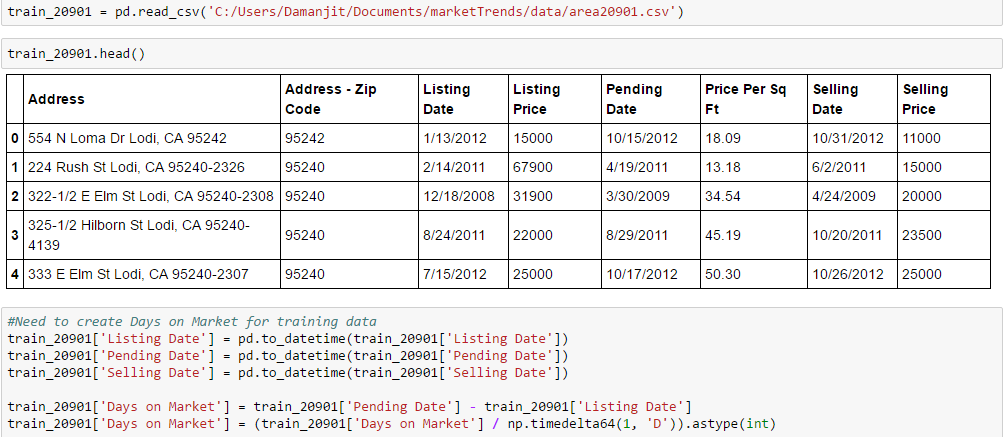
train_20901 = pd.read_csv('C:/Users/Damanjit/Documents/marketTrends/data/area20901.csv')
train_20901.head()
#small snippet of the full data, to see full data see images.
     Address - Zip Code     Listing Date      Listing Price
0    95242                  10/15/2012        15000
1    95240                  2/14/2011         67900
2    95240                  12/18/2008        31900
3    95240                  8/24/2011         22000
4    95240                  7/15/2012         25000

#Need to create Days on Market for training data
train_20901['Listing Date'] = pd.to_datetime(train_20901['Listing Date'])
train_20901['Pending Date'] = pd.to_datetime(train_20901['Pending Date'])
train_20901['Selling Date'] = pd.to_datetime(train_20901['Selling Date'])

train_20901['Days on Market'] = train_20901['Pending Date'] - train_20901['Listing Date']
train_20901['Days on Market'] = (train_20901['Days on Market'] / np.timedelta64(1, 'D')).astype(int)

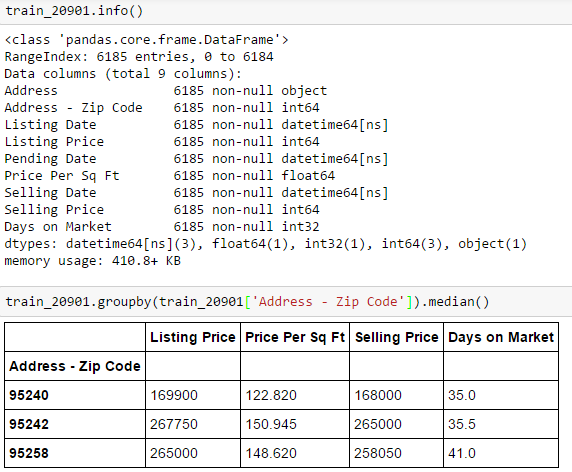
train_20901.info()

<class 'pandas.core.frame.DataFrame'>
RangeIndex: 6185 entries, 0 to 6184
Data columns (total 9 columns):
Address               6185 non-null object
Address - Zip Code    6185 non-null int64
Listing Date          6185 non-null datetime64[ns]
Listing Price         6185 non-null int64
Pending Date          6185 non-null datetime64[ns]
Price Per Sq Ft       6185 non-null float64
Selling Date          6185 non-null datetime64[ns]
Selling Price         6185 non-null int64
Days on Market        6185 non-null int32
dtypes: datetime64[ns](3), float64(1), int32(1), int64(3), object(1)
memory usage: 410.8+ KB

train_20901.groupby(train_20901['Address - Zip Code']).median()

Address - Zip Code  Listing Price   Price Per Sq Ft Selling Price   Days on Market
95240               169900          122.820          168000         35.0
95242               267750          150.945          265000         35.5
95258               265000          148.620          258050         41.0
打开数据并准备好
按邮编对数据进行分组
我想要做的是用上市日期来描绘上市价格的中位数随时间的变化。日期自2008年2月10日起至2016年9月12日结束。我想把日期存起来,这样只有日期和年份才能显示出来。例如,我想为95242、95240和95258的三个不同的邮政编码绘制12/09年的挂牌价格中位数。所以在12/09这段时间里,垃圾箱应该有三个不同的点。我想在10/08到12/16之间的所有不同时间周期中这样做。图中总共应该有99个回收箱。我所困惑的是如何在DataFrame中构造数据以完成这一任务并绘制它。我试过pandas.resample和pandas.pivot,但没有成功。任何正确方向的小提示都将不胜感激。
我想我的桌子最后看起来应该是这样的:
Listing Date    Zip Code     Median Home Prices
10/08           95240        168000
10/08           95242        216500
10/08           95258        210000
11/08           95240        171400
11/08           95242        219000
11/08           95258        212100
...and等,其中每个邮政编码都有自己的中间价格在一定时期内。我可以用字典对每个月和一年进行硬编码,这样就可以找到某个邮政编码的房价中值,但我觉得熊猫应该有一种更简单的方法来处理大型数据集。
编辑
------------------------------------------------------------------------------因此,当我使用重采样时,我确实为时间序列数据创建了回收箱,但是我希望单独获得不同的邮政编码。当我重新整理的时候我有这个
train_20901.resample('M', on = 'Selling Date').median()


Selling Date    Zip Code    Days on Market  Listing Price   Price Per Sq Ft Selling Price
2008-10-31        95240         21.0           160500         122.575        150000
2008-11-30        95240         36.0           179400         136.710        180000
2008-12-31        95240         32.0           165400         126.665        165025
2009-01-31        95240         37.5           165200         122.075        165000
2009-02-28        95240         52.0           174700         116.925        172500
2009-03-31        95240         48.5           129900         99.300         124950
2009-04-30        95240         35.5           164950         114.900        163250
2009-05-31        95240         21.0           159000         122.860        165000
2009-06-30        95240         36.0           134900         110.470        126000
2009-07-31        95240         14.0           174900         121.800        177500
我是否使用groupby函数,但如果使用,如何将索引保留为timeseries,但得到不同的邮政编码,而不是中间值?
解出
我通过这样做弄明白了。
resampled = train_20901.set_index('Selling Date').groupby('Address - Zip Code').resample('M').median()这正是我想要的,现在我只需要策划。
回答 1
Stack Overflow用户
发布于 2020-09-16 04:31:17
如上文所示,解决这一问题的办法是:
resampled = train_20901.set_index('Selling Date').groupby('Address - Zip Code').resample('M').median()https://stackoverflow.com/questions/41458698
复制相似问题
腾讯云开发者

Copyright © 2013 - 2026 Tencent Cloud. All Rights Reserved. 腾讯云 版权所有
深圳市腾讯计算机系统有限公司 ICP备案/许可证号:粤B2-20090059  粤公网安备44030502008569号
腾讯云计算(北京)有限责任公司 京ICP证150476号 | 京ICP备11018762号