
BoxLayout加左边距
BoxLayout加左边距
提问于 2017-01-03 13:42:16
我有一个JPanel,它有一个BoxLayout (页面轴),我想布局两个组件,一个在另一个之上。
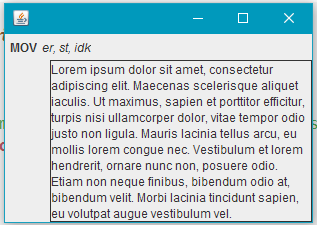
我的问题是大口红盒左边的边边,我怎么能摆脱这个呢?如果我不添加最上面的组件,就没有余地了。

下面是我的代码,第二个映像是通过不添加headerPanel创建的
JLabel commandLabel = new JLabel(command);
    JLabel paramLabel = new JLabel(params);
    JLabel descLabel = new JLabel("<html><body style='width: 200px;'>" + description + "</body></html>");
    Font baseFont = commandLabel.getFont(), commandFont, paramFont, descFont;

    commandFont = baseFont.deriveFont(Font.BOLD);
    paramFont = baseFont.deriveFont(Font.ITALIC);
    descFont = baseFont.deriveFont(Font.PLAIN);

    commandLabel.setFont(commandFont);
    paramLabel.setFont(paramFont);
    descLabel.setFont(descFont);
    descLabel.setAlignmentX(LEFT_ALIGNMENT);
    descLabel.setBorder(BorderFactory.createStrokeBorder(new BasicStroke()));
    JPanel headerPanel = new JPanel(new FlowLayout(FlowLayout.LEADING));
        headerPanel.add(commandLabel);
        headerPanel.add(paramLabel);
    this.add(headerPanel);
this.add(descLabel);这个类扩展了JPanel,并添加到一个JFrame中,它就是pack()'d。
回答 2
Stack Overflow用户
回答已采纳
发布于 2017-01-03 14:30:30
虽然我无法知道所观察到的行为来自何处,但可以通过使用中间JPanel来包含您的标签来实现预期的显示,而不是直接添加JLabel:
    JLabel commandLabel = new JLabel(command);
    JLabel paramLabel = new JLabel(params);
    JLabel descLabel = new JLabel("<html><body style='width: 200px;'>" + description + "</body></html>");
    Font baseFont = commandLabel.getFont(), commandFont, paramFont, descFont;

    commandFont = baseFont.deriveFont(Font.BOLD);
    paramFont = baseFont.deriveFont(Font.ITALIC);
    descFont = baseFont.deriveFont(Font.PLAIN);

    commandLabel.setFont(commandFont);
    paramLabel.setFont(paramFont);
    descLabel.setFont(descFont);
    descLabel.setAlignmentX(LEFT_ALIGNMENT);
    descLabel.setBorder(BorderFactory.createStrokeBorder(new BasicStroke()));
    JPanel headerPanel = new JPanel(new FlowLayout(FlowLayout.LEADING));
    JPanel descPanel = new JPanel(new FlowLayout(FlowLayout.LEADING));// added
    headerPanel.add(commandLabel);
    headerPanel.add(paramLabel);

    descPanel.add(descLabel);// added

    this.add(headerPanel);
this.add(descPanel);// modifiedStack Overflow用户
发布于 2017-01-03 15:20:40
我的问题是大口红盒左边的边边,我怎么能摆脱这个呢?
您需要使组件的对齐保持一致。也就是说,所有组件的对齐"X“属性都应该保持对齐。
我猜JLabel是中心对齐的,所以您需要使用:
descLabel.setAlignmentX(JLabel.LEFT_ALIGNMENT);有关更多信息和示例,请参见关于固定对齐问题的Swing教程中的How to Use BoxLayout部分。
页面原文内容由Stack Overflow提供。腾讯云小微IT领域专用引擎提供翻译支持
原文链接:
https://stackoverflow.com/questions/41444875
复制相关文章
相似问题
腾讯云开发者

Copyright © 2013 - 2026 Tencent Cloud. All Rights Reserved. 腾讯云 版权所有
深圳市腾讯计算机系统有限公司 ICP备案/许可证号:粤B2-20090059  粤公网安备44030502008569号
腾讯云计算(北京)有限责任公司 京ICP证150476号 | 京ICP备11018762号