
QtCreator:未显示qDebug消息
QtCreator:未显示qDebug消息
提问于 2017-01-02 10:58:01
我目前正在Windows 7 (64位,终极)上使用currently 3.2.1和QT5.3.2(按照我当前项目的要求)。我目前正在做一个GUI项目
我无法在应用程序输出窗口中看到任何qDebug消息,尽管我已经完成了以下操作:
- 具有适当的QDebug代码
- 以调试模式构建项目
- 使用"CONFIG += openssl链接“"CONFIG +=控制台”作为构建项目的附加参数
- 根本没有定义QT_NO_DEBUG_OUTPUT
- 确认我有一个调试器( MinGW 4.8.2 32位在安装QtCreator期间安装了GDB)
我能知道我还应该尝试什么吗?谢谢!
回答 2
Stack Overflow用户
回答已采纳
发布于 2017-01-03 18:37:34
我没有收到任何由Qt中的
qDebug()输出的调试消息?那是什么原因呢?
通过自定义日志消息处理程序重新定义Qt应用程序中的标准Qt调试输出是很常见的,但我们仍然可以处理使调试消息到达调试控制台的问题:
// example for custom message handler
void customLogHandler(QtMsgType type, const QMessageLogContext& context,
                      const QString& msg)
{
   // send the data to log file via the other thread
   emit writeToFile(type, context, msg);

   // now output to debugger console
#ifdef Q_OS_WIN
    OutputDebugString(text.toStdWString().c_str());
#else
    std::cerr << text.toStdString() << std::endl;
#endif
}

void main()
{
   // custom handler start
   qInstallMessageHandler(&customLogHandler);

   // other app initializations
}Stack Overflow用户
发布于 2020-03-31 22:01:16
这是在Arch上为我做的。
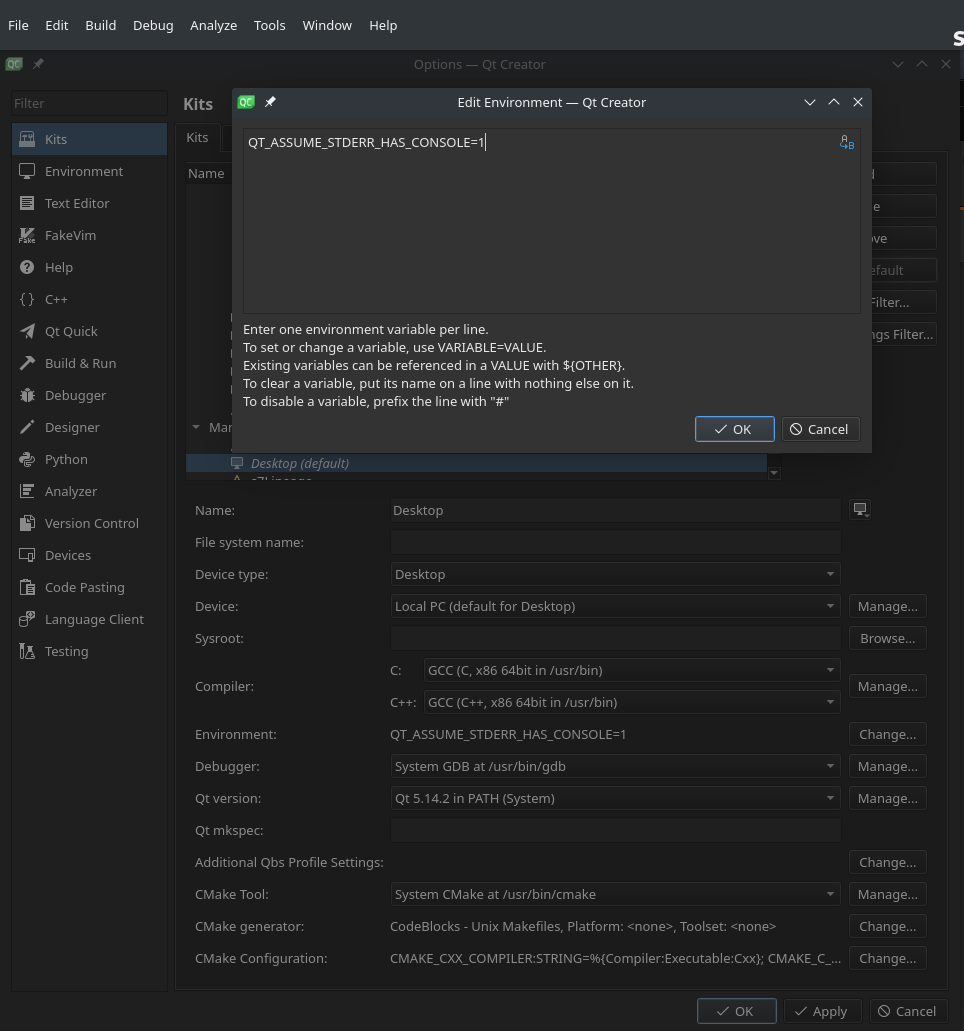
Qt创建者>工具>选项>工具包,选择工具包,查找环境,单击change并添加:
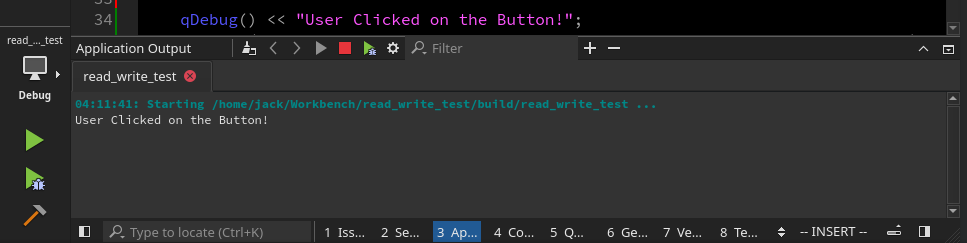
QT_ASSUME_STDERR_HAS_CONSOLE=1现在,可以在应用程序输出中输出消息,如下所示:
qDebug() << "User clicked on the button!";
比你在节目中看到的要好:
页面原文内容由Stack Overflow提供。腾讯云小微IT领域专用引擎提供翻译支持
原文链接:
https://stackoverflow.com/questions/41425530
复制相关文章
相似问题
腾讯云开发者

Copyright © 2013 - 2026 Tencent Cloud. All Rights Reserved. 腾讯云 版权所有
深圳市腾讯计算机系统有限公司 ICP备案/许可证号:粤B2-20090059  粤公网安备44030502008569号
腾讯云计算(北京)有限责任公司 京ICP证150476号 | 京ICP备11018762号