
不能绑定到“routerLink”,因为它不是“a”的已知属性。("<header id=“标题”>)
以前有人问过这个问题,我做了所有建议的评论,但似乎都没有效果。我有一个组合的问题。让wallaby.js与我的项目一起工作,并在运行ng test时找出错误。
Can't bind to 'routerLink' since it isn't a known property of 'a'. ("<header id="header">                                                                                         <h1 id="logo">                                                                                                                                                                    <a [ERROR ->][routerLink]="['/home']"></a>
                </h1>
        "): AppComponent@2:5
        Can't bind to 'routerLink' since it isn't a known property of 'a'. ("
                <div id="menu">
                        <a [ERROR ->][routerLink]="['/home']" class="btn">Home</a>
                        <a [routerLink]="['/about']" class="btn">About</a>
                        "): AppComponent@6:5
        Can't bind to 'routerLink' since it isn't a known property of 'a'. ("
                <div id="menu">
                        <a [routerLink]="['/home']" class="btn">Home</a>
                        <a [ERROR ->][routerLink]="['/about']" class="btn">About</a>
                        <a [routerLink]="['/experiments']" class="btn">Expe"): AppComponent@7:5
        Can't bind to 'routerLink' since it isn't a known property of 'a'. ("terLink]="['/home']" class="btn">Home</a>
                        <a [routerLink]="['/about']" class="btn">About</a>
                        <a [ERROR ->][routerLink]="['/experiments']" class="btn">Experiments</a>
                </div>
        "): AppComponent@8:5
        'router-outlet' is not a known element:
        1. If 'router-outlet' is an Angular component, then verify that it is part of this module.
        2. If 'router-outlet' is a Web Component then add "CUSTOM_ELEMENTS_SCHEMA" to the '@NgModule.schemas' of this component to suppress this message. ("
        <div id="container">
                [ERROR ->]<router-outlet></router-outlet>
        </div>
        "): AppComponent@18:1
我的NgModule
import {BrowserModule} from "@angular/platform-browser";
import {NgModule,CUSTOM_ELEMENTS_SCHEMA} from "@angular/core";
import {FormsModule} from "@angular/forms";
import {HttpModule} from "@angular/http";
import {RouterModule} from "@angular/router";
import {HomeComponent} from "./home/home.component";
import {ExperimentsComponent} from "./experiments/experiments.component";
import {AboutComponent} from "./about/about.component";
import {AppComponent} from "./app.component";
import {ExperimentsService} from "./common/experiments.service";
import {StateService} from "./common/state.service";
import {ExperimentDetailComponent} from "./experiments/experiment-details/experiment.detail.component";

@NgModule({
    declarations: [
        AppComponent,
        AboutComponent,
        HomeComponent,
        ExperimentsComponent,
        ExperimentDetailComponent
    ],
    imports: [
        BrowserModule,
        FormsModule,
        HttpModule,
        RouterModule.forRoot([
            {path: '', redirectTo: '/home', pathMatch: 'full'},
            {path: 'home', component: HomeComponent},
            {path: 'about', component: AboutComponent},
            {path: 'experiments', component: ExperimentsComponent},
            {path: '**', component: HomeComponent}
        ])
    ],
    schemas: [
      CUSTOM_ELEMENTS_SCHEMA
    ],
    providers: [
        ExperimentsService,
        StateService
    ],
    bootstrap: [AppComponent]
})
export class AppModule {
}
这是唯一的模块。这是一个简单的应用程序:
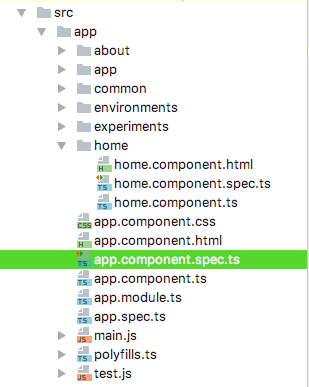
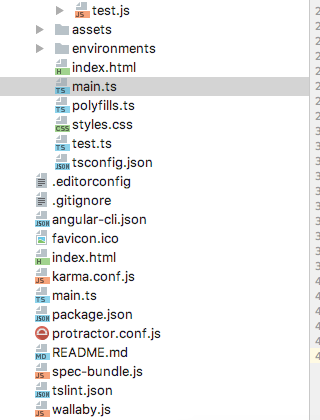
我还在GitHub 这里上发布了这个项目。
import { TestBed, async } from '@angular/core/testing';
import { AppComponent } from './app.component';
import {RouterTestingModule} from "@angular/router/testing";
import {HomeComponent} from "./home/home.component";
import {AboutComponent} from "./about/about.component";
import {ExperimentsComponent} from "./experiments/experiments.component";

describe('AppComponent', () => {
  beforeEach(() => {
    TestBed.configureTestingModule({
      imports: [
        RouterTestingModule.withRoutes([
          {path: '', redirectTo: '/home', pathMatch: 'full'},
          {path: 'home', component: HomeComponent},
          {path: 'about', component: AboutComponent},
          {path: 'experiments', component: ExperimentsComponent},
          {path: '**', component: HomeComponent}
        ])
      ],
      declarations: [
        AppComponent
      ],
    });
    TestBed.compileComponents();
  });

  it('should create the app', async(() => {
    let fixture = TestBed.createComponent(AppComponent);
    let app = fixture.debugElement.componentInstance;
    expect(app).toBeTruthy();
  }));
});但是现在我得到了Failed: Component HomeComponent is not part of any NgModule or the module has not been imported into your module. Error: Component HomeComponent is not part of any NgModule or the module has not been imported into your module.
但是HomeCompenent显然在我的@NgModule里
回答 3
Stack Overflow用户
发布于 2016-12-31 15:35:15
这是你的app.component.spec.ts
您还应该在那里添加routerModule
beforeEach(() => {
    TestBed.configureTestingModule({
      declarations: [
        AppComponent
      ],
      imports:[RouterModule.forRoot([])] //add the router module here as well
    });
    TestBed.compileComponents();
});当您测试您的AppComponent时,正如我所说的,您应该给出您曾经给根@NgModule的任何测试床,所以:
 beforeEach( () => {
    TestBed.configureTestingModule( {
        imports : [
            BrowserModule,
            FormsModule,
            HttpModule,
            RouterTestingModule.withRoutes( [
                { path : '', redirectTo : '/home', pathMatch : 'full' },
                { path : 'home', component : HomeComponent },
                { path : 'about', component : AboutComponent },
                { path : 'experiments', component : ExperimentsComponent },
                { path : '**', component : HomeComponent }
            ] )
        ],
        declarations : [
            AppComponent,
            AboutComponent,
            HomeComponent,
            ExperimentsComponent,
            ExperimentDetailComponent
        ],

        schemas : [
            CUSTOM_ELEMENTS_SCHEMA
        ],
        providers : [
            ExperimentsService,
            StateService
        ]
    } );
    TestBed.compileComponents();
} );Stack Overflow用户
发布于 2016-12-31 15:35:27
当您使用TestBed时,您正在从头开始配置一个模块。在您当前的配置中,您所拥有的只是
TestBed.configureTestingModule({
  declarations: [
    AppComponent
  ],
});因此,测试环境的模块中包含的所有内容都是AppComponent。不包括来自AppModule的任何内容。
因此,您将得到错误,因为您丢失了RouterModule中包含的所有路由器指令。您可以导入RouterModule,但是对于测试,您应该使用RouterTestingModule
import { RouterTestingModule } from '@angular/core/testing'

TestBed.configureTestingModule({
  imports: [
    RouterTestingModule.withRoutes([])
  ],
  declarations: [
    AppComponent
  ],
});您可以向withRoutes添加路由。
还请参见:
Stack Overflow用户
发布于 2022-01-13 15:46:47
我也有这个问题,我使用的是一个自己创建的模拟路由器。
所有使用/导入routing、router、RouterTestingModule.withRoutes([])等的例子都给了我更多的错误。
对我来说,解决方案也是为routerLink指令创建一个模拟(当您不模拟路由器但使用RouterTestingModule (可能在RouterTestingModule本身中)时,我不确定在哪里找到了实现?)
因此,事后看来,我本可以自己创建模拟,但正如他们所说的,“真正的RouterLinkDirective相当复杂,与RouterModule的其他组件和指令纠缠在一起。它需要具有挑战性的设置来模拟和在测试中使用。”
我在documentation页面找到了它的实现:https://angular.io/guide/testing-components-scenarios#routerlink
由于链接可能消失,我在这里发布代码:
@Directive({
  selector: '[routerLink]'
})
export class RouterLinkDirectiveStub {
  @Input('routerLink') linkParams: any;
  navigatedTo: any = null;

  @HostListener('click')
  onClick() {
    this.navigatedTo = this.linkParams;
  }
}https://stackoverflow.com/questions/41409554
复制相似问题
腾讯云开发者

Copyright © 2013 - 2026 Tencent Cloud. All Rights Reserved. 腾讯云 版权所有
深圳市腾讯计算机系统有限公司 ICP备案/许可证号:粤B2-20090059  粤公网安备44030502008569号
腾讯云计算(北京)有限责任公司 京ICP证150476号 | 京ICP备11018762号