
Django教程:.choice_set.all未被调用
我是Django框架的新手,我似乎无法确定为什么我的detail.html没有正确地呈现。看来,我在question.choice_set.all中迭代而不是选择的for循环似乎没有被击中。如果有人能帮我找出为什么会很有帮助。
detail.html
<h1>{{ question.question_text }}</h1>

{% if error_message %}<p><strong>{{ error_message }}</strong></p>{%     endif %}

<form action="{% url 'polls:vote' question.id %}" method="post">
{% csrf_token %}

{% for choice in question.choice_set.all %}
<label for="choice{{ forloop.counter }}">{{ choice.choice_text }}

</label><br />

<input type="radio" name="choice" id="choice{{ forloop.counter }}"
value="{{ choice.id }}" />
{% endfor %}


<input type="submit" value="Vote" />
</form>
Views.py
from django.http import HttpResponseRedirect, HttpResponse
from django.template import loader
from django.urls import reverse
from django.shortcuts import get_object_or_404, render

from .models import Choice, Question

# Long Method of return HttpResponse
# def index(request):
#     latest_question_list = Question.objects.order_by('-pub_date')[:5]
#     template = loader.get_template('polls/index.html')
#     context = {
#         'latest_question_list': latest_question_list,
#     }

def index(request):
    latest_question_list = Question.objects.order_by('pub_date')[:5]
    context = {'latest_question_list': latest_question_list}
    return render(request, 'polls/index.html', context)
    # render takes the request (object,template,dictionary<optional>)


# def detail(request, question_id):
#     try:
#         question = Question.objects.get(pk=question_id)
#     except Question.DoesNotExist:
#         raise Http404("Question does not exist")
#     return render(request, 'polls/detail.html', {'question': question})

# SHORTCUT TO USE GET AND RASIE 404
def detail(request, question_id):
    question = get_object_or_404(Question, pk=question_id)
    return render(request, 'polls/detail.html', {'question': question})


def results(request, question_id):
    question = get_object_or_404(Question, pk=question_id)
    return render(request, 'polls/results.html', {'question': question})

def vote(request, question_id):
    question = get_object_or_404(Question, pk=question_id)
    try:
        selected_choice = question.choice_set.get(pk=request.POST['choice'])
    except (KeyError, Choice.DoesNotExist):
        # Redisplay the question voting form.
        return render(request, 'polls/detail.html', {
            'question': question,
            'error_message': "You didn't select a choice.",
        })
    else:
        selected_choice.votes += 1
        selected_choice.save()
        # Always return an HttpResponseRedirect after successfully dealing
        # with POST data. This prevents data from being posted twice if a
        # user hits the Back button.
        return HttpResponseRedirect(reverse('polls:results', args=(question.id,)))
urls.py
# map views to url
from django.conf.urls import url
from django.conf.urls import include

from . import views

app_name = 'polls'

urlpatterns = [
    #ex: polls/
    url(r'^$', views.index, name='index'),

    #ex: /polls/5/
    url(r'^(?P<question_id>[0-9]+)/$', views.detail, name='detail'),

    #ex: /polls/5//results/
    url(r'^(?P<question_id>[0-9]+)/results/$', views.results, name='results'),

    #ex: /polls/5/vote
    url(r'^(?P<question_id>[0-9]+)/vote/$', views.vote, name='vote'),
]
**这是我的数据模型** model.py
# Pythons Imports for built in modules
import datetime


from django.db import models

from django.utils import timezone


class Question(models.Model):
    question_text = models.CharField(max_length=200)
    pub_date = models.DateTimeField('date published')
    #string method for question object representation
    def __str__(self):
        return self.question_text

    def was_published_recently(self):
        return self.pub_date >= timezone.now() - datetime.timedelta(days=1)


class Choice(models.Model):
    question = models.ForeignKey(Question, on_delete=models.CASCADE)
    choice_text = models.CharField(max_length=200)
    votes = models.IntegerField(default=0)
    def __str__(self):
        return self.choice_text

 # Running  python manage.py makemigrations polls instructs django of
# changes to your model回答 4
Stack Overflow用户
发布于 2016-12-31 01:56:17
作为一项工作,您可以向question模型中添加一个函数,该函数可以获取所有相关信息并生成一个字典。通过字典,您可以通过模板访问信息。
这是我的项目中的一个小例子。
学生班下的models.py
def get_homework(self):
    '''get all homeworks of classes related to this student'''
    dict = {}
    dict['notification'] = False
    dict['content'] = {}
    for my_class in self.related_class.all():
        homework_list = []
        for class_homework in my_class.related_homework.filter(due_date__gte=date.today()):
            if class_homework.due_date == date.today():
                dict['notification'] = True
            homework = {}
            homework['name_chinese'] = class_homework.name_chinese
            homework['assigned_by'] = class_homework.assigned_by
            homework['homework_content'] = class_homework.homework_content
            homework['assign_date'] = class_homework.assign_date
            homework['due_date'] = class_homework.due_date
            homework['submission'] = class_homework.submission
            homework_list.append(homework)
        dict['content'][my_class.name_chinese] = homework_list
    return dict
views.py
dict = student.get_homework()
return render(request,'ParentHomework.html',dict)Stack Overflow用户
发布于 2018-04-23 22:18:31
在“投票/管理”中注册“选择”
from django.contrib import admin
from .models import Question
from .models import Choice

admin.site.register(Question)
admin.site.register(Choice)
之后,在你的管理面板中添加一些选择,你就可以开始了。
Stack Overflow用户
发布于 2019-01-05 06:54:04
在这里,我们建立了两个模型:“问题”和“选择”。
通过遵循本教程,我们使用Admin特权添加了问题模型中的数据。但是我们没有在“选择”表中添加任何内容,这就是为什么"question.choice_set.all"不返回任何内容(Null),因此"{%用于question.choice_set.all %}中的选择“没有执行。
我刚刚在details.html中为演示添加了一行代码
{{ question.question_text }}

{{ question.choice_set.all }}

{% if error_message %}<p><strong>{{ error_message }}</strong></p>{%endif %}
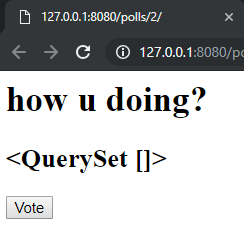
在这里我们可以看到,QuerySet是空的。
之后,我在“选择”表中手动输入了数据,在执行代码时,我得到了输出中的单选按钮和标签,这表明for循环工作正常。
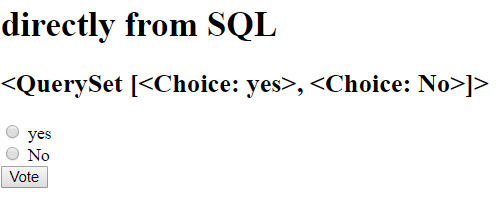
在选择表中输入数据时,请记住,question_id是选择表中的外键。因此,它的值应该与问题表中任何一个id值相匹配。
也许还有其他更好的解决办法,但这就是我想出来的。我也是个想学习django的新手。
编码愉快!!
https://stackoverflow.com/questions/41404653
复制相似问题
腾讯云开发者

Copyright © 2013 - 2026 Tencent Cloud. All Rights Reserved. 腾讯云 版权所有
深圳市腾讯计算机系统有限公司 ICP备案/许可证号:粤B2-20090059  粤公网安备44030502008569号
腾讯云计算(北京)有限责任公司 京ICP证150476号 | 京ICP备11018762号