
将XpsDocument PowerPoint幻灯片放映嵌入WPF DocumentViewer中
我最近尝试将PowerPoint文件作为XpsDocument嵌入到WPF中。
这是一个简单的WPF应用程序,我将DocumentViewer属性嵌入到MainWindow.xaml网格中:
<Window x:Class="PowerPoint2.MainWindow"
    xmlns="http://schemas.microsoft.com/winfx/2006/xaml/presentation"
    xmlns:x="http://schemas.microsoft.com/winfx/2006/xaml"
    xmlns:d="http://schemas.microsoft.com/expression/blend/2008"
    xmlns:mc="http://schemas.openxmlformats.org/markup-compatibility/2006"
    xmlns:local="clr-namespace:PowerPoint2"
    mc:Ignorable="d"
    Title="MainWindow" Height="350" Width="525">

<Grid>
    <DocumentViewer
        Name="DocumentviewPowerPoint"
        VerticalAlignment="Top"
        HorizontalAlignment="Left" />
</Grid>
要创建绑定到"DocumentviewPowerPoint“的文档,我将已打开的PowerPoint文件转换为Xps格式,并将此变量绑定到前面提到的XAML属性:
using System;
using System.IO;
using System.Windows;
using System.Windows.Xps.Packaging;
using Microsoft.Office.Core;
using Microsoft.Office.Interop.PowerPoint;
using Application = Microsoft.Office.Interop.PowerPoint.Application;

namespace PowerPoint2
{
    public partial class MainWindow : Window
    {
        public MainWindow()
        {
            InitializeComponent();

            const string powerPointFile = @"c:\temp\ppt.pptx";
            var xpsFile = Path.GetTempPath() + Guid.NewGuid() + ".pptx";
            var xpsDocument = ConvertPowerPointToXps(powerPointFile, xpsFile);

            DocumentviewPowerPoint.Document = xpsDocument.GetFixedDocumentSequence();
        }

        private static XpsDocument ConvertPowerPointToXps(string pptFilename, string xpsFilename)
        {
            var pptApp = new Application();

            var presentation = pptApp.Presentations.Open(pptFilename, MsoTriState.msoTrue, MsoTriState.msoFalse,
            MsoTriState.msoFalse);

            try
            {
                presentation.ExportAsFixedFormat(xpsFilename, PpFixedFormatType.ppFixedFormatTypeXPS);
            }
            catch (Exception ex)
            {
                MessageBox.Show("Failed to export to XPS format: " + ex);
            }
            finally
            {
                presentation.Close();
                pptApp.Quit();
            }

            return new XpsDocument(xpsFilename, FileAccess.Read);
        }
    }
}
在运行程序时,这一切都运行得很好,显示嵌入到WPF中的Xps文档:
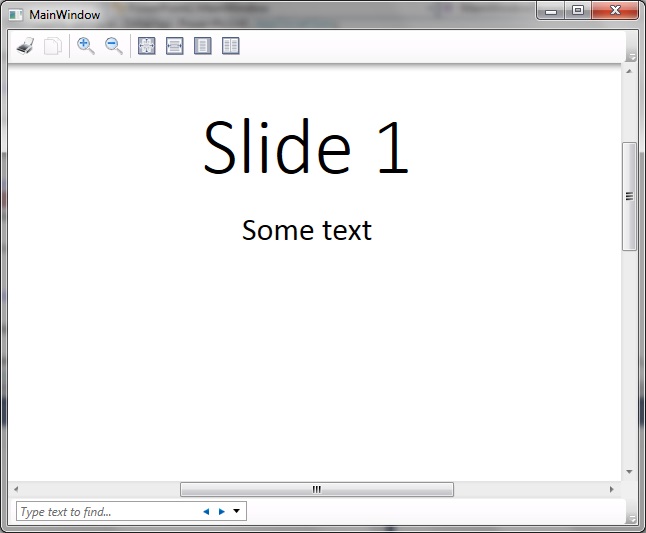
我的问题是,如何进一步修改我的代码,以便将PowerPoint不仅显示为所显示的一系列可滚动幻灯片,而且还显示为实际幻灯片?我想做进一步的更新,使用户能够导航到下面的幻灯片上的每一个鼠标点击-像一个‘适当的’演示文稿。我的问题是,我不熟悉XpsDocument Apis的用法--我不知道是用这些来实现我想要的,还是在表示变量的设置属性中转换成Xps格式。
回答 1
Stack Overflow用户
发布于 2017-01-10 10:26:20
我设法解决了我感兴趣的问题。
有关详细解释,请参阅本篇博文:
该解决方案解决了这样的问题:通过调用相关的PowerPoint方法组合,能够使单个DocumentViewer幻灯片(转换为DocumentViewer文件格式)占用整个可用的窗口空间。
在按下屏幕按钮以调用RelayCommand时,观察到MainWindowViewModel.cs类中的DocumentViewer API调用的以下组合可以工作:
public ICommand Command
  {
     get
     {
        return _command ?? (_command = new RelayCommand(
            x =>
            {
               DocumentViewer = MainWindow.GetInstance();

               const string powerPointFile = @"c:\temp\ppt.pptx";
               var xpsFile = Path.GetTempPath() + Guid.NewGuid() + ".xps";
               var xpsDocument = ConvertPowerPointToXps(powerPointFile, xpsFile);

               FixedFixedDocumentSequence = xpsDocument.GetFixedDocumentSequence();
               DocumentViewer.Document = FixedFixedDocumentSequence;

               DocumentViewer.GoToPage(1);
               DocumentViewer.FitToMaxPagesAcross(1);
               WindowState = WindowState.Maximized;
               DocumentViewer.FitToMaxPagesAcross(1);
            }));
     }
}以及获取DocumentViewer实例本身?我还需要更新MainWindow.xaml.cs以使其返回DocumentViewer对象的实例:
using System.Windows.Controls;命名空间DocumentView {公共部分类MainWindow {私有静态DocumentViewer _docViewer;
  public MainWindow()
  {
     InitializeComponent();
     _docViewer = DocumentViewPowerPoint;
  }

  public static DocumentViewer GetInstance()
  {
     return _docViewer;
  }
}}
其中DocumentViewPowerPoint是在MainWindow.xaml中给DocumentViewer指定的名称:
<Window x:Class="DocumentView.MainWindow"
    xmlns="http://schemas.microsoft.com/winfx/2006/xaml/presentation"
    xmlns:x="http://schemas.microsoft.com/winfx/2006/xaml"
    xmlns:d="http://schemas.microsoft.com/expression/blend/2008"
    xmlns:mc="http://schemas.openxmlformats.org/markup-compatibility/2006"
    xmlns:local="clr-namespace:DocumentView"
    mc:Ignorable="d"
    WindowState="{Binding WindowState, Mode=TwoWay}"
    Title="MainWindow" Height="350" Width="525">

<Window.DataContext>
    <local:MainWindowViewModel />
</Window.DataContext>

<Grid>
    <Grid.RowDefinitions>
        <RowDefinition Height="*" />
        <RowDefinition Height="50" />
    </Grid.RowDefinitions>

    <DocumentViewer
        Grid.Row="0"
        Document="{Binding FixedFixedDocumentSequence}"
        Name="DocumentViewPowerPoint"
        VerticalAlignment="Top"
        HorizontalAlignment="Left" />

    <Button
        Grid.Row="1"
        Command="{Binding Command}"
        Width="70" Height="30" Content="Press" />
</Grid>
https://stackoverflow.com/questions/41349445
复制相似问题
腾讯云开发者

Copyright © 2013 - 2026 Tencent Cloud. All Rights Reserved. 腾讯云 版权所有
深圳市腾讯计算机系统有限公司 ICP备案/许可证号:粤B2-20090059  粤公网安备44030502008569号
腾讯云计算(北京)有限责任公司 京ICP证150476号 | 京ICP备11018762号