
闪亮:使RHandsontable只在单击时读取
闪亮:使RHandsontable只在单击时读取
提问于 2016-12-27 08:32:00
我想让我的rhandsontable只在单击动作按钮“冻结预测”时阅读,并在单击“编辑预测”时激活该表。它应该显示在单击“生成预测”按钮上的求和输出。
请帮助纠正我的现有代码按照上述条件。
UI.R
packages <- c( "shiny", "data.table", "devtools", "shinysky","googleVis","scales","rhandsontable" )
lapply( packages, require, character.only = TRUE )

jsResetCode <- "shinyjs.reset = function() {history.go(0)}" #JS Code to refresh the App

did_recalc <- FALSE

ui <- fluidPage(
  # Application title
  titlePanel("Scenario Planner Test App"),

    br(),br(),
  actionButton("recalc", "Generate Forecast"),
  actionButton("edit", "Edit Forecast"),
  actionButton("freeze", "Freeze Forecast"),br(),br(),
  rHandsontableOutput('table'),br(),br(),
  textOutput('restitle'),
  textOutput('result')

)
Server.R
Sys.setenv(R_ZIPCMD="/usr/bin/zip")
packages <- c( "shiny", "data.table", "devtools", "shinysky","googleVis","scales","reshape2" )
lapply( packages, require, character.only = TRUE )

disableActionButton <- function(id,session) {
  session$sendCustomMessage(type="jsCode1",
                            list(code= paste("$('#",id,"').prop('disabled',true)"
                                             ,sep="")))
}

enableActionButton <- function(id,session) {
  session$sendCustomMessage(type="jsCode2",
                            list(code= paste("$('#",id,"').prop('disabled',false)"
                                             ,sep="")))
}


shiny::shinyServer( function(input,output,session)({
  values <- reactiveValues(data=as.data.frame(runif(2)))

  observe({
    input$recalc
    values$data <- as.data.frame(runif(2))
  })

  observe({
    if(!is.null(input$table))
     values$data <- hot_to_r(input$table)
  })


  output$table <- renderRHandsontable({
    rhandsontable(values$data)
    })

  observe({
    input$freeze
    print("freeze")
    ##if(!is.null(input$table))
    print("2freeze")
    rhandsontable(values$data)  %>%
    hot_table(readOnly = TRUE)
  })


  output$restitle <- renderText({
          "Sum Output"
     })

  output$result <- renderText({
    sum(values$data)
  })
})
)回答 1
Stack Overflow用户
回答已采纳
发布于 2016-12-29 12:16:55
我要用它来工作
- 将状态变量添加到名为
readonly的反应性变量 - 将两个
observerEvent例程添加到edit和freeze操作按钮以切换readonly。 - 修改
output$table命令以使用反应性readonly变量。
如果您只是使用一个复选框来指示表是可编辑的,然后将该变量连接到readOnly参数,但有时您需要这样做,那么它会更容易,而不需要很多这样的元素,所以我这样解决了它。
完整的服务器.R代码如下所示:
packages <- c("shiny","data.table","devtools","shinysky","googleVis","scales","reshape2")
lapply(packages,require,character.only = TRUE)

disableActionButton <- function(id,session) {
  session$sendCustomMessage(type = "jsCode1",
                            list(code = paste("$('#",id,"').prop('disabled',true)"
                                             ,sep = "")))
}

enableActionButton <- function(id,session) {
  session$sendCustomMessage(type = "jsCode2",
                            list(code = paste("$('#",id,"').prop('disabled',false)"
                                             ,sep = "")))
}


shiny::shinyServer(function(input,output,session)({

  values <- reactiveValues(data = as.data.frame(runif(2)),readonly=FALSE)

  observe({
    input$recalc
    values$data <- as.data.frame(runif(2))
  })

  observe({
    if (!is.null(input$table))
      values$data <- hot_to_r(input$table)
  })


  output$table <- renderRHandsontable({
    rhandsontable(values$data,readOnly=values$readonly)
  })

  observeEvent(input$edit, {
   values$readonly <- FALSE
  })

  observeEvent(input$freeze,{
    values$readonly <- TRUE
  })


  output$restitle <- renderText({
    "Sum Output"
  })

  output$result <- renderText({
    sum(values$data)
  })
})
)
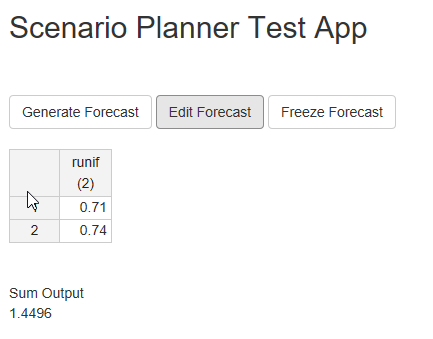
看起来是这样的:
页面原文内容由Stack Overflow提供。腾讯云小微IT领域专用引擎提供翻译支持
原文链接:
https://stackoverflow.com/questions/41341635
复制相关文章
相似问题
腾讯云开发者

Copyright © 2013 - 2026 Tencent Cloud. All Rights Reserved. 腾讯云 版权所有
深圳市腾讯计算机系统有限公司 ICP备案/许可证号:粤B2-20090059  粤公网安备44030502008569号
腾讯云计算(北京)有限责任公司 京ICP证150476号 | 京ICP备11018762号