
如何在iPad 10 SWIFT3.0 Xcode 8.2中停止景观旋转
如何在iPad 10 SWIFT3.0 Xcode 8.2中停止景观旋转
提问于 2016-12-23 05:34:51
我知道这是重复的问题,但我找不到这个问题的解决办法。我已将Info.plist文件中的“计算更改”设置为“停止旋转景观模式”。
Supported interface orientations (iPad)上面的键值只保留了肖像,然后我检查了iPad,它工作得很好,但是当我上传到应用程序商店时,它会产生如下错误
ERROR ITMS-90474: "Invalid Bundle. iPad Multitasking support requires these orientations:
'UIInterfaceOrientationPortrait,UIInterfaceOrientationPortraitUpsideDown,UIInterfaceOrientationLandscapeLeft,UIInterfaceOrientationLandscapeRight'. Found
'UIInterfaceOrientationPortrait' in bundle 'com.example.demo'."
ERROR ITMS-90474: "Invalid Bundle. iPad Multitasking support requires these orientations:
'UIInterfaceOrientationPortrait,UIInterfaceOrientationPortraitUpsideDown,UIInterfaceOrientationLandscapeLeft,UIInterfaceOrientationLandscapeRight'. Found 'UIInterfaceOrientationPortrait' in bundle 'com.example.demo'."
多任务支持需要景观定向,我编写了下面的代码来覆盖旋转方法,但当屏幕旋转时不调用它。
extension UINavigationController {
    public override func supportedInterfaceOrientations() -> Int {
        return visibleViewController.supportedInterfaceOrientations()
    }
    public override func shouldAutorotate() -> Bool {
        return visibleViewController.shouldAutorotate()
   }
}
并尝试设置navigationController对象的直接值,然后给出错误:
只读属性不能赋值。
回答 1
Stack Overflow用户
回答已采纳
发布于 2016-12-23 07:05:24
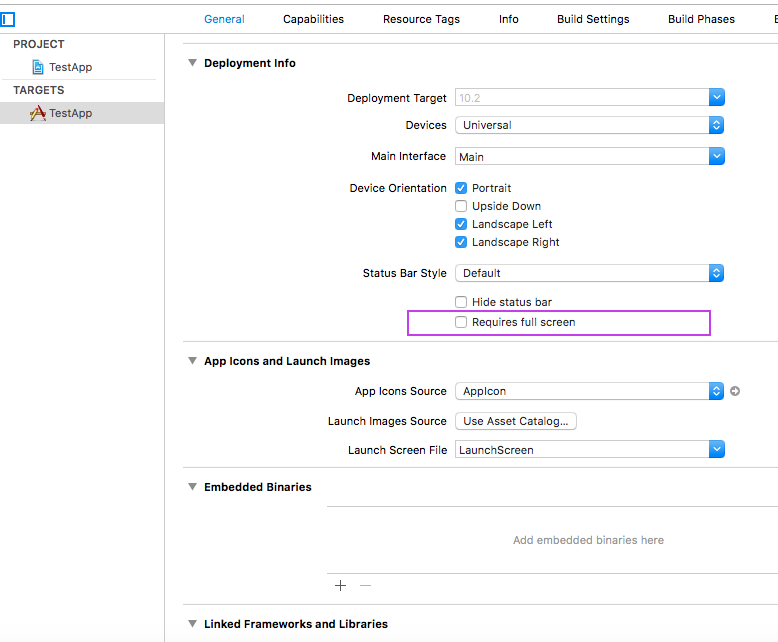
问题是您的应用程序支持multitasking,这需要所有的接口方向。
要么支持所有方向,要么只检查下面的标志
页面原文内容由Stack Overflow提供。腾讯云小微IT领域专用引擎提供翻译支持
原文链接:
https://stackoverflow.com/questions/41295708
复制相关文章
相似问题
腾讯云开发者

Copyright © 2013 - 2026 Tencent Cloud. All Rights Reserved. 腾讯云 版权所有
深圳市腾讯计算机系统有限公司 ICP备案/许可证号:粤B2-20090059  粤公网安备44030502008569号
腾讯云计算(北京)有限责任公司 京ICP证150476号 | 京ICP备11018762号