
如何比较两个工作簿中的数据行和列,在目标工作簿中添加数据
如何比较两个工作簿中的数据行和列,在目标工作簿中添加数据
提问于 2016-12-22 05:50:45
我有两个excel工作簿,即"Source.xlsx“和"Target.xlsx”,其数据如下:
Source.xlsx
  A      B      C      D         E
Signal  From    To  Conductor   Cable
#112    68      145   1        1935
#113    78      146   2        1936
#114    88      147   3        1937
#115    98      148   4        1938
#116    108     149   1        1939
#117    118     150   2        1940
#118    128     151   3        1941
#119    138     152   4        1942
#120    148     153   1        1943
#121    158     154   2        1944
Traget.xlsx
 A      B      C          D       E
From    To  Conductor   Signal  Cable
68     145                      1935
78     146                      1936
88     147                      1937
98     148                      1938
108    149                      1939
118    150                      1940
165    151                      1941
138    152                      1942
122    133                      1943
158    154                      1944
要求:
- 我想比较excel工作簿中的数据(第1页,两者都是),行和列。如果匹配,则将来自源的信号和导体列的数据添加到目标文件的信号和导体列中。匹配数据的标准分别是源文件中的第1行B列、C列和E列,以及第1行A列、B列和E列等。
- 一旦数据被复制,要将这一行涂成绿色,直到数据被填充到单元格中为止。
我尝试了以下代码:
Sub E3ToEPlan()
' E3ToEPlan Macro
' Macro to Check/ Transfer data in E3 and EPlan Excel files

Dim sourcebook As Workbook, targetbook As Workbook
Dim sourcesheet As Worksheet, targetsheet As Worksheet
Dim sourcefilename As String, targetfilename As String

sourcefilename = "C:\Source.xlsx"
targetfilename = "C:\Target.xlsx"

Set sourcebook = Workbooks.Open(sourcefilename)
Set targetbook = Workbooks.Open(targetfilename)

Set sourcesheet = sourcebook.Worksheets(1)
Set targetsheet = targetbook.Worksheets(1)

Dim column_count As Long, row_count As Long
column_count = sourcesheet.Columns.Count
row_count = sourcesheet.Rows.Count
'sourcesheet.Range("A2:A9").Copy
'targetsheet.Range("D2:D9").PasteSpecial

'Condition to match the data in the other workbook
Dim i As Integer, j As Integer
For i = 0 To column_count
    'For j = 0 To column_count
        If sourcesheet.Cells(i, 2).Value = targetsheet.Cells(i, 1).Value And sourcesheet.Cells( _
        i, 3).Value = targetsheet.Cells(i, 2).Value And sourcesheet.Cells(i, 5).Value = targetsheet _
        .Cells(i, 5) Then
            sourcesheet.Cells(i, 1).Value.Copy
            targetsheet.Cells(i, 4).Value.PasteSpecial
            sourcesheet.Cells(i, 4).Value.Copy
            targetsheet.Cells(i, 3).Value.PasteSpecial
            targetsheet.Cells(i, column_count).Interior.Color = vbGreen
        End If
    'Next j
Next i
End Sub
但这让我在If语句上出错了。
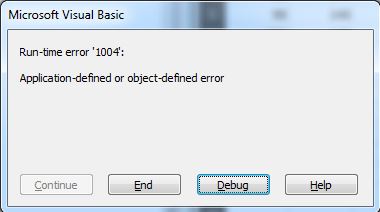
回答 1
Stack Overflow用户
回答已采纳
发布于 2016-12-22 06:31:28
我已经测试过这段代码了,它还能工作。
有几个问题:
- 不能使用
Value.CopyValue引用单元格中的值,即公式或文本字符串的结果。 Columns.Count计数工作表中的所有Columns,同样适用于Rows。我添加了其他代码来确定Columns和Rows的使用量。- Excel中的列和行从1开始,因此没有
Row0,它用作For i = 0 To column_count的起始行,随后我将其从1改为'LastRow‘,我假设您希望遍历每一行。
见下面的代码:
Option Explicit

Sub E3ToEPlan()
    ' E3ToEPlan Macro
    ' Macro to Check/ Transfer data in E3 and EPlan Excel files

    Dim sourcebook As Workbook, targetbook As Workbook
    Dim sourcesheet As Worksheet, targetsheet As Worksheet
    Dim sourcefilename As String, targetfilename As String

    sourcefilename = "C:\Source.xlsx"
    targetfilename = "C:\Target.xlsx"

    Set sourcebook = Workbooks.Open(sourcefilename)
    Set targetbook = Workbooks.Open(targetfilename)
    Set sourcesheet = sourcebook.Worksheets(1)
    Set targetsheet = targetbook.Worksheets(1)

    Dim LastColumn As Long
    LastColumn = sourcesheet.Cells(1, Columns.Count).End(xlToLeft).Column

    Dim LastRow As Long
    With sourcesheet
        LastRow = .Range("A1").SpecialCells(xlCellTypeLastCell).Row
    End With

    'Condition to match the data in the other workbook
    Dim CurrentRow As Long
    Dim SourceShtColB As String, SourceShtColC As String, SourceShtColE As String
    Dim TargetShtColA As String, TargetShtColB As String, TargetShtColE As String

    For CurrentRow = 1 To LastRow

        SourceShtColB = sourcesheet.Cells(CurrentRow, 2).Value
        TargetShtColA = targetsheet.Cells(CurrentRow, 1).Value
        SourceShtColC = sourcesheet.Cells(CurrentRow, 3).Value
        TargetShtColB = targetsheet.Cells(CurrentRow, 2).Value
        SourceShtColE = sourcesheet.Cells(CurrentRow, 5).Value
        TargetShtColE = targetsheet.Cells(CurrentRow, 5).Value

        If SourceShtColB = TargetShtColA And _
            SourceShtColC = TargetShtColB And _
                SourceShtColE = TargetShtColE Then

            targetsheet.Cells(CurrentRow, 4) = sourcesheet.Cells(CurrentRow, 1)
            targetsheet.Cells(CurrentRow, 3) = sourcesheet.Cells(CurrentRow, 4)
            targetsheet.Cells(CurrentRow, LastColumn).Interior.Color = vbGreen

        End If

    Next CurrentRow
End Sub页面原文内容由Stack Overflow提供。腾讯云小微IT领域专用引擎提供翻译支持
原文链接:
https://stackoverflow.com/questions/41276542
复制相关文章
相似问题
腾讯云开发者

Copyright © 2013 - 2026 Tencent Cloud. All Rights Reserved. 腾讯云 版权所有
深圳市腾讯计算机系统有限公司 ICP备案/许可证号:粤B2-20090059  粤公网安备44030502008569号
腾讯云计算(北京)有限责任公司 京ICP证150476号 | 京ICP备11018762号