
如何使用Selenium单击出现在某些文本之前的两个复选框?
如何使用Selenium单击出现在某些文本之前的两个复选框?
提问于 2016-12-19 08:47:48
A如下图所示。我有两个复选框,在发短信之前。
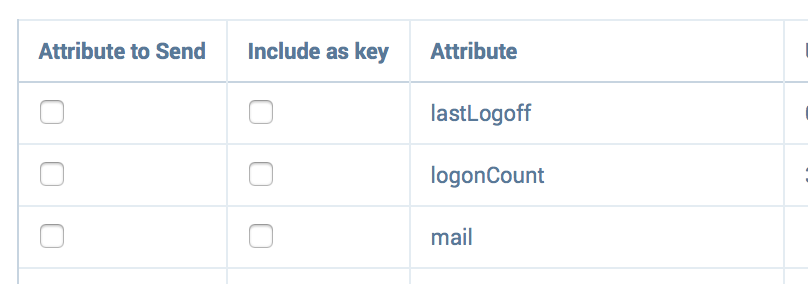
我需要通过查找文本来单击复选框。请指导我怎么做。
xpath:
<div class="ad-feature ng-scope">
<ng-include class="ng-scope" src="'view/enterprise-integration/activedirectory/sanctioned-setup.html'" style="">
<table class="ad-sanctioned-setup ng-scope">
<tbody>
<tr>
<td>
<td>
<p>
<span class="description"> For Sanctioned Services, you can use multiple attributes when creating a unique key to identify a user. </span>
<div class="panel-data-preview ng-scope" ng-if="sanctionedEnabledOrDisabled[$index]">
<div class="data-scroll">
<table class="data">
<thead>
<tbody>
<tr class="ng-scope" ng-repeat="key in directoryUsersAttributesByControllerIndex[$index]" style="">
<td>
<input type="checkbox" data-ng-click="toggleAttributeSelection($parent.$index, key)" data-ng-checked="isAttributeAlreadySelected($parent.$index, key)">
</td>
<td>
<td class="ng-binding">lastLogoff</td>
环境:
Python Firefox浏览器
回答 1
Stack Overflow用户
回答已采纳
发布于 2016-12-19 09:09:58
您可以使用下面的xpath单击"lastLogoff“复选框中的”“包含作为键。
//td[contains(text(),'lastLogoff')]/preceding-sibling::td/input解释-
//td[contains(text(),'lastLogoff')] 将找到带有<td> lastLogoff文本的标记。
/preceding-sibling::td/input将用于在上下文节点之前移动<td>标记,并导航到它的<input>标记。
请使用相同的方式单击属性下的复选框发送
页面原文内容由Stack Overflow提供。腾讯云小微IT领域专用引擎提供翻译支持
原文链接:
https://stackoverflow.com/questions/41218765
复制相关文章
相似问题
腾讯云开发者

Copyright © 2013 - 2026 Tencent Cloud. All Rights Reserved. 腾讯云 版权所有
深圳市腾讯计算机系统有限公司 ICP备案/许可证号:粤B2-20090059  粤公网安备44030502008569号
腾讯云计算(北京)有限责任公司 京ICP证150476号 | 京ICP备11018762号