
Excel -找不到范围,错误91
Excel -找不到范围,错误91
提问于 2016-12-19 03:42:21
我试着从一个查找表(不同的表格)中从单元格中找到姓名输入的电子邮件。我试着从细胞K中查找名字,在R细胞中查找电子邮件。我从不同的电子邮件单上查找电子邮件。
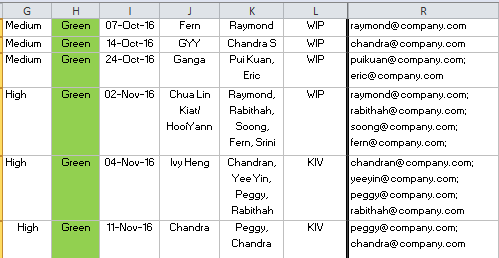
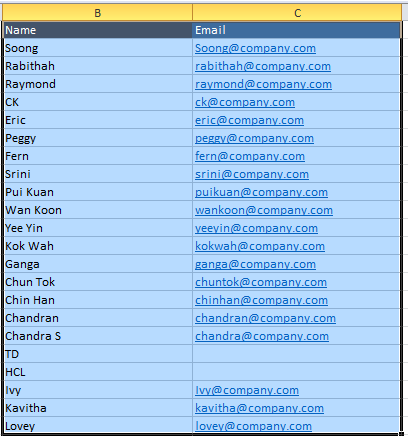
这是我的查表。但是,当我试图使用Find查找时,我得到了错误91,它是对象变量,或者是块不设置,这可能是我,它无法从查找表中找到范围。这是我的VBA代码,用于拆分名称和查找。我想输出';‘在每个名字的末尾,这样我就可以发送自动提醒电子邮件给他们所有的细胞。
    Public Sub getEmails()
    Dim toNames As Range
    Set toNames = Range("K11") ' names input by user

   Dim names As Range
   Set names = Sheets("Email").Range("B2:C23") ' names range from lookup table from    different worksheet

  Dim splitNames
  splitNames = Split(toNames, ",")


  Dim selectedEmails As String
  Dim findRange As Range

For i = 0 To UBound(splitNames)
    ' find the range matching the name
   Set findRange = names.Find(What:=splitNames(i), LookIn:=xlFormulas, _
    LookAt:=xlPart, SearchOrder:=xlByRows, SearchDirection:=xlNext, _
    MatchCase:=False, SearchFormat:=False)

    ' if match found, get the email and store to selected emails variable
    If Not findRange Is Nothing Then
    selectedEmails = selectedEmails & Sheets("Email").Range("C" & findRange.Row) & ";"
    End If

    Next i

    'output emails
    Range("R11") = selectedEmails
End Sub
请帮帮忙,我对这个VBA很陌生。这是我的调试结果
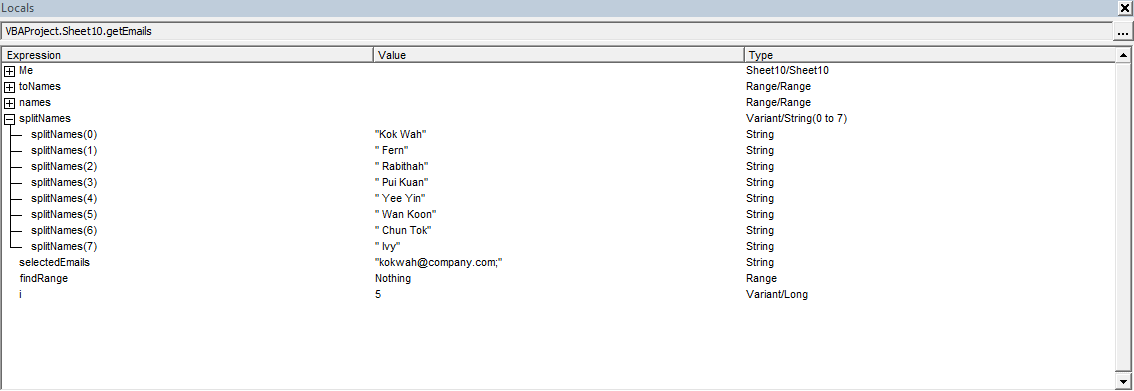
回答 2
Stack Overflow用户
回答已采纳
发布于 2016-12-19 08:43:33
继续使用每个用户使用Find的代码方法,我添加了一个循环,从第一行开始,以K列中的数据开始,直到最后一行有数据为止。在每个单元格中,它检查其他“电子邮件”表中所有用户的电子邮件,并将合并后的电子邮件String放在同一行的K列中。
码
Option Explicit

Public Sub getEmails()

Dim names As Range, findRange As Range
Dim splitNames
Dim selectedEmails As String, i As Long, lRow As Long

Set names = Sheets("Email").Range("B2:C23") ' names range from lookup table from    different worksheet

' modify "Sheet1" to your sheet's name
With Sheets("Sheet1")
    ' loop column K untill last row with data (staring from row 2 >> modify where you data starts)
    For lRow = 2 To .Cells(.Rows.Count, "K").End(xlUp).Row
        ' fill array directly from cell
        splitNames = Split(.Range("K" & lRow), ",")

        For i = 0 To UBound(splitNames)
            ' find the range matching the name
            Set findRange = names.Find(What:=Trim(splitNames(i)), LookIn:=xlFormulas, _
                LookAt:=xlPart, SearchOrder:=xlByRows, SearchDirection:=xlNext, _
                MatchCase:=False, SearchFormat:=False)

            ' if match found, get the email and store to selected emails variable
            If Not findRange Is Nothing Then
                If selectedEmails = "" Then ' first email of this row
                    selectedEmails = findRange.Offset(0, 1).Value
                Else  ' add a ";" to separate email addresses
                    selectedEmails = selectedEmails & ";" & findRange.Offset(0, 1).Value
                End If

            End If
        Next i

        .Range("R" & lRow) = selectedEmails
        ' clrear all variables and arrays for next cycle
        Erase splitNames
        selectedEmails = ""
    Next lRow

End With

End Sub
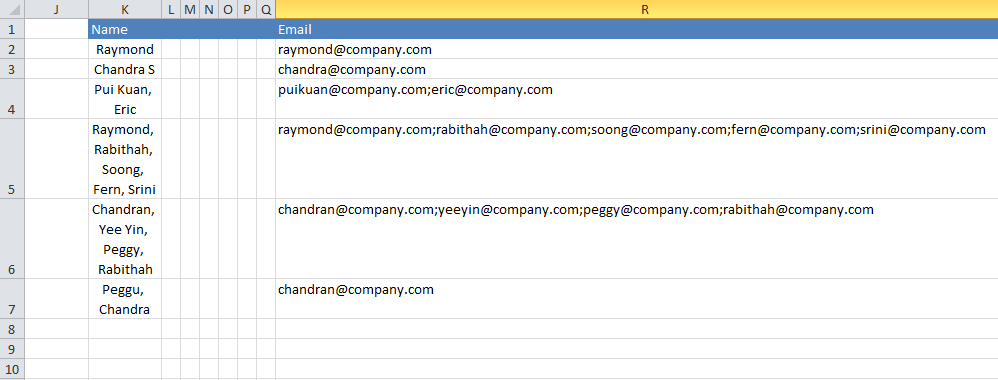
我得到的结果的屏幕截图:
Stack Overflow用户
发布于 2016-12-19 07:55:51
主要根据你的截图,你可能会追求这样的东西:
Option Explicit

Public Sub main()
    Dim cell As Range

    With Sheets("Names") '<--| change it to actual name of your sheet with "names"
        For Each cell In .Range("K2", .Cells(.Rows.count, "K").End(xlUp)) '<--| loop through its column K cells from row 2 down to last not empty one
            WriteEmails cell.Value, cell.Offset(, 7) '<--| call 'WriteEmails()' passing current cell content (i.e. names) and cell to write corresponding emails to
        Next cell
    End With
End Sub


Sub WriteEmails(names As String, targetRng As Range)
    Dim cell As Range
    Dim selectedEmails As String

    With Sheets("Email") '<--| reference your LookUp sheet
        With .Range("C1", .Cells(.Rows.count, 2).End(xlUp)) '<--| reference its columns B and C from row 1 (headers) down to column B last not empty row
            .AutoFilter field:=1, Criteria1:=Split(names, vbLf), Operator:=xlFilterValues  '<--| filter it on its 1st column (i.e. column B) with passed 'names' split by 'vblf'
            If Application.WorksheetFunction.Subtotal(103, .Resize(, 1)) > 1 Then '<--| if any cell filtered other than headers
                For Each cell In .Resize(.Rows.count - 1, 1).Offset(1, 1).SpecialCells(xlCellTypeVisible) '<--|loop through filtered cells in 2nd column (i.e. column "C")
                    selectedEmails = selectedEmails & cell.Value & vbLf '<--| build your emails string, delimiting them by 'vbLf'
                Next cell
                targetRng.Value = Left(selectedEmails, Len(selectedEmails) - 1) '<--| write emails string in passed range
            End If
        End With
        .AutoFilterMode = False
    End With
End Sub页面原文内容由Stack Overflow提供。腾讯云小微IT领域专用引擎提供翻译支持
原文链接:
https://stackoverflow.com/questions/41215466
复制相关文章
相似问题
腾讯云开发者

Copyright © 2013 - 2026 Tencent Cloud. All Rights Reserved. 腾讯云 版权所有
深圳市腾讯计算机系统有限公司 ICP备案/许可证号:粤B2-20090059  粤公网安备44030502008569号
腾讯云计算(北京)有限责任公司 京ICP证150476号 | 京ICP备11018762号