
如何深入了解快照Firebase Swift 3?
如何深入了解快照Firebase Swift 3?
提问于 2016-12-18 20:20:49
使用当前的实现,我可以通过创建一个结构var uid的实例来读取属于FireBaseData的预订,该实例由Firebase数据库中指定的值初始化。
我需要在/Users节点下为所有用户获取所有预订,然后将它们分配给一个数组,以便在UITableVIew中显示这些值。我不知道如何更深入地了解快照。
防火墙数据库结构:
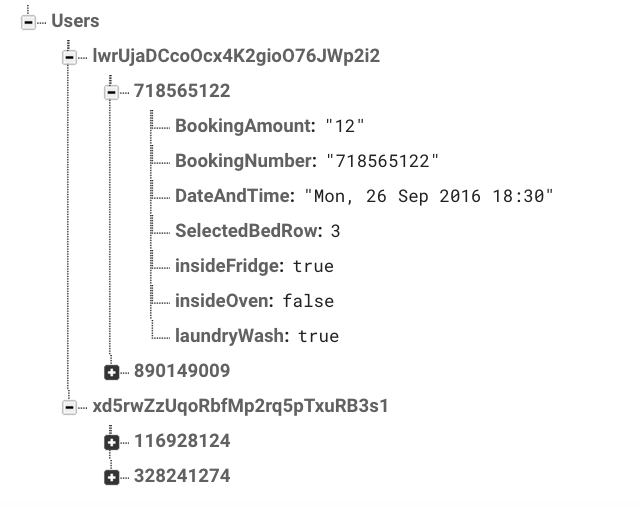
// create a reference to Firebase
var dbRef:FIRDatabaseReference!
var uid = "lwrUjaDCcoOcx4K2gioO76JWp2i2"

// this array will hold all bookings for the logged in user
      var bookingInfo = [FireBaseData]()

override func viewDidLoad() {
     super.viewDidLoad()
        dbRef = FIRDatabase.database().reference().child("Users")
             startObservingDB() // observe the database for value changes
}

func startObservingDB() {
    dbRef.child("lwrUjaDCcoOcx4K2gioO76JWp2i2").
       observe(.value, with: { (snapshot: FIRDataSnapshot) in

  // an instance of FireBaseData holding all bookings belonging to currentUid
        var newBookingInfo = [FireBaseData]()

        for booking in snapshot.children {

           // after each iteration create an instance of FireBaseData with
           //   'booking' for the current iteration & assign it to bookingItem
          let bookingItem = FireBaseData(snapshot: booking as! FIRDataSnapshot)

           // append the bookingItem after each iteration to newBookingInfo array
           newBookingInfo.append(bookingItem)
        }

        //assign newBookingInfo to global variable bookingInfo so it can be used globally within the class
       self.bookingInfo = newBookingInfo

    }, withCancel: { (Error:Any) in
    })

}

// use this struct to retrieve data from the snapshot received
struct FireBaseData {
  var BookingAmount:String!
   var BookingNumber:String!
.
.
  ... and so on
    }

   init(snapshot:FIRDataSnapshot){

      if let BookingAmountContent = (snapshot.value! as? NSDictionary)?["BookingAmount"] as? String {
        BookingAmount = BookingAmountContent
      }
    if let BookingNumberContent = (snapshot.value! as? NSDictionary)?["BookingNumber"] as? String {
        BookingNumber = BookingNumberContent
.
.
.... and so on
      }

snapshot.children_IS <FTransformedEnumerator: 0x60800023a380>
 snapshot.value_IS({
    lwrUjaDCcoOcx4K2gioO76JWp2i2 =     {
       718565122 =         {
        BookingAmount = 12;
        BookingNumber = 718565122;
        DateAndTime = "Mon, 26 Sep 2016 18:30";
        EmailAddress = "1@gmail.com";
        FlatNumber = 10;
        FrequecyAmount = 48;
        FrequencyName = Once;
        FullName = "Michael ";
        PhoneNumber = 25558882522;
        PostCode = SE13TYY;
        SelectedBathRow = 4;
        SelectedBedRow = 3;
        StreetAddress = "High Street";
        SuppliesAmount = 5;
        SuppliesName = "Bring cleaning supplies";
        insideCabinets = 0;
        insideFridge = 1;
        insideOven = 0;
        interiorWindows = 1;
        laundryWash = 1;
    };
    890149009 =         {
        BookingAmount = 73;
        BookingNumber = 890149009;
        DateAndTime = "Sat, 01 Oct 2016 13:30";
        EmailAddress = "1@gmail.com";
        FlatNumber = 10;
        FrequecyAmount = 48;
        FrequencyName = Once;
        FullName = "Michael ";
        PhoneNumber = 25558882522;
        PostCode = SE13TYY;
        SelectedBathRow = 4;
        SelectedBedRow = 3;
        StreetAddress = "High Street";
        SuppliesAmount = 5;
        SuppliesName = "Bring cleaning supplies";
        insideCabinets = 0;
        insideFridge = 1;
        insideOven = 0;
        interiorWindows = 1;
        laundryWash = 1;
    };
};
   xd5rwZzUqoRbfMp2rq5pTxuRB3s1 =     {
    116928124 =         {
        BookingAmount = 22;
        BookingNumber = 116928124;
        DateAndTime = "Fri, 16 Dec 2016 16:30";
        EmailAddress = "b@gmail.com";
        FlatNumber = 10;
        FrequecyAmount = 22;
        FrequencyName = "Every week";
        FullName = Mi;
        PhoneNumber = 28488824;
        PostCode = RTRFHGT;
        SelectedBathRow = 3;
        SelectedBedRow = 1;
        StreetAddress = "12 High St";
        SuppliesAmount = 0;
        SuppliesName = "I have cleaning supplies";
        TimeStampBookingSavedInDB = 1481886718;
        TimeStampDateAndTime = 1481905800;
        insideCabinets = 0;
        insideFridge = 0;
        insideOven = 0;
        interiorWindows = 0;
        laundryWash = 0;
    };
    328241274 =         {
        BookingAmount = 22;
        BookingNumber = 328241274;
        DateAndTime = "Sun, 18 Dec 2016 16:30";
        EmailAddress = "bi@gmail.com";
        FlatNumber = 10;
        FrequecyAmount = 22;
        FrequencyName = "Every week";
        FullName = Mi;
        PhoneNumber = 28488824;
        PostCode = RTRFHGT;
        SelectedBathRow = 3;
        SelectedBedRow = 1;
        StreetAddress = "12 High St";
        SuppliesAmount = 0;
        SuppliesName = "I have cleaning supplies";
        TimeStampBookingSavedInDB = 1481888650;
        TimeStampDateAndTime = 1482078600;
        insideCabinets = 0;
        insideFridge = 0;
        insideOven = 0;
        interiorWindows = 0;
        laundryWash = 0;
    };
    };
 })
最新答案:@Jay建议
*Problem : with this implementation `queryOrdered(byChild:)` has no effect.*
func startObservingDB() {
 dbRef.queryOrdered(byChild: "TimeStampDateAndTime").observe(.value, with: { (snapshot: FIRDataSnapshot) in

    // an instance of FireBaseData holding all bookings under currentUid
    var newBookingInfo = [FireBaseData]()

    //iterate over each user node child
    for user_child in snapshot.children {

        //user_snap is each user
        let user_snap = user_child as! FIRDataSnapshot
           //now iterate over each booking
            for booking in user_snap.children {

                // after each iteration through snapshot.children, create an instance of FireBaseData with  'booking' for the current iteration & assign it to bookingItem
                let bookingItem = FireBaseData(snapshot: booking as! FIRDataSnapshot)

                // append the bookingItem after each iteration to newBookingInfo array
                newBookingInfo.append(bookingItem)


        }
    }

        //assign newBookingInfo to global variable bookingInfo so it can be used globally within the class
        self.bookingInfo = newBookingInfo
        // reload the data every time FIRDataEventType is triggered by value changes in Database
        self.tableView.reloadData()
    }, withCancel: { (Error:Any) in
        print("Huge \(Error)")
    })

    //Set the estimatedRowHeight of your table view
    tableView.estimatedRowHeight = 44.0
    // Set the rowHeight of your table view to UITableViewAutomaticDimension
    tableView.rowHeight = UITableViewAutomaticDimension
} // end of startObservingDB()
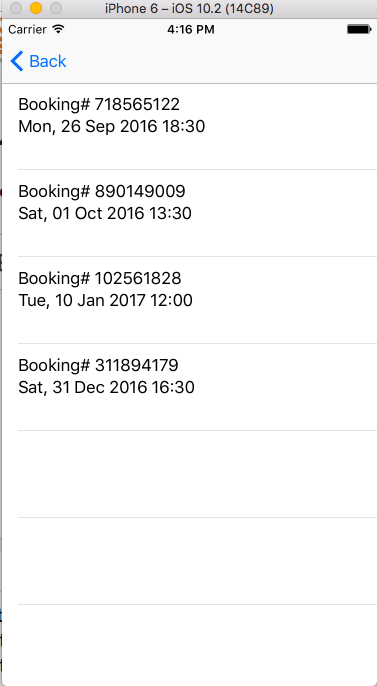
@Jay还建议用代码对从Firebase DB检索的对象数组进行排序,而不是使用Firebase提供的方法。
     // sort the array in place so that the most recent date will appear first
     self.bookingInfo.sort(by: {(DateAndTimeObject_1,DateAndTimeObject2) -> Bool in

       DateAndTimeObject_1.TimeStampDateAndTime < DateAndTimeObject2.TimeStampDateAndTime
     })

    // filter each element in the array against the condition specified in the body of the closure
    self.bookingInfo = self.bookingInfo.filter({(firstElementInArray) -> Bool in
        firstElementInArray.TimeStampDateAndTime == 1483201800
})回答 1
Stack Overflow用户
回答已采纳
发布于 2016-12-19 18:27:28
因此,您接下来的是每个用户节点内的每个预订节点。
模板如下所示:
users
  uid_0
   booking_0
     booking_amount: "12"
   booking_1
     booking_amount: "14"
由.value读取,它读取用户节点中的所有内容。
每个用户节点都有多个预订子节点,因此我们需要对这些子节点进行迭代,以获得它们的子值。
在每个子元素内部都有一个键:我们想要得到的值对,在本例中,是booking_amount和值。
let usersRef = myRootRef.child(byAppendingPath: "users")

usersRef?.observe(.value, with: { snapshot in

    if ( snapshot!.value is NSNull ) {
      print("not found")
     } else {

      for user_child in (snapshot?.children)! { //iterate over each user node child
        //assign the user_child enumerator to a snapshot
        let user_snap = user_child as! FDataSnapshot

        for booking in user_snap.children { //now iterate over each booking
          //booking is a enumerator so make it a snapshot
          let bookingSnap = booking as! FDataSnapshot
          let dict = bookingSnap.value as! [String: String]
          let amount = dict["booking_amount"]

          print(amount!)
        }
      }
    }
})页面原文内容由Stack Overflow提供。腾讯云小微IT领域专用引擎提供翻译支持
原文链接:
https://stackoverflow.com/questions/41212468
复制相关文章
相似问题
腾讯云开发者

Copyright © 2013 - 2026 Tencent Cloud. All Rights Reserved. 腾讯云 版权所有
深圳市腾讯计算机系统有限公司 ICP备案/许可证号:粤B2-20090059  粤公网安备44030502008569号
腾讯云计算(北京)有限责任公司 京ICP证150476号 | 京ICP备11018762号