
如何创建组合框QItemDelegate
如何创建组合框QItemDelegate
提问于 2016-12-18 10:34:48
我实现了以下委托,以便在QTableView中提供一个组合框。用例是用文本等效替换对用户来说通常毫无意义的列(键)(例如数字id)。
下面的代码片段可以工作(也用于保存适当的值),但它有三个问题:
- 它显示原始值,而不是文本等效值。
- QTableView中的行选择提供所有列,但不提供带有此委托的列。
- 理想情况下,我希望组合框以这样的方式出现,而不需要用户单击它就可以发现它是一个。
注:键可以是任何字符串(不一定是整数)。一个典型的例子是该国(“法国”的价值相当于关键的"FR")。
class ComboDelegate(QtGui.QItemDelegate):
    """
    A delegate that places a QComboBox in every
    cell of the column to which it is being applied
    """

    def __init__(self, parent, value_data):
        "Value_data is a list of tuples: (item, label)"
        QtGui.QItemDelegate.__init__(self, parent)
        self.value_data = value_data

    @property
    def items(self):
        "The list of items for display"
        return [item[0] for item in self.value_data]

    @property
    def labels(self):
        "The list of labels for display"
        return [item[1] for item in self.value_data]

    def item(self, label):
        "Get the item from a label"
        try:
            index = self.labels.index(label)
        except ValueError:
            pass
        print("Value no:  &%s" % index)
        return self.items[index]

    def createEditor(self, parent, option, index):
        "Create the editor (called each time)"

        combo = QtGui.QComboBox(parent)
        for duplet in self.value_data:
            # the duplet is label, item
            item, label = duplet
            combo.addItem(label)

        combo.currentIndexChanged.connect(self.currentIndexChanged)
        return combo

    def setEditorData(self, editor, index):
        editor.blockSignals(True)
        editor.setCurrentIndex(index.row())
        editor.blockSignals(False)

    def setModelData(self, editor, model, index):
        "This is the data stored into the field"
        print("Current text: %s" % editor.currentText())
        model.setData(index, self.item(editor.currentText()))

    def currentIndexChanged(self):
self.commitData.emit(self.sender())回答 2
Stack Overflow用户
发布于 2016-12-18 17:50:17
添加{your table view}.openPersistentEditor({your QModelIndex}) --这是我的解决方案:
import sys
from PySide import QtGui, QtCore


class ComboBoxDelegate(QtGui.QItemDelegate):
    def __init__(self, parent=None):
        super(ComboBoxDelegate, self).__init__(parent)
        self.items = []

    def setItems(self, items):
        self.items = items

    def createEditor(self, widget, option, index):
        editor = QtGui.QComboBox(widget)
        editor.addItems(self.items)
        return editor

    def setEditorData(self, editor, index):
        value = index.model().data(index, QtCore.Qt.EditRole)
        if value:
            editor.setCurrentIndex(int(value))

    def setModelData(self, editor, model, index):
        model.setData(index, editor.currentIndex(), QtCore.Qt.EditRole)

    def updateEditorGeometry(self, editor, option, index):
        editor.setGeometry(option.rect)

    def paint(self, painter, option, index):
        text = self.items[index.row()]
        option.text = text
        QtGui.QApplication.style().drawControl(QtGui.QStyle.CE_ItemViewItem, option, painter)

if __name__ == '__main__':
    app = QtGui.QApplication(sys.argv)
    column = 0
    model = QtGui.QStandardItemModel(4, 2)
    tableview = QtGui.QTableView()
    tableview.setModel(model)
    delegate = ComboBoxDelegate()
    delegate.setItems([str(x) for x in range(10)])
    tableview.setItemDelegateForColumn(column, delegate)

    for row in range(4):
        for col in range(2):
            index = model.index(row, col, QtCore.QModelIndex())
            value = (row + 1)*(col + 1)
            model.setData(index, value)

    for i in range(model.rowCount()):
        tableview.openPersistentEditor(model.index(i, column))
    tableview.show()
    sys.exit(app.exec_())
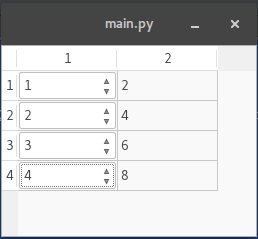
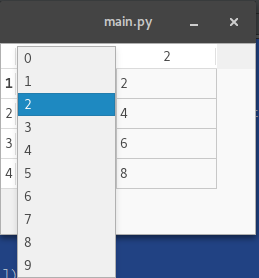
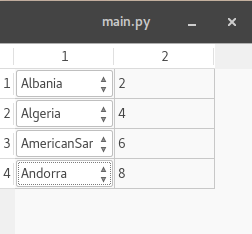
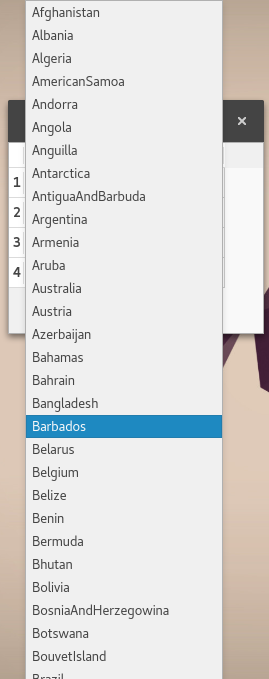
字符串被放置,因为我在前面的示例中使用str(),所以我向您展示了另一个显示国家的示例。
import sys
from PySide import QtGui, QtCore


class ComboBoxDelegate(QtGui.QItemDelegate):
    def __init__(self, parent=None):
        super(ComboBoxDelegate, self).__init__(parent)
        self.items = []

    def setItems(self, items):
        self.items = items

    def createEditor(self, widget, option, index):
        editor = QtGui.QComboBox(widget)
        editor.addItems(self.items)
        return editor

    def setEditorData(self, editor, index):
        value = index.model().data(index, QtCore.Qt.EditRole)
        if value:
            editor.setCurrentIndex(int(value))

    def setModelData(self, editor, model, index):
        model.setData(index, editor.currentIndex(), QtCore.Qt.EditRole)

    def updateEditorGeometry(self, editor, option, index):
        editor.setGeometry(option.rect)

    def paint(self, painter, option, index):
        text = self.items[index.row()]
        option.text = text
        QtGui.QApplication.style().drawControl(QtGui.QStyle.CE_ItemViewItem, option, painter)

if __name__ == '__main__':
    app = QtGui.QApplication(sys.argv)
    column = 0
    model = QtGui.QStandardItemModel(4, 2)
    tableview = QtGui.QTableView()
    tableview.setModel(model)
    delegate = ComboBoxDelegate()
    delegate.setItems([QtCore.QLocale.countryToString(QtCore.QLocale.Country(locale)) for locale in range(QtCore.QLocale.Afghanistan, QtCore.QLocale.Zulu+ 1 )])
    tableview.setItemDelegateForColumn(column, delegate)

    for row in range(4):
        for col in range(2):
            index = model.index(row, col, QtCore.QModelIndex())
            value = (row + 1)*(col + 1)
            model.setData(index, value)

    for i in range(model.rowCount()):
        tableview.openPersistentEditor(model.index(i, column))
    tableview.show()
    sys.exit(app.exec_())
Stack Overflow用户
发布于 2016-12-18 12:51:54
第一个问题最容易用该模型解决,即当要求DisplayRole时,它可以提供一定值的文本,但仍然可以通过EditRole提供数值。
要显示组合框,有两个选项
- 当使用委托时,重写
paint()方法来绘制组合框,例如,像QComboBox本身一样将其委托给当前的小部件样式 - 而不是委托,设置一个索引小部件。请参阅
QAbstractItemView::setIndexWidget()
页面原文内容由Stack Overflow提供。腾讯云小微IT领域专用引擎提供翻译支持
原文链接:
https://stackoverflow.com/questions/41207485
复制相关文章
相似问题
腾讯云开发者

Copyright © 2013 - 2026 Tencent Cloud. All Rights Reserved. 腾讯云 版权所有
深圳市腾讯计算机系统有限公司 ICP备案/许可证号:粤B2-20090059  粤公网安备44030502008569号
腾讯云计算(北京)有限责任公司 京ICP证150476号 | 京ICP备11018762号