
为连接字符串/密码提供最低级别的安全性
一些信息:
使用-Small加密数据库的SQLite应用程序
-Using我仍然可以查看代码内部(即使方法的名称被混淆)
sQliteConnection.SetPassword("Password=ThisIsMySuperSecretPassword");-I不需要对代码本身进行高度的保护(逻辑),但我需要保护数据库密码。
如果我用一些连词,比如
PartA = "ThisIs"
PartB= "MySuper"
PartC= "SecretPassword"
Password = PartA + PartB + PartC
由于代码中的4行没有放在一起,也许我可以将保护最小化。
现在我可以更进一步,做这样的事情:
PartA = "Tehtibs5Iasu"
PartB= "M4ytS6uhpae3r5"
PartC= "S5efc2rhe8taP3ags5sgw4ogr5d6"
因此,我有一个有效的字符和一个无效的字符,只是为了混淆最终的潜伏者。我将使用For循环来“解密”每个部分。
这样的解决方案有多安全?
代码中还有其他保护密码的技巧吗?
回答 1
Stack Overflow用户
发布于 2016-12-18 18:50:07
Is there other tricks to protect a password inside the code?
是
(如果“诀窍”指的是提供密码和使用连接字符串的替代方法)。
注意,你不能在某人的电脑上保守秘密。但是,特别是使用SQLite DB,您可能会很难抓取连接string...by而不存储连接字符串。此示例DB将使用密码:‘

‘。也就是说,它将使用二进制密码。
具有所有共享方法的类用于管理连接:
Imports System.Data.SQLite
Imports System.IO
Imports System.Drawing.Imaging

Friend Class SQLiteConn

    ' ToDo: obscure the name to hide the purpose ?
    Friend Shared PasswordImg As Image
    ' full path to the dbfile
    Friend Shared DBFile As String

    ' cant create one
    Private Sub New()

    End Sub

    ' this is to avoid exposing any method which returns the PW Byte()
    Friend Shared Sub SetPassword(dbcon As SQLiteConnection)
        If PasswordImg Is Nothing Then
            Throw New ArgumentNullException("PasswordImg")
        End If
        dbcon.SetPassword(ImageToByteArray(PasswordImg))
    End Sub

    Friend Shared Sub ChangePassword(newPW As Image)
        ' not tested, I think this is correct
        Using dbCon As New SQLiteConnection(GetLiteConnStr())
            dbCon.SetPassword(ImageToByteArray(newPW))
            ' to do: add error handling,
            ' only set pwImg on success
            PasswordImg = newPW
        End Using
    End Sub

    ' the connection string is not persisted
    ' to make it harder to copy the byte[] ... it only
    ' exists momentarliy
    Friend Shared Function GetLiteConnStr() As String
        Dim cb As New SQLiteConnectionStringBuilder

        If String.IsNullOrEmpty(DBFile) Then
            Throw New ArgumentNullException("DbFile")
        End If

        cb.DataSource = DBFile
        cb.HexPassword = ImageToByteArray(PasswordImg)
        cb.Pooling = True
        ' add other needed options

        Return cb.ConnectionString
    End Function

    Private Shared Function ImageToByteArray(img As Image) As Byte()
        Dim tmpData As Byte()
        Using ms As New MemoryStream()
            img.Save(ms, ImageFormat.Png)
            tmpData = ms.ToArray
        End Using
        Return tmpData
    End Function
End ClassSQLite允许实现二进制密码。
- 在这种情况下,PW的来源是一个小的橙色的球图像。这将导致密码为694字节。
- 当然,它不可能是任何橙色的球,但是那个橙色的球。
- 图像被嵌入到应用程序中,所以在使用之前必须提取图像--如果他们知道怎么做,并且知道需要做什么的话。任何错误提取它都会使它失效。
- 您可以通过更改图像中的几个像素或使用不同的图像来更改密码。
- 生成的字节数组不存储在任何地方,因此它仅作为连接字符串的一部分暂时存在。实际连接字符串也是如此。
- 这不一定是图像。您可以使用
Guid.ToByteArray()或某些密码哈希的结果。这两种方法在代码之外都会更容易再现。 - 它可以修改为返回一个ConnectionString,而不是一个
New SQLiteConnection,但我不认为这有什么好处。 - 应用程序设置中的(无用的、未使用的)连接字符串可能仍然是寻找正常方法的人的一条青鱼。
用法
首先,在某个地方设置密码映像(记住,所有内容都是static/Shared):
' only place the PW source is revealed in code
SQLiteConn.PasswordImg = My.Resources.ballorange
' change path for AppData or whatever as needed
SQLiteConn.DBFile = Path.Combine(Environment.GetFolderPath(Environment.SpecialFolder.MyDocuments),
"SQLite dbs", "CryptoTest.db")注意,每次引用像My.Resources.ballorange这样的东西时,都会创建一个全新的图像对象。您只需要设置PasswordImg一次。如果要更改代码以接受图像作为参数,则可能会出现资源泄漏的风险,这是创建连接的副作用。
创建DB
Dim tmpConnStr = String.Format("Data Source='{0}';Version=3;{1}", SQLiteConn.DBFile, "")

Dim sql = <sql>CREATE TABLE CryptoTest (
                    Id             INTEGER  NOT NULL PRIMARY KEY AUTOINCREMENT UNIQUE,
                    Name           TEXT,
                    Value          INTEGER);</sql>.Value

Using dbCon As New SQLiteConnection(tmpConnStr)
    ' tell helper to set PW, encrypt file
    SQLiteConn.SetPassword(dbCon)
    dbCon.Open()
    Using cmd As New SQLiteCommand(sql, dbCon)
        cmd.ExecuteNonQuery()
    End Using
End Using
我将避免在客户端计算机上创建DB。如果在安装过程中向它们提供了一个空的但加密的DB文件,它会降低修补代码的难度,从而从一开始就不加密它。只需像任何其他数据文件一样分发一个空白,将其安装到所需的路径。
不过,并不是很多SQLite浏览器工具都支持加密,因此您可能需要上述工具来应用该加密。
写入DB
Using dbcon As New SQLiteConnection(SQLiteConn.GetLiteConnStr())
    dbcon.Open()

    Using cmd As New SQLiteCommand("INSERT INTO CryptoTest (name, value) VALUES ('foo', 7)", dbcon)
        cmd.ExecuteNonQuery()
    End Using
End Using
读DB
Using dbCon As New SQLiteConnection(SQLiteConn.GetLiteConnStr())
    Using cmd As New SQLiteCommand("SELECT * FROM CryptoTest", dbCon)
        dbCon.Open()

        dtSample = New DataTable()
        dtSample.Load(cmd.ExecuteReader())
    End Using
End Using

dgv1.DataSource = dtSample
它运作良好:
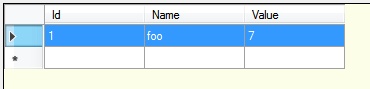
这不是愚蠢的证据,他们可以使用ILSpy或其他反编译程序来查看您正在做什么,但是对于一个网络应用程序来说,情况总是如此。然而,这只是第一个障碍--他们还需要解决如何获取运行时数据。
当您发出更新/bug修复时,还可以通过使用不同的图像、更改几个像素或稍微修改方法(例如将字节数组转换为Base64字符串)来更改密码。
它肯定比通过模糊(串连字符串)的安全性更好,并且可能足以满足您所要做的事情。
https://stackoverflow.com/questions/41192205
复制相似问题
腾讯云开发者

Copyright © 2013 - 2026 Tencent Cloud. All Rights Reserved. 腾讯云 版权所有
深圳市腾讯计算机系统有限公司 ICP备案/许可证号:粤B2-20090059  粤公网安备44030502008569号
腾讯云计算(北京)有限责任公司 京ICP证150476号 | 京ICP备11018762号