
CommandBar.Content AppBarButton标签位置右侧
CommandBar.Content AppBarButton标签位置右侧
提问于 2016-12-15 18:04:45
这是我的密码:
       <CommandBar DefaultLabelPosition="Right" IsOpen="True">
            <CommandBar.Content>
                <AppBarButton Icon="Account" Label="Test 1"></AppBarButton>
            </CommandBar.Content>
            <AppBarButton Icon="Accept" Label="Test 2"/>
        </CommandBar>
这就是我得到的结果:
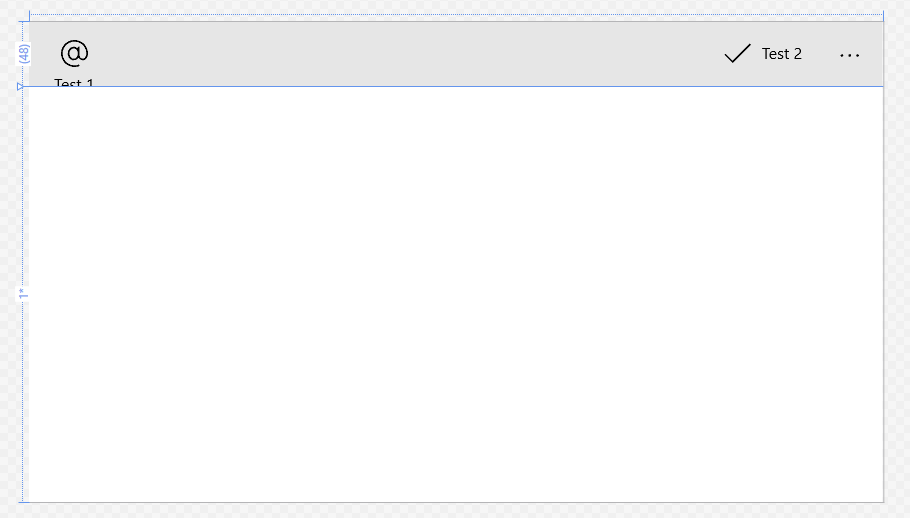
那么现在我是如何触发标签在右边的呢?DefaultLabelPosition不影响内容值。
我想要创建一个类似于WPF或WinForms的工具栏。
格列茨
回答 1
Stack Overflow用户
发布于 2016-12-15 19:06:07
这里几乎没有什么值得注意的。
1) DefaultLabelPosition可用于针对周年更新的应用程序。因此,如果你想把它用于针对早期版本的应用程序,它将无法工作。
2)无论以上各点,CommandBar.Content本身都是一个单独的AppBarButton演示者。
我怎么才能让它工作呢?
您可以从默认的AppBarButton模板创建样式模板,并根据需要设计ContentRoot。
下面是我以前在玩时修改过的网格。
<Grid x:Name="ContentRoot" MinHeight="{ThemeResource AppBarThemeMinHeight}">
    <Grid.ColumnDefinitions>
        <ColumnDefinition Width="Auto"/>
        <ColumnDefinition Width="Auto"/>
    </Grid.ColumnDefinitions>
    <ContentPresenter x:Name="Content" AutomationProperties.AccessibilityView="Raw" Content="{TemplateBinding Icon}" Foreground="{TemplateBinding Foreground}" HorizontalAlignment="Stretch" Height="20" VerticalAlignment="Center"/>
    <TextBlock x:Name="TextLabel" Foreground="{TemplateBinding Foreground}" FontSize="12" FontFamily="{TemplateBinding FontFamily}" Margin="5,0" Grid.Row="0" Grid.Column="1" TextAlignment="Center" TextWrapping="Wrap" Text="{TemplateBinding Label}" VerticalAlignment="Center"/>
</Grid>
样式还有VisualState Compact,它隐藏了AppBar关闭上的标签文本,所以请注释掉
然后将此样式分配给您的按钮。
<Page.BottomAppBar>
    <CommandBar IsOpen="True">
        <CommandBar.Content>
            <AppBarButton Icon="Account" Label="Test 1" Style="{StaticResource RightAlignAppBarButton}"/>
        </CommandBar.Content>
        <AppBarButton Icon="Accept" Label="Accept" Style="{StaticResource RightAlignAppBarButton}" />
    </CommandBar>
</Page.BottomAppBar>
这是输出

这是完整的风格供您参考。
<Style x:Key="RightAlignAppBarButton" TargetType="AppBarButton">
<Setter Property="Background" Value="{ThemeResource AppBarButtonBackground}"/>
<Setter Property="Foreground" Value="{ThemeResource AppBarButtonForeground}"/>
<Setter Property="BorderBrush" Value="{ThemeResource AppBarButtonBorderBrush}"/>
<Setter Property="HorizontalAlignment" Value="Left"/>
<Setter Property="VerticalAlignment" Value="Top"/>
<Setter Property="FontFamily" Value="{ThemeResource ContentControlThemeFontFamily}"/>
<Setter Property="FontWeight" Value="Normal"/>
<Setter Property="Width" Value="68"/>
<Setter Property="UseSystemFocusVisuals" Value="True"/>
<Setter Property="AllowFocusOnInteraction" Value="False"/>
<Setter Property="Template">
<Setter.Value>
<ControlTemplate TargetType="AppBarButton">
<Grid x:Name="Root" BorderBrush="{TemplateBinding BorderBrush}" BorderThickness="{TemplateBinding BorderThickness}" Background="{TemplateBinding Background}" MaxWidth="{TemplateBinding MaxWidth}" MinWidth="{TemplateBinding MinWidth}">
<Grid.Resources>
<Style x:Name="LabelOnRightStyle" TargetType="AppBarButton">
<Setter Property="Width" Value="NaN"/>
</Style>
</Grid.Resources>
<VisualStateManager.VisualStateGroups>
<VisualStateGroup x:Name="ApplicationViewStates">
<VisualState x:Name="FullSize"/>
<!--<VisualState x:Name="Compact">
<Storyboard>
<ObjectAnimationUsingKeyFrames Storyboard.TargetProperty="Visibility" Storyboard.TargetName="TextLabel">
<DiscreteObjectKeyFrame KeyTime="0" Value="Collapsed"/>
</ObjectAnimationUsingKeyFrames>
</Storyboard>
</VisualState>-->
<VisualState x:Name="LabelOnRight">
<Storyboard>
<ObjectAnimationUsingKeyFrames Storyboard.TargetProperty="Margin" Storyboard.TargetName="Content">
<DiscreteObjectKeyFrame KeyTime="0" Value="12,14,0,14"/>
</ObjectAnimationUsingKeyFrames>
<ObjectAnimationUsingKeyFrames Storyboard.TargetProperty="MinHeight" Storyboard.TargetName="ContentRoot">
<DiscreteObjectKeyFrame KeyTime="0" Value="{ThemeResource AppBarThemeCompactHeight}"/>
</ObjectAnimationUsingKeyFrames>
<ObjectAnimationUsingKeyFrames Storyboard.TargetProperty="(Grid.Row)" Storyboard.TargetName="TextLabel">
<DiscreteObjectKeyFrame KeyTime="0" Value="0"/>
</ObjectAnimationUsingKeyFrames>
<ObjectAnimationUsingKeyFrames Storyboard.TargetProperty="(Grid.Column)" Storyboard.TargetName="TextLabel">
<DiscreteObjectKeyFrame KeyTime="0" Value="1"/>
</ObjectAnimationUsingKeyFrames>
<ObjectAnimationUsingKeyFrames Storyboard.TargetProperty="TextAlignment" Storyboard.TargetName="TextLabel">
<DiscreteObjectKeyFrame KeyTime="0" Value="Left"/>
</ObjectAnimationUsingKeyFrames>
<ObjectAnimationUsingKeyFrames Storyboard.TargetProperty="Margin" Storyboard.TargetName="TextLabel">
<DiscreteObjectKeyFrame KeyTime="0" Value="8,15,12,17"/>
</ObjectAnimationUsingKeyFrames>
</Storyboard>
</VisualState>
<VisualState x:Name="LabelCollapsed">
<Storyboard>
<ObjectAnimationUsingKeyFrames Storyboard.TargetProperty="MinHeight" Storyboard.TargetName="ContentRoot">
<DiscreteObjectKeyFrame KeyTime="0" Value="{ThemeResource AppBarThemeCompactHeight}"/>
</ObjectAnimationUsingKeyFrames>
<ObjectAnimationUsingKeyFrames Storyboard.TargetProperty="Visibility" Storyboard.TargetName="TextLabel">
<DiscreteObjectKeyFrame KeyTime="0" Value="Collapsed"/>
</ObjectAnimationUsingKeyFrames>
</Storyboard>
</VisualState>
<VisualState x:Name="Overflow">
<Storyboard>
<ObjectAnimationUsingKeyFrames Storyboard.TargetProperty="Visibility" Storyboard.TargetName="ContentRoot">
<DiscreteObjectKeyFrame KeyTime="0" Value="Collapsed"/>
</ObjectAnimationUsingKeyFrames>
<ObjectAnimationUsingKeyFrames Storyboard.TargetProperty="Visibility" Storyboard.TargetName="OverflowTextLabel">
<DiscreteObjectKeyFrame KeyTime="0" Value="Visible"/>
</ObjectAnimationUsingKeyFrames>
</Storyboard>
</VisualState>
<VisualState x:Name="OverflowWithToggleButtons">
<Storyboard>
<ObjectAnimationUsingKeyFrames Storyboard.TargetProperty="Visibility" Storyboard.TargetName="ContentRoot">
<DiscreteObjectKeyFrame KeyTime="0" Value="Collapsed"/>
</ObjectAnimationUsingKeyFrames>
<ObjectAnimationUsingKeyFrames Storyboard.TargetProperty="Visibility" Storyboard.TargetName="OverflowTextLabel">
<DiscreteObjectKeyFrame KeyTime="0" Value="Visible"/>
</ObjectAnimationUsingKeyFrames>
<ObjectAnimationUsingKeyFrames Storyboard.TargetProperty="Margin" Storyboard.TargetName="OverflowTextLabel">
<DiscreteObjectKeyFrame KeyTime="0" Value="38,0,12,0"/>
</ObjectAnimationUsingKeyFrames>
</Storyboard>
</VisualState>
</VisualStateGroup>
<VisualStateGroup x:Name="CommonStates">
<VisualState x:Name="Normal">
<Storyboard>
<PointerUpThemeAnimation Storyboard.TargetName="OverflowTextLabel"/>
</Storyboard>
</VisualState>
<VisualState x:Name="PointerOver">
<Storyboard>
<ObjectAnimationUsingKeyFrames Storyboard.TargetProperty="Background" Storyboard.TargetName="Root">
<DiscreteObjectKeyFrame KeyTime="0" Value="{ThemeResource AppBarButtonBackgroundPointerOver}"/>
</ObjectAnimationUsingKeyFrames>
<ObjectAnimationUsingKeyFrames Storyboard.TargetProperty="BorderBrush" Storyboard.TargetName="Root">
<DiscreteObjectKeyFrame KeyTime="0" Value="{ThemeResource AppBarButtonBorderBrushPointerOver}"/>
</ObjectAnimationUsingKeyFrames>
<ObjectAnimationUsingKeyFrames Storyboard.TargetProperty="Foreground" Storyboard.TargetName="Content">
<DiscreteObjectKeyFrame KeyTime="0" Value="{ThemeResource AppBarButtonForegroundPointerOver}"/>
</ObjectAnimationUsingKeyFrames>
<ObjectAnimationUsingKeyFrames Storyboard.TargetProperty="Foreground" Storyboard.TargetName="TextLabel">
<DiscreteObjectKeyFrame KeyTime="0" Value="{ThemeResource AppBarButtonForegroundPointerOver}"/>
</ObjectAnimationUsingKeyFrames>
<ObjectAnimationUsingKeyFrames Storyboard.TargetProperty="Foreground" Storyboard.TargetName="OverflowTextLabel">
<DiscreteObjectKeyFrame KeyTime="0" Value="{ThemeResource AppBarButtonForegroundPointerOver}"/>
</ObjectAnimationUsingKeyFrames>
<PointerUpThemeAnimation Storyboard.TargetName="OverflowTextLabel"/>
</Storyboard>
</VisualState>
<VisualState x:Name="Pressed">
<Storyboard>
<ObjectAnimationUsingKeyFrames Storyboard.TargetProperty="Background" Storyboard.TargetName="Root">
<DiscreteObjectKeyFrame KeyTime="0" Value="{ThemeResource AppBarButtonBackgroundPressed}"/>
</ObjectAnimationUsingKeyFrames>
<ObjectAnimationUsingKeyFrames Storyboard.TargetProperty="BorderBrush" Storyboard.TargetName="Root">
<DiscreteObjectKeyFrame KeyTime="0" Value="{ThemeResource AppBarButtonBorderBrushPressed}"/>
</ObjectAnimationUsingKeyFrames>
<ObjectAnimationUsingKeyFrames Storyboard.TargetProperty="Foreground" Storyboard.TargetName="Content">
<DiscreteObjectKeyFrame KeyTime="0" Value="{ThemeResource AppBarButtonForegroundPressed}"/>
</ObjectAnimationUsingKeyFrames>
<ObjectAnimationUsingKeyFrames Storyboard.TargetProperty="Foreground" Storyboard.TargetName="TextLabel">
<DiscreteObjectKeyFrame KeyTime="0" Value="{ThemeResource AppBarButtonForegroundPressed}"/>
</ObjectAnimationUsingKeyFrames>
<ObjectAnimationUsingKeyFrames Storyboard.TargetProperty="Foreground" Storyboard.TargetName="OverflowTextLabel">
<DiscreteObjectKeyFrame KeyTime="0" Value="{ThemeResource AppBarButtonForegroundPressed}"/>
</ObjectAnimationUsingKeyFrames>
<PointerDownThemeAnimation Storyboard.TargetName="OverflowTextLabel"/>
</Storyboard>
</VisualState>
<VisualState x:Name="Disabled">
<Storyboard>
<ObjectAnimationUsingKeyFrames Storyboard.TargetProperty="Background" Storyboard.TargetName="Root">
<DiscreteObjectKeyFrame KeyTime="0" Value="{ThemeResource AppBarButtonBackgroundDisabled}"/>
</ObjectAnimationUsingKeyFrames>
<ObjectAnimationUsingKeyFrames Storyboard.TargetProperty="BorderBrush" Storyboard.TargetName="Root">
<DiscreteObjectKeyFrame KeyTime="0" Value="{ThemeResource AppBarButtonBorderBrushDisabled}"/>
</ObjectAnimationUsingKeyFrames>
<ObjectAnimationUsingKeyFrames Storyboard.TargetProperty="Foreground" Storyboard.TargetName="Content">
<DiscreteObjectKeyFrame KeyTime="0" Value="{ThemeResource AppBarButtonForegroundDisabled}"/>
</ObjectAnimationUsingKeyFrames>
<ObjectAnimationUsingKeyFrames Storyboard.TargetProperty="Foreground" Storyboard.TargetName="TextLabel">
<DiscreteObjectKeyFrame KeyTime="0" Value="{ThemeResource AppBarButtonForegroundDisabled}"/>
</ObjectAnimationUsingKeyFrames>
<ObjectAnimationUsingKeyFrames Storyboard.TargetProperty="Foreground" Storyboard.TargetName="OverflowTextLabel">
<DiscreteObjectKeyFrame KeyTime="0" Value="{ThemeResource AppBarButtonForegroundDisabled}"/>
</ObjectAnimationUsingKeyFrames>
</Storyboard>
</VisualState>
</VisualStateGroup>
<VisualStateGroup x:Name="InputModeStates">
<VisualState x:Name="InputModeDefault"/>
<VisualState x:Name="TouchInputMode">
<VisualState.Setters>
<Setter Target="OverflowTextLabel.Padding" Value="0,11,0,13"/>
</VisualState.Setters>
</VisualState>
<VisualState x:Name="GameControllerInputMode">
<VisualState.Setters>
<Setter Target="OverflowTextLabel.Padding" Value="0,11,0,13"/>
</VisualState.Setters>
</VisualState>
</VisualStateGroup>
</VisualStateManager.VisualStateGroups>
<Grid x:Name="ContentRoot" MinHeight="{ThemeResource AppBarThemeMinHeight}">
<Grid.ColumnDefinitions>
<ColumnDefinition Width="Auto"/>
<ColumnDefinition Width="Auto"/>
</Grid.ColumnDefinitions>
<ContentPresenter x:Name="Content" AutomationProperties.AccessibilityView="Raw" Content="{TemplateBinding Icon}" Foreground="{TemplateBinding Foreground}" HorizontalAlignment="Stretch" Height="20" VerticalAlignment="Center"/>
<TextBlock x:Name="TextLabel" Foreground="{TemplateBinding Foreground}" FontSize="12" FontFamily="{TemplateBinding FontFamily}" Margin="5,0" Grid.Row="0" Grid.Column="1" TextAlignment="Center" TextWrapping="Wrap" Text="{TemplateBinding Label}" VerticalAlignment="Center"/>
</Grid>
<TextBlock x:Name="OverflowTextLabel" Foreground="{TemplateBinding Foreground}" FontSize="15" FontFamily="{TemplateBinding FontFamily}" HorizontalAlignment="Stretch" Margin="12,0,12,0" Padding="0,5,0,7" TextAlignment="Left" TextWrapping="NoWrap" Text="{TemplateBinding Label}" TextTrimming="Clip" Visibility="Collapsed" VerticalAlignment="Center"/>
</Grid>
</ControlTemplate>
</Setter.Value>
</Setter>
</Style>您可以使用很少的其他属性,并按需要获得输出。
页面原文内容由Stack Overflow提供。腾讯云小微IT领域专用引擎提供翻译支持
原文链接:
https://stackoverflow.com/questions/41170612
复制相关文章
相似问题
腾讯云开发者

Copyright © 2013 - 2026 Tencent Cloud. All Rights Reserved. 腾讯云 版权所有
深圳市腾讯计算机系统有限公司 ICP备案/许可证号:粤B2-20090059  粤公网安备44030502008569号
腾讯云计算(北京)有限责任公司 京ICP证150476号 | 京ICP备11018762号