
即使我已经声明了Android权限写外部存储也不能工作
即使我已经声明了Android权限写外部存储也不能工作
提问于 2016-12-15 14:49:14
我的目标SDK是22!当我尝试编写外部存储时,会显示一段祝酒词:
java.lang.SecurityExeption:需要WRITE_EXTERNAL_STORAGE许可才能使用DESTINATION_FILE_URI: uid 10504没有android.permission.WITE_EXTERNAL_STORAGE
这是一个错误:
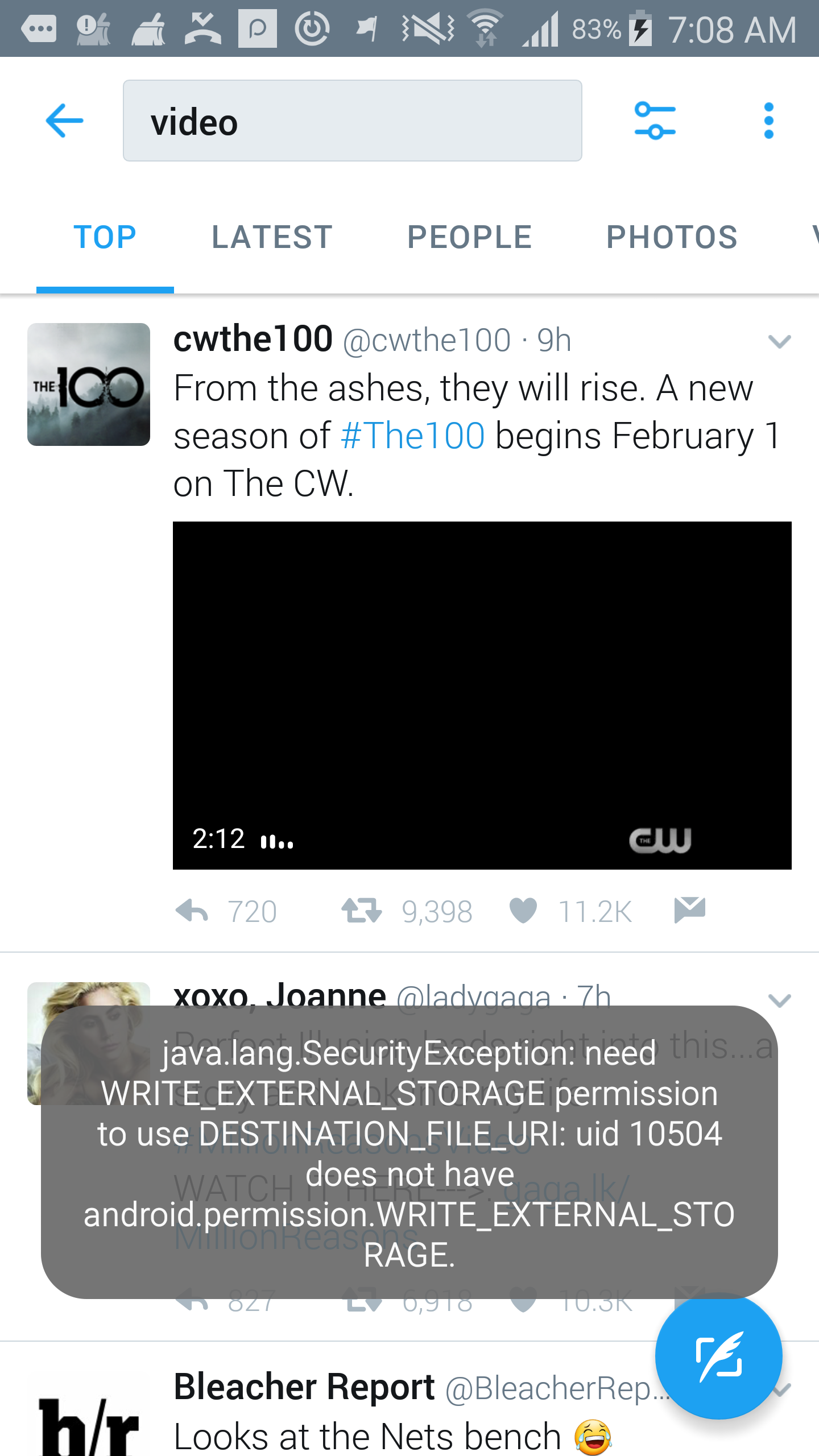
有人能帮忙吗?
我的AndroidMainfest:
<?xml version="1.0" encoding="utf-8"?>
<manifest xmlns:android="http://schemas.android.com/apk/res/android"
    xmlns:tools="http://schemas.android.com/tools"
    package="com.CowLabel">

    <uses-permission android:name="android.permission.WRITE_EXTERNAL_STORAGE"/>
    <uses-permission android:name="android.permission.INTERNET"/>
    <uses-permission android:name="android.permission.ACCESS_NETWORK_STATE"/>
    <uses-permission android:name="android.permission.BIND_ACCESSIBILITY_SERVICE"/>
    <uses-permission android:name="com.android.vending.BILLING"/>
    <uses-permission android:name="com.android.alarm.permission.SET_ALARM"/>


    <application
        android:hardwareAccelerated="true"
        android:allowBackup="true"
        android:icon="@drawable/Cows"
        android:label="@string/app_name"
        android:supportsRtl="true"
        android:name="CowLabel.util.MyApplication"
        android:theme="@style/Mytheme">


        <meta-data android:name="com.google.android.gms.version"
            android:value="@integer/google_play_services_version" />


        <activity android:name="CowLabel.WelcomeActivity" android:theme="@style/Theme.AppCompat.Light.NoActionBar">

            <intent-filter>
                <action android:name="android.intent.action.MAIN" />

                <category android:name="android.intent.category.LAUNCHER" />
            </intent-filter>

        </activity>
        <activity android:name="CowLAbel.Purchase_activity"/>

        <service
            android:name="CowLabel.accessibilityservice"

            android:permission="android.permission.BIND_ACCESSIBILITY_SERVICE"
            android:label="Cow Label" >
            <intent-filter>
                <action android:name="android.accessibilityservice.AccessibilityService" />
            </intent-filter>

            <meta-data
                android:name="android.accessibilityservice"
                android:resource="@xml/accessibility_service_config" />

        </service>

        <activity
            android:name="com.CowLabel.MainActivity"></activity>

        <receiver android:name="com.CowLabel.Notification_reciever"/>


        </application>


</manifest>
我的等级档案:
apply plugin: 'com.android.application'


android {
    compileSdkVersion 25
    buildToolsVersion "24.0.3"

    defaultConfig {
        applicationId "com.CowLabel"
        minSdkVersion 15
        targetSdkVersion 22
        versionCode 11
        versionName "2.3"
        multiDexEnabled true
        vectorDrawables.useSupportLibrary = true
    }
    buildTypes {
        release {
            minifyEnabled false
            proguardFiles getDefaultProguardFile('proguard-android.txt'), 'proguard-rules.pro'
        }
    }


}

repositories {

    maven {
        name "Fyber's maven repo"
        url "https://fyber.bintray.com/maven"
    }
    flatDir {
        dirs "libs"
    }

}


dependencies {
    compile fileTree(dir: 'libs', include: ['*.jar'])
    testCompile 'junit:junit:4.12'
    compile 'com.android.support:appcompat-v7:25.0.0'
    compile 'org.jsoup:jsoup:1.9.2'
    compile 'com.mcxiaoke.volley:library:1.0.19'
    compile 'com.android.support:multidex:1.0.1'
    compile 'com.google.android.gms:play-services-ads:10.0.1'
    compile 'com.anjlab.android.iab.v3:library:1.0.+'
    compile 'com.google.firebase:firebase-core:10.0.1'
    compile 'com.google.firebase:firebase-database:10.0.1'
    compile 'com.google.firebase:firebase-ads:10.0.1'
    compile 'com.google.firebase:firebase-appindexing:10.0.1'
    compile 'com.google.firebase:firebase-config:10.0.1'
    compile 'com.google.firebase:firebase-messaging:10.0.1'
    compile 'com.google.firebase:firebase-crash:10.0.1'


    compile(name:'heyzap-unified-platform-10.2.2', ext:'aar')
    //adcolony
    compile 'com.fyber.mediation:adcolony:2.3.6-r2@aar'

    //inmobi
    compile 'com.fyber.mediation:inmobi:6.0.0-r3@aar'
    compile 'com.squareup.picasso:picasso:2.5.2'

    //tapjoy
    compile 'com.fyber.mediation:tapjoy:11.8.1-r1@aar'

    //unityads
    compile 'com.fyber.mediation:unityads:2.0.5-r1@aar'

    //vungle
    compile 'com.google.dagger:dagger:2.4'
    compile 'javax.inject:javax.inject:1'

    // IMPORTANT!
// The latest Vungle adapter is not currently published to Fyber's maven repository.
// Please follow the "Eclipse Users" instructions to download the Vungle adapter and add the `aar` file to your project's `libs` folder
    compile (name: 'fyber-vungle-4.0.3-r1', ext: 'aar')

}
apply plugin: 'com.google.gms.google-services'回答 3
Stack Overflow用户
发布于 2017-04-05 20:36:55
我认为需要Fyber.init();
Fyber sdk似乎改变了权限。
Stack Overflow用户
发布于 2017-05-31 08:23:29
您可以尝试分析android中的apk文件。检查AndroidManifest.xml,看看哪些用途-权限放在那里。
Stack Overflow用户
发布于 2018-01-15 13:40:11
您必须检查您的库,有一个库阻止了您的权限,所以您应该强制使用"tools:replace="maxSdkVersion“android:maxSdkVersion="27”
页面原文内容由Stack Overflow提供。腾讯云小微IT领域专用引擎提供翻译支持
原文链接:
https://stackoverflow.com/questions/41167008
复制相关文章
相似问题
腾讯云开发者

Copyright © 2013 - 2026 Tencent Cloud. All Rights Reserved. 腾讯云 版权所有
深圳市腾讯计算机系统有限公司 ICP备案/许可证号:粤B2-20090059  粤公网安备44030502008569号
腾讯云计算(北京)有限责任公司 京ICP证150476号 | 京ICP备11018762号