
UITextView的数据检测器选项和文本性能
UITextView的数据检测器选项和文本性能
提问于 2016-12-14 07:14:38
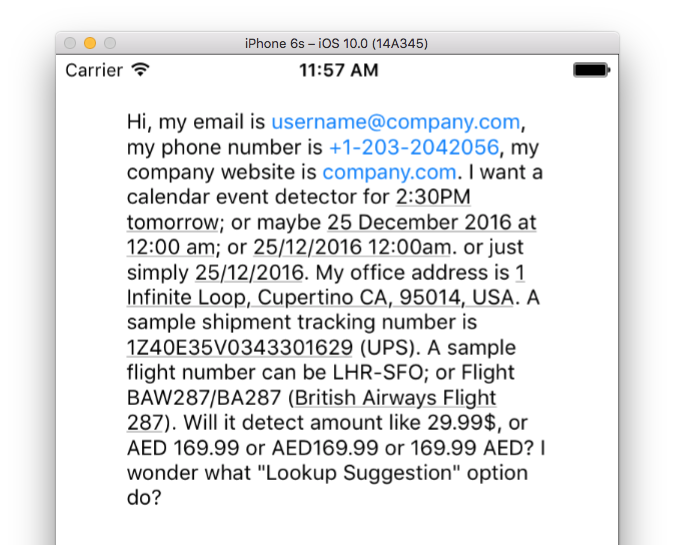
UITextView提供了一个非常有用的数据检测器功能,它支持:
- 电话号码检测
- URL检测街道地址检测
- 事件检测
- 货件跟踪号码检测
- 航班号码检测,以及
- 信息用户可能想要查找
我准备了一个小样本来测试它,我只有一个问题:
如何更改检测到的文本的外观?
应用于tintColor和/或linkTextAttributes的更改似乎只适用于URL、电子邮件和电话号码。应用于tintColor或linkTextAttributes属性UITextView的更改似乎不会对事件/日期或时间、地址、托运号和航班号等项目产生任何影响。
回答 1
Stack Overflow用户
发布于 2016-12-14 09:47:49
使用NSDataDetector似乎只有一种方式。
数据检测的样本如下。
let wAS = aTextView.attributedText.mutableCopy() as! NSMutableAttributedString

let wDateResult = try! NSDataDetector( types: NSTextCheckingResult.CheckingType.date.rawValue ).matches(
    in: wAS.string
,   options: NSRegularExpression.MatchingOptions( rawValue: 0 )
,   range: NSMakeRange( 0, wAS.string.characters.count )
)
for w in wDateResult {
    wAS.addAttributes( [ NSForegroundColorAttributeName : UIColor.red ], range: w.range )
}

aTextView.attributedText = wAS页面原文内容由Stack Overflow提供。腾讯云小微IT领域专用引擎提供翻译支持
原文链接:
https://stackoverflow.com/questions/41136834
复制相关文章
相似问题
腾讯云开发者

Copyright © 2013 - 2026 Tencent Cloud. All Rights Reserved. 腾讯云 版权所有
深圳市腾讯计算机系统有限公司 ICP备案/许可证号:粤B2-20090059  粤公网安备44030502008569号
腾讯云计算(北京)有限责任公司 京ICP证150476号 | 京ICP备11018762号